Every now or then we need new column on some grid listing in Magento. It is quite simple task, but you will probably want to format values way you want or whatever.
This is where writing your own renderer would be usefull and simple.
To pull this out, you would overide some grid, add column to it and write custom renderer.
How it works in real life situations.?!
Let’s take a look at product listing admin grid.
Overide block class called Mage_Adminhtml_Block_Catalog_Product_Grid located in /app/code/core/Mage/Adminhtml/Block/Catalog/Product/Grid.php file.
We won’t rewrite this block in this post, but this post assumes you know how to do it yourself.
Modify _prepareCollection() method with new data, for example let’s add short description of a product:
protected function _prepareCollection()
{
$store = $this->_getStore();
$collection = Mage::getModel('catalog/product')->getCollection()
->addAttributeToSelect('sku')
->addAttributeToSelect('name')
->addAttributeToSelect('short_description') // THIS IS WHAT WE HAVE ADDED
->addAttributeToSelect('attribute_set_id')
->addAttributeToSelect('type_id')
->joinField('qty',
'cataloginventory/stock_item',
'qty',
'product_id=entity_id',
'{{table}}.stock_id=1',
'left');

if ($store->getId()) {
//$collection->setStoreId($store->getId());
$collection->addStoreFilter($store);
$collection->joinAttribute('custom_name', 'catalog_product/name', 'entity_id', null, 'inner', $store->getId());
$collection->joinAttribute('status', 'catalog_product/status', 'entity_id', null, 'inner', $store->getId());
$collection->joinAttribute('visibility', 'catalog_product/visibility', 'entity_id', null, 'inner', $store->getId());
$collection->joinAttribute('price', 'catalog_product/price', 'entity_id', null, 'left', $store->getId());
}
else {
$collection->addAttributeToSelect('price');
$collection->addAttributeToSelect('status');
$collection->addAttributeToSelect('visibility');
}

$this->setCollection($collection);

parent::_prepareCollection();
$this->getCollection()->addWebsiteNamesToResult();
return $this;
}
Now let’s add this to a new column:
/*You will find some more code inside this method, but for readability purposes, I'll just say you need to add code you find here at beginning of this method...*/

protected function _prepareColumns()
{
$this->addColumn('Short description',
array(
'header'=> Mage::helper('catalog')->__('Short description'),
'index' => 'short_description',
'renderer'  => 'Mage_Adminhtml_Block_Catalog_Product_Renderer_Red',// THIS IS WHAT THIS POST IS ALL ABOUT
));

}
Make directory called Renderer inside directory where your Grid.php is located and make file Red.php
Make class
Mage_Adminhtml_Block_Catalog_Product_Renderer_Red extends Mage_Adminhtml_Block_Widget_Grid_Column_Renderer_Abstract
Notice “Mage_”, this is because I’m not rewriting anything in this post…
Here is code:
< ?php class Mage_Adminhtml_Block_Catalog_Product_Renderer_Red extends Mage_Adminhtml_Block_Widget_Grid_Column_Renderer_Abstract { public function render(Varien_Object $row) { $value =  $row->getData($this->getColumn()->getIndex());
return '<span style="color: red;">'.$value.'</span>';

}

}
?>
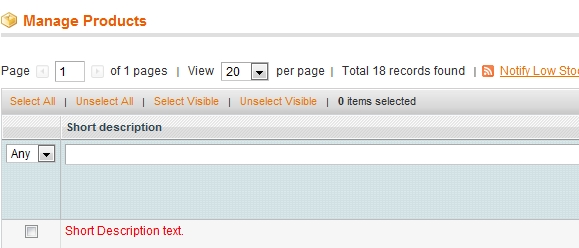
Now you should have one additional column at product grid containing short description writen in red.
If you feel like you would need a team of experts to help you out with this, or any other Magento development related subject, we would be happy to assist you. Our Magento Technical Audit is a great place to start improving your store.