Logging user/customer actions in Magento

Recently I wrote a Magento extension called ActionLogger, inspired (thematically) by the “Logging of Administrator Actions” feature available in Magento Enterprise. ActionLogger is pretty simple extension, working on pretty simple but powerful concept of Magento controllers predispatch action.
All you need to do is to create event observer/observers for “controller_action_predispatch” event. This event is fired on every controller action call.
For example, if your store is located on url http://magento-1501.net url, and you go to url like http://magento-1501.net/electronics/cell-phones this will call action “view” from controller “category” from module “Mage_Catalog“. Simple logic/tracing would point this to be app\code\core\Mage\Catalog\controllers\CategoryController.php file and its viewAction().
Adding an event observer like the one shown below will trigger your code upon calling such url.
<frontend>
<events>
<controller_action_predispatch>
<observers>
<activecodeline_actionlogger_controller_action_predispatch>
<class>activecodeline_actionlogger/observer</class>
<method>hookToFrontendControllerActionPredispatch</method>
</activecodeline_actionlogger_controller_action_predispatch>
</observers>
</controller_action_predispatch>
</events>
</frontend>
Same goes for the admin section, for example if you open a link like http://magento-1501.net/index.php/admin/sales_order/index/key/9c13e78eecdc3d5805f6426be9f56254/. This one would call action “index” from controller “sales_order” from module “Mage_Adminhtml“. Simple logic/tracing would point this to be app\code\core\Mage\Adminhtml\controllers\Sales\OrderController.php file and its indexAction().
Adding an event observer like the one shown below will trigger your code upon calling such url.
<adminhtml>
<events>
<controller_action_predispatch>
<observers>
<activecodeline_actionlogger_controller_action_predispatch>
<class>activecodeline_actionlogger/observer</class>
<method>hookToAdminhtmlControllerActionPredispatch</method>
</activecodeline_actionlogger_controller_action_predispatch>
</observers>
</controller_action_predispatch>
</events>
</adminhtml>
All this is fine & etc., but what’s the point? We already know this, you might say.
The point is, the concept is very simple but enables you to add powerful logging mechanism on top of it. All you need to do is to add few lines of code that would record given action, controller, current user/customer, possibly entire parameters passed to controller, etc.
Then you can store it either in database or in some file.
For example, in ActionLogger extension I created a special models, called Admin and Frontend that handle writing logged values to database from observer.
public function hookToFrontendControllerActionPredispatch($observer = null)
{
if (!Mage::helper('activecodeline_actionlogger')->_canLogFrontendActions()) {
return;
}

$log = Mage::getModel('activecodeline_actionlogger/frontend');

$log->setActionName(Mage::app()->getRequest()->getActionName());
$log->setControllerName(Mage::app()->getRequest()->getControllerName());

if (Mage::helper('activecodeline_actionlogger')->_canLogRequestParams()) {
if($params = Mage::app()->getRequest()->getParams()) {
$log->setParams(Mage::helper('core')->encrypt(serialize($params)));
}
}

$log->setClientIp(Mage::app()->getRequest()->getClientIp());
$log->setControllerModule(Mage::app()->getRequest()->getControllerModule());

if ($customer = Mage::getSingleton('customer/session')->getCustomer()) {
$log->setCustomerId($customer->getId());
} else {
$log->setCustomerId(0);
}

try {
$log->save();
} catch (Exception $e) {
Mage::log('file: '.__FILE__.', line: '.__LINE__, 'msg: '.$e->getMessage());
}
}
On top of that you can create a nice grid in Magento for listing these. Combine this with built in Magento roles, and you can have your grid shown only to certain role.
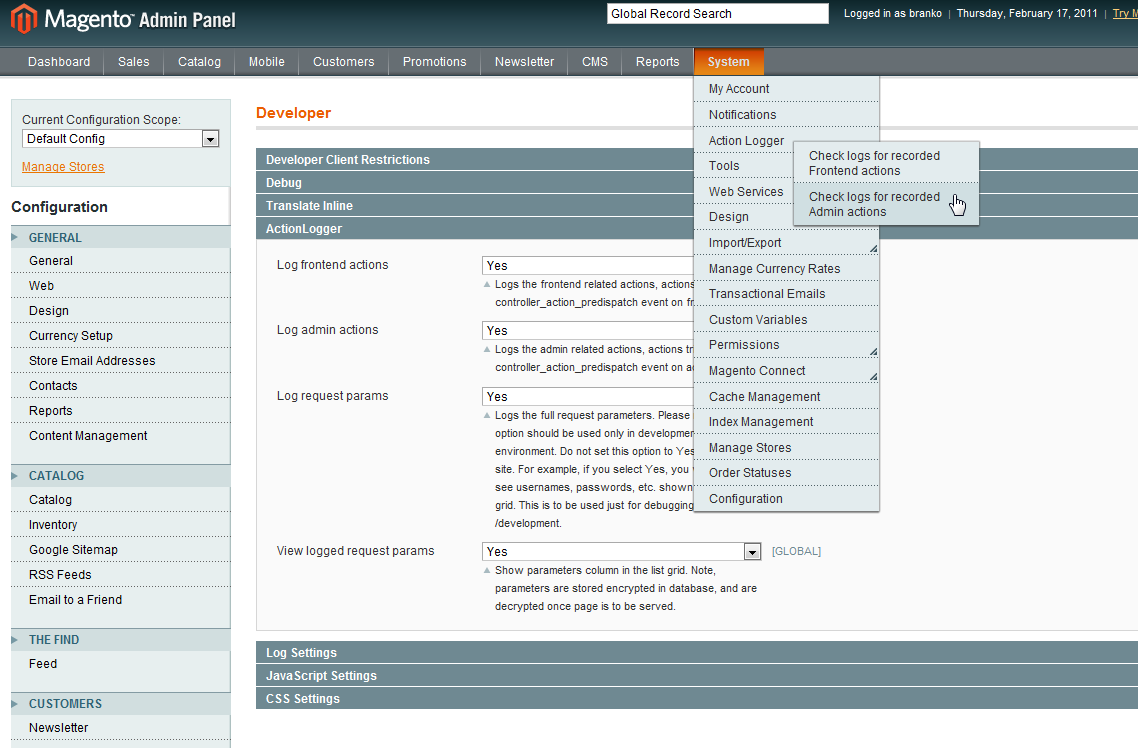
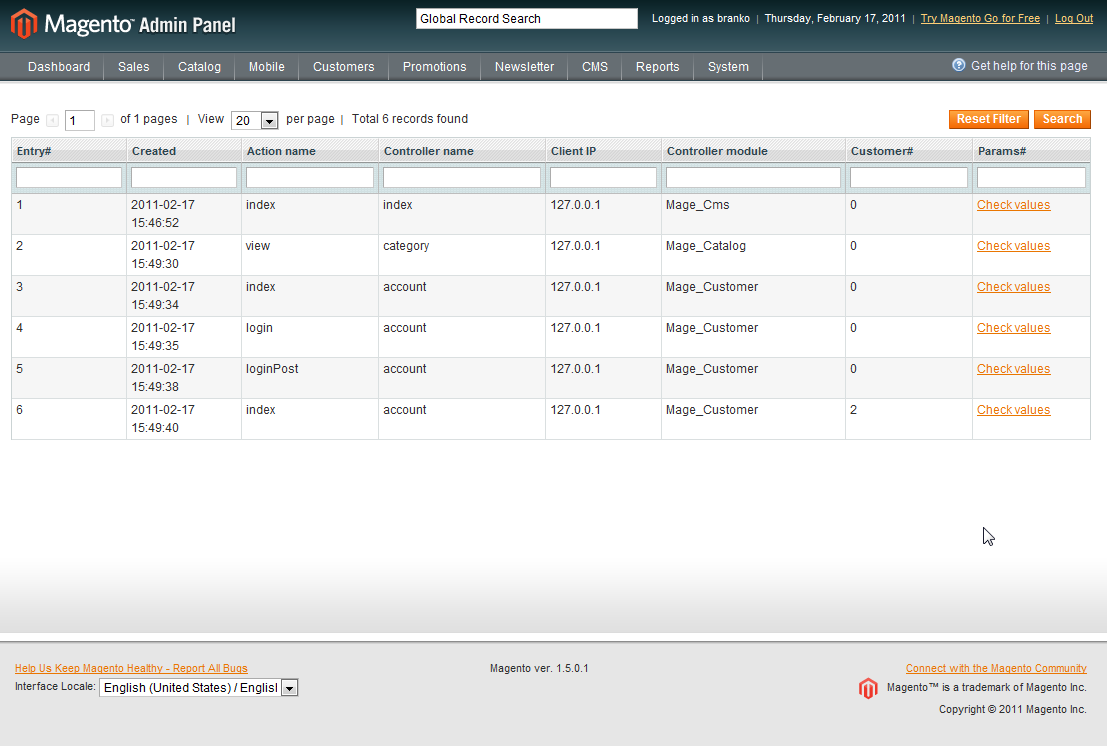
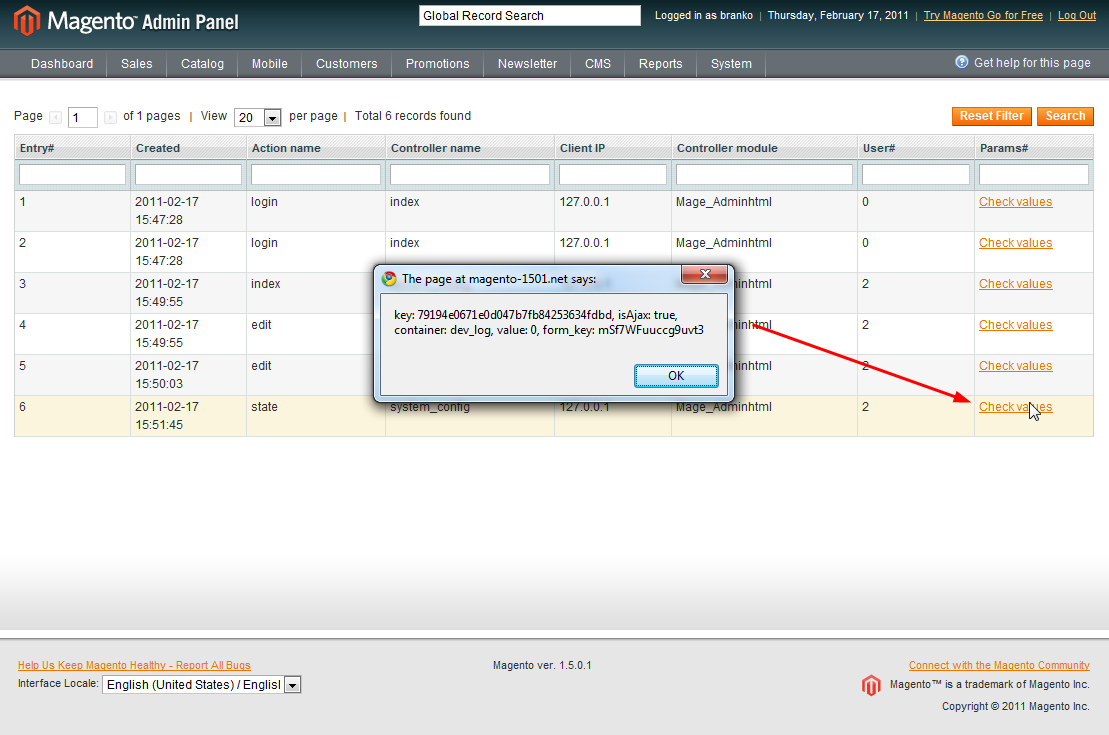
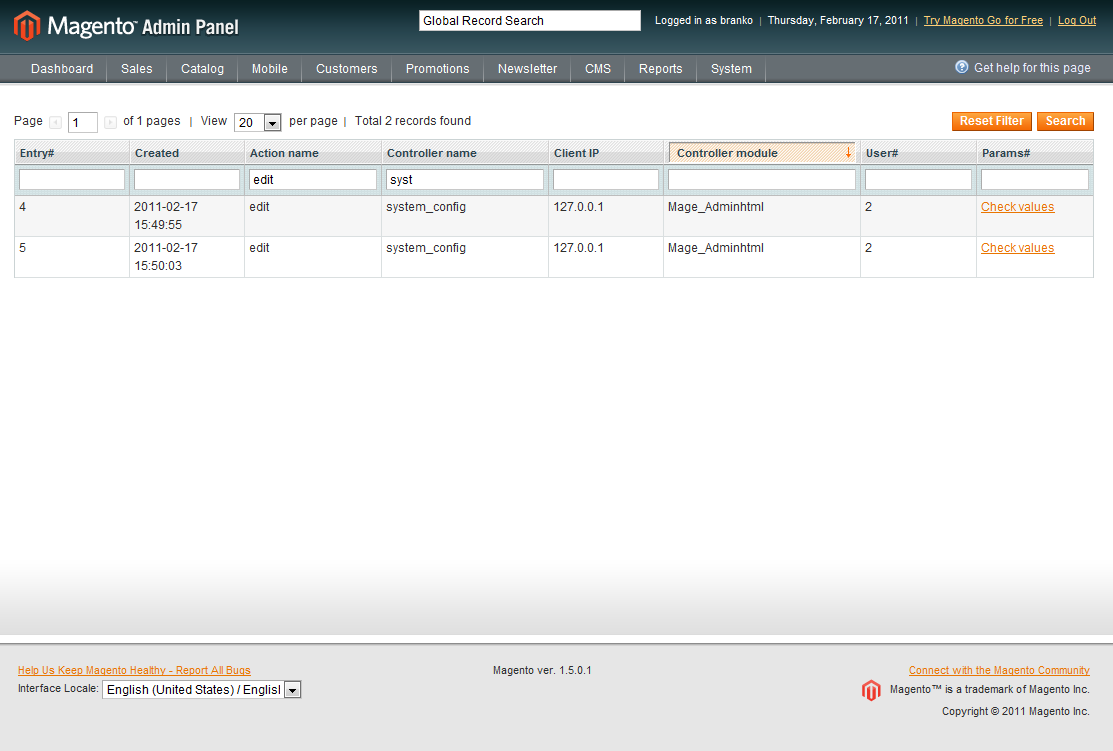
Concept like this can be used for development/debugging purposes and possibly for some user/customer behaviour profiling. Although “profiling” can mostly be done via Google Analytics these days, there are still admin part of sites that are not suppose to get analyzed by Google.
Thinking further down the road, one can build truly dynamic user specific menus based on the logged data statistics, etc.
Hope I got you thinking.
P.S. Unlike my usual way of packing up the code into the zip archive, this time I decided to actually submit extension to Magento connect.
This was done yesterday and is waiting to be approved :). Once approved, I’ll post a link to extension for those who are interested.Extension is now live at Magento Connect here.
Cheers.





41 comments
when we search through Action logger frontend grid then flash the Admin logger grid and move on loading….?
how to resolve it?
Hi,
the problem with 404 relies in helper/Data.php
if you var_dump $store you will see that its returning Inchoo_Logger, instead of store id. If you put 1 in getStoreConfig for second param, 404 will disappear. Btw. its not working on latest 1.9.3.1
Anybody has resolved the 404 issue after installing this extension? Cleared all cache, logged out and login all possibility checked but could not solve the 404 error. Please help me
Please update the link.
Hi,
I installed this module in magento 1.9, but it does not working. When I logged in into Administration, it displayed “404 error: Page not found.”. Can you tell me the know how to slove this issue.
Thanks
acl rules. log out and log back again like always.
Hi, I installed this module from magento 1.9, but it does not working. When I logged in into Administration, it displayed “404 error: Page not found.”. Can you tell me the reason and solution? Thanks
Hey it is not working where can i find working one
Hi,
I installed master version from Github on a fresh MAgento 1.9 install and it broke my dashboard. Everytime I tried to log in I was receiving a 404 error. I tried cleaning var/session and var/cache folders several times and trying to log in again with no luck.
I checked all permissions and everything is looking fine, but for some reason this module breaks the site. There isn’t any information on the Magento log, or either on the apache log on what’s causing the issue.
Any idea on what’s happening?
Thank you,
Jordi
+1
Hey, Any update on its (https://github.com/ajzele/Inchoo_Logger) compatibility with v1.8.1? When enabled, if we login to admin at backend, instead of loading the backend dashboard, it is showing a page with 404 error.
Do we need to update any file/url in the extension’s file?
Help/Suggestions are welcome.
@Branko Ajzele: Please guide!
Hi, did you try to login/logout?
I also tried to get this cool extension work but failed. So now I use this one http://amasty.com/admin-actions-log.html
We’ve recently hired a few new managers and we need to log all the actions performed by the admins to know who, what and when makes changes.
I uploaded the files from GITHUB to Magento ver. 1.7.0.2. But cannot see the new admin menu to access Logger. tried re-login and clearing cache. But no luck 🙁
Lance, Thanks for the reply however this is not the case. This is not the usual 404 when hitting the module page. I have logged out and back in, cleared the cache, etc etc. Perhaps it’s another module interfering.
Matt you probably need to log out and log back in. It needs to reload the admin ACL.
Tried installing on 1.8.0.1 but after clearing cache I receive 404 error when hitting any page in the admin. No recorded logs to point me in the right direction. Custom admin URL.
Hi,
It’s been moved from magento connect to github:
https://github.com/ajzele/Inchoo_Logger
Enjoy!! and thanks for the extension!!
Thanks
ash
For the purpose of admin actions logging also you can use this sollution (if you are far from developing) – http://amasty.com/audit-log.html
By looking at your code it looks like everything is now in the one grid yeah?
One other question… I have the following user roles set up in the back end of Mangento: Administrators and Data Admin but neither seem to be recording anything in the Logger – Log entries of everything that passed through Mage::log() area – I am only getting frontend logs?
Thanks again
Hi Branko
First up thanks for this post, extension and all the other great work you release into the Magento community!
I just wanted to check that the new version (Inchoo_Logger) you have placed on Github is now called Logger in the System > Configuration > Developer area?
If so I ave not set log Request Params to Yes but can’t seem to see the separate Recorded Frontend actions and Recorded Admin actions within the System > Tools menu now only one entry called Logger?
You can find improved version of the module here https://github.com/ajzele/Inchoo_Logger. Its rewrite actually, so its different then the original one mentioned in this post. Cheers.
Can you please upload your plugin to github with the rest of our plugins? I would really like to take a look =)
ups, not available
Hi Branko, thank you for this excelent post. Your module is not available under magento connect. Could you post a link to download it? Cheers 😉
Seems to be not available anymore ad MagentoConnect. 404 Page not found.
Can i disable front end logging. i only wanted backend log’s. how to do this ?
Hi,
Thank you for this great extension. I need it desperately for ver 1.4.0.1. Can I have a zip which I can install myself?
Many thanks for creating and sharing this extension. Will it work on 1.7.0.2 by any chance?
After installing the module to version 1.6.1 (1.7.1-beta as well) I received after clicking “Inchoo Logger” message: “Inchoo_Logger seems to be disabled under System > Configuration > Advanced > Developer > Inchoo Logger > Enabled [Yes | No]. Please enable it in order to see the logger grid.”
But it is allowed.
I installed this extension. This is really good.
But, Under Developer section there is option for front end and admin options. Also, under System->Logger there are no sub-menus.
Am I missing anything?
Thanks.
I guess that’s the new link to the extension: http://www.magentocommerce.com/magento-connect/catalog/product/view/id/10454/s/inchoo-logger-2627/
As Philip and Jens mentioned, the files are gone on Magento Connect, could you please reupload the extension?
Thanks!
Download in Magento Connect is dead. Could you reupload the extension?
Regards,
Jens
Hi,
I tried to download this but Magento Connect is reporting that the file is no longer there. Is there a way to download a zip file of this extension and just install it manually? Also, I might modify it a bit to fit our shop.
Regards,
Philip
I have been thinking about this for a while, like your work. It’s worth saying, this adds a few ‘script calls’ to a page so is likely to affect performance if left on on a busy site.
I was also looking to add a dump of $_SESSION and $_COOKIE to help with debugging customers issues. Though Mage makes good use of sessions so the DB could get large quickly. I am going to play with the source and ‘upgrade’ into a more debugging module than a logging one.
The first steps are easy just add,
to ActiveCodeline/ActionLogger/Model/Observer.php -> hookToFrontendControllerActionPredispatch
and then add the two fields to the sql install ActiveCodeline/ActionLogger/sql/activecodeline_actionlogger_setup
NOTE: this should be done before the module is installed.
I’ll post more work when I’ve had a play.
Alan
Maybe you can prepare version for 1.4.2?
regards
cr3pt
Hi & thank you for this extension.
I have a problem in admin when i want to see the frontend or admin grid i go to 404 page not found.
I have a custom admin url.
Any idea ? Thank in advance
Hello, I see white coloured code on gray background. Very uncomfortable to read.
Hey Branko, Nice tip – you could combine it with this guide to auditing changes in models, to audit all changed records by a particular user:
http://magebase.com/magento-tutorials/using-a-backend-model-to-customize-magento-a-tip-from-magento-developers-paradise/
I’m sure there would be some industries where that level of audit is required/useful.
Thank you for the excellent post. I’d definitely be interested in this.