Magento mobile theme – imobile

imobile_lead_image

Magento meets jQuery mobile (ver 1.1.0), before we start please note this is only experiment, use this theme on your own, this is not (yet) production ready. In a nutshell we have “package” under which we place all edited files. For start we use magento iphone theme and then add some “extra stuff”.

Some of key features:

  • Autodetects the mobile device
  • jQuery mobile (v. 1.1.0)
  • Homepage slider (http://swipejs.com/)
  • Almost all pages styled :-)

Installation is simple, just copy downloaded files, (app, skin) after that go to administration and do some Magento magic. Magento already have browser detection, you only need to create rule. In our case we dropped table support because most of them will display normal desktop view store. Here is rule:

iPhone|iPod|BlackBerry|Palm|Googlebot-Mobile|mobile|mobi|Windows Mobile|Safari Mobile|Android|Opera Mini|Fennec

You can add any other browser to this Expression, just point your device to http://whatsmyuseragent.com/ and find out user agent name of device browser. And this is how it looks in administration
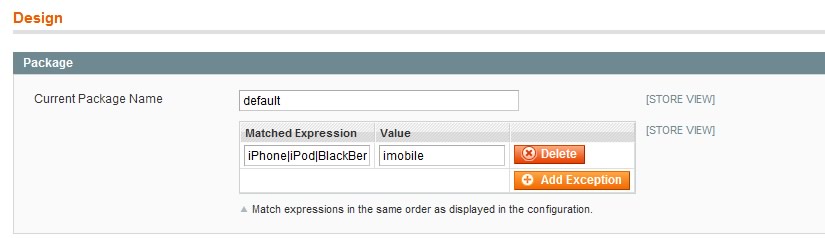
Using expressions

We need to mention that theme is independent from main store theme, all files which are edited don’t “break” default Magento markup we are only using power of HTML5 and one of the new cool feature “custom data attributes“.

Simply, the specification for custom data attributes states that any attribute that starts with “data-” will be treated as a storage area for private data (private in the sense that the end user can’t see it – it doesn’t affect layout or presentation).

Short explanation by John Resig

And here is our example for store header:

</pre>
<div data-role="header" data-position="inline" data-theme="c">
<h1><a href="<?php echo $this->getUrl('') ?>" data-icon="home">
<img src="<?php echo $this->getLogoSrc() ?>" alt="<?php echo $this->getLogoAlt() ?>" /></a></h1>
<!--?php echo $this----->getChildhtml('top-user');?></div>
<pre>

We don’t have any local hosted files regarding to jQuery because it is much easier to edit and place the newest version of js.

					<![CDATA[<script type="text/javascript" src="https://ajax.googleapis.com/ajax/libs/jquery/1.7.2/jquery.min.js"></script><script type="text/javascript">jQuery.noConflict();</script>]]>
					<![CDATA[<script type="text/javascript" src="http://code.jquery.com/mobile/1.1.0/jquery.mobile-1.1.0.min.js"></script>]]>
				<![CDATA[		<link rel="stylesheet" href="http://code.jquery.com/mobile/1.1.0/jquery.mobile-1.1.0.min.css" />]]>
            skin_jsjs/swipe.js

Ah, if you need more info about jQuery mobile framework go to: http://jquerymobile.com/.

Swipe JS, http://swipejs.com/,

Swipe is a lightweight mobile slider with 1:1 touch movement, resistant bounds, scroll prevention, and completely library agnostic. ;-) .

Ok, we made simple approach, create static block, named Slider with ID slider and place this code

</pre>
<div style="display: block;"><img src="{{media url=" alt="" /></div>
<div style="display: none;"><img src="{{media url=" alt="" /></div>
<pre>

If is there no needs for homepage slider just removed it from local.xml (from line 44).

For styling pages, we cover most of them but there is always more space to improve some part of Magento interface.

For demo and download go to our demo store http://imobile.inchoo4u.net with your smartphone, emulate in browser (change user agent), visit @ github, or just scan this QR code.

So if you have any suggestion, issues, trouble just comment below, enjoy

56
Top

Enjoyed this post?

Subscribe to our RSS Feed, Follow us on Twitter and spread it to your friends!

Author

Stanislav Mihic

Frontend Developer

Stanislav is specialized in web and front-end development with technologies such as JavaScript, CSS, and HTML using agile practices

Other posts from this author

Discussion 56 Comments

1 2
Add Comment
  1. Nice work! Working neat on 3GS Safari. Only the slider is kinda wierd.

  2. I notice that, I will try to fix it. Thanks for feedback.

  3. I use Flexslider (not advertising hehe). Semantic, responsive, html tags can be used. Very nice script.

    http://www.woothemes.com/flexslider/flexslider-demo/

    Np, keep up the good work!

  4. I made an order, now where are my $137 snickers!!?!?

  5. Toni Anicic

    @Zdravko, you need to be logged in to inchoo.net to have “inchooer” badge when commenting. This way we don’t know if it’s really you or someone just took your nick :P

  6. Zdravko Karanovic

    I love badges!

  7. Martin

    Great work, can you plz add wp7/ie9 mobile ?
    User agent info contains:
    - Windows Phone
    - IEMobile/9.0

  8. Clive

    This is really awesome! I did notice something though, if one of the categories on the homepage does not have sub categories it does not seem to contain url to that category.

  9. Clive

    Fixed the problem of no url on flat categories. On line 15 of category-navigation.phtml i changed it to <a href="getUrlKey() ?>.html”>.

  10. Peterjan

    Hi looks great and would like to work with this package :-)

    Trying to get it working but ran in to the following problem: I can navigate up to the gridpage but when trying to get into the product detail page it keeps running and will not load the product detailpage? Using firebug I see a “throw $continue” is deprecated, use “return” instead” error. Can this be a Jquery conflict somewhere or is it something else that I got wrong?

  11. Marcus

    Looks great. My suggestions on the first look:

    -if you jump into a category the header links plus logo and the footer disappears. It would be good if they don’t do this
    -the slider for the add to cart is nice but I think in most cases you will add only 1 item to cart and the slider claims much space

  12. my categories wont function.

  13. Hi,

    Why is that my categories is not working.

    Please check my site below: http://www.gardenarches.ie using iPhone

    Need help..

    Thanks!

  14. Im using magento 1.7 platform for this installation

  15. Hi Raxis, there is issue with top level categories, Clive have quick solution, http://inchoo.net/ecommerce/magento/magento-mobile-theme-imobile/comment-page-1/#comment-28803,
    Peterjan, can you please send your store url so I can check what’s happening, thanks

  16. Hi Stan,

    Can you possibly give me the correct code, Clive solution is not working but the logic is correct but i need to know how to get the exact url of the product.

    <a href="htmlEscape($_product->getName()?>”>

    <a href=".html”>

    it gives me 404 error.

    Thanks

  17. <a href="htmlEscape($_product->getName()?>”>

    <a href=".html”>

  18. getStoreCategories() ?>

    0): ?>

    <a href="getCategoryUrl($_category) ?>”>
    getName() ?>

    load($_category->getId()) ?>
    getChildrenCategories() ?>
    0): ?>

    <a href="getCategoryUrl($_subcategory) ?>”>
    getName() ?>

  19. Hi,

    I already solve that issue, now i have new problem,

    1. I cant remove the checkout product
    2. Product quantity is default by 94

    Is there a way how to fix this?

    Thanks

  20. Hi,

    When i Click Proceed to checkout the product in Shopping cart is 94 item.

    How to fix this? anybody can help?

    Thanks

  21. Hi,

    The Continue Shopping button does not work… Its a good template but its seems there are lots of bugs.

    Hope this problem will fix sooner.

    Thanks

  22. leozzz

    i have upgrade from 1.6 to 1.7, but i cannot see any new HTML5 mobile theme, should i need to download the new theme from anywhere?

  23. Is there anyway to override the matched expressions so that I can create a “View full site” button at the bottom.
    Does anybody have any idea Where Matched expression is evaluated and if it’s override-able with some custom logic?

  24. will

    http://inchoo.net/ecommerce/magento/magento-mobile-theme-imobile/comment-page-1/#comment-28803

    this solution is not working for me. how can i fix it so that top level categories with no sub categories display the products?

  25. Hi there, here is quick update regarding to category navigation http://bit.ly/LeTe3N

  26. will

    Thanks so much

  27. Hello
    I know I am missing something but your innstructions about “some Magento magic: cre a little vague and I have looked at other sites and follwed their configurations to no effect. I have the mobile template installed and if I set it up as the main site template it works just fine. What I cannot fo it get it to appear as an exception in the Design menu. I can get iphone to work as an exception but not imobile (and I much prefer imobile in terms of look and functionaliity),

    Any advice would be much appreciated.

    regards

    Andrew

  28. Hi – you can remove my comment if you wish to as to not waste anyone’s time. I have it working.

    Thanks for your efforts – much appreciated.

  29. Hi there,
    Does anyone have any hints on switching back to the default desktop view?

  30. @Andrew, I looked at this briefly recently but I hav’nt had time to go over it properly.
    To start have a look in /app/code/core/Mage/Core/Model/Design/Package.php at the getTheme($type) method,
    You’ll see the Custom theme is set if it matches a User Agent regex value that’s set in the config.

    Overriding this method locally and adding a check for a session variable that you’ve set when clicking a ‘Desktop view’ button on the mobile theme would work.
    I’ll write this up in a blog post shortly.

  31. sunil

    Hi looks very good in Iphone .

    But i want to set header and footer to fixed position. i have already applied data-position=”fixed” but still header and footer not set on fixed position. Is there any way?

    Thanks,
    Sunil

  32. Pratik

    Hi,

    Thanks for your theme it’s working fine in iphone (Portrait Dimensions)

    but it’s not working in landscape resolution,

    do you have any idea for the same ??

    Please let me know if you have any solution for landscape view.

    Thanks In advance.
    Pratik

  33. nils

    tried it, but seems to get stuck it has to display products under sub categories…

  34. Andrew Hardie

    Do you have to change any code to make this work, other than adding the expression – we can get the default iphone theme to show using expressions but not this theme, which is a shame, because this is far neater!

    Any advice appreciated.

  35. Hi Andrew, can you please post more info regarding to expression (screenshot maybe).
    Pratik, can you please send me url of your store so I can check issue with landscape orientation.
    Sunil, can you please for start with jQuery mobile documentation, there is some issues with position fixed on some mobile browsers.

  36. PJ

    Hi Andrew, Thanks for a very nice mobile theme.
    Everything is working well except for checkout. I am getting a blank page.
    I guess this is because I am working with a OnePage checkout extension. Can I somehow redirect to the standard Magento checkout?

  37. PJ

    sorry :-) Hi Stanislav

  38. Pravin

    In Mobile theme , how can i open the desktop version?

  39. patrick

    Thanks Stanislav.
    works great.
    the only problem is I want to get to the product page from product list using ajax but with:

    &amp;lt;a href=&amp;quot;&amp;lt;?php echo $_product-&amp;gt;getProductUrl() ?&amp;gt;&amp;quot; data-ajax=&amp;quot;false&amp;quot;&amp;gt;

    clicking on a product in product list opens a new window in safari mobile.
    I tried to remove data-ajax=”false” but it does not work.
    how would you load a product page using ajax (without page reload)?

  40. gondo

    hi
    im trying to open categories but im getting just bunch of JS code on your demo page:
    http://postimage.org/image/tnc8pa43h/

  41. Hello,

    I have the same problem as many out there, that not loading catalog, just moving through categories…

    Any solutions?
    I tried this one – http://bit.ly/LeTe3N but no effect.

  42. This is exactly what I have been looking for, you guys rock!

    Could you tell how to go about redesigning the homepage? I want to add some product images, couldn’t see any .phtml file that corresponded to the homepage..

    Thanks!

  43. If anyone else has noticed the list and grid view of catalog pages are the same layout, to change grid view to a grid is very easy, find line 45 and change data-role to “gridview”

    What I can’t work it is how to get 2 or 3 products per column.. anyone? Have tried the usual catalog.xml and list.phtml changes to column count without any luck.

  44. raj

    hi,

    I am getting error after checkout :
    Fatal error: Call to undefined method Mage_Catalog_Helper_Data::canApplyMsrp

    I am using magento 1.5.1

    thanks

  45. Hi, great mobile theme.

    All pages work fine except the product pages. The moment you come to a product it goes back to theme’s product page. I am using inbuilt URL rewrites that remove the category & subcategories from product URL.

    View the difference here:
    1) http://www.ijstore.com
    2) http://www.ijstore.com/green-string-necklace.html

    All exceptions under design (package / themes) added.

  46. ElenaMBelda

    I am facing a conflict between OneStepCheckout and the mobile theme. Is there a way to force original-magento-onepage-checkout from the template? Thanks!

  47. Any luck on linking back to the full site from the mobile site??

    http://www.jcsmoke.com is my site and its working great on mobile phones but my boss wants to link back?? Help please!

  48. Mahendra

    Mobile template is working fine!! thanks for that, however, navigation and products are not appearing, I var_dump the category data, seems its empty, but we have plenty of items there,

    getStoreCategories() ?>

    result is: array(0) { } NULL

    any solution??

  49. Hi. Thanks for the great theme! I wanted to use the slider feature on the home page as follows:

    &lt;/pre&gt;
    &lt;div style=&quot;display: none;&quot;&gt;&lt;Form with SEARCH at top and LOG-IN or ACCOUNT DASHBOARD page depending on if user is logged in&gt;&lt;/div&gt;
    &lt;div style=&quot;display: block;&quot;&gt;&lt;img src=&quot;myimagehere&quot; alt=&quot;&quot; /&gt;&lt;/div&gt;
    &lt;div style=&quot;display: none;&quot;&gt;&lt;CATEGORY LIST /&gt;&lt;/div&gt;
    &lt;pre&gt;

    What is the best method to call the search/log-in forms in:

    I tried a cms page with

    &lt;reference code=&quot;content&quot;&gt;
    &lt;block type=&quot;core/template&quot; name=&quot;top.search&quot; as=&quot;topSearch&quot; template=&quot;catalogsearch/form.mini.phtml&quot;/&gt;
    &lt;block type=&quot;customer/form_login&quot; name=&quot;customer_form_login&quot; template=&quot;customer/form/login.phtml&quot;/&gt;
    &lt;/reference&gt;

    added to update xml but that didnt work. Any help is appreciated.

1 2

Add Your Comment

Please wrap all source codes with [code][/code] tags.
Top