Simple product with custom options in grouped product in Magento

Does the title sound complicated? Grouped Products display several products on one page. For example – if you’re selling chef’s knives and you have the same knife in four sizes, you can make a grouped product to display all four sizes. Customers can select the size(s) they want and add to cart from this page. Another example would be a themed bedroom set – you can create a grouped product and sell the sheets, comforter, and pillow cases all from the same page.
 Technically, we create a simple products and after that a grouped products. When we edit the grouped product, we will associate simple products to it.It works very fine, but some of you might have issue if a simple product has custom options. If that’s the case, and if costum options are set as required (default way), the simple product will not be associative to the grouped product. Let’s see what needs to be changed in that case.
On Magento site, there is a nice tutorial how to create a grouped product. Please read it first to become familiar with the process. If you don’t have to assign simple products with custom options to a grouped product, that tutorial will be enough.
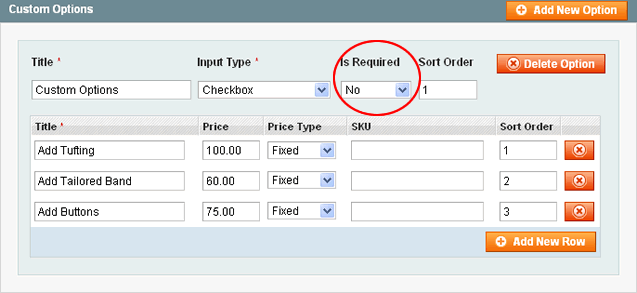
In case you wish to have simple products with custom options listed, be sure you don’t set any of the custom options to be required.






62 comments
Hi, it does not work for me on Magento 1.9.3.10.
This works for options other than text field. How do you achieve this if the custom option is a text area?
thanks but how can have multi qty for one product ? for example size ” L , M , … HAVE qty
Is it possible, and if so, how could it be accomplished so that ‘simple products’ with custom options would show in a ‘bundled product’?
Thanks for this post it really helps my out to understand magento grouped product
Hello,
I tryed this solution but it does not work for me…
I have a simple product with custom options(not required) in a group prodct but the custom options do not apear on the front end -.-
I am trying to fix this for houres now but I dont find a soulution
Hi there,
Just seen this post on required custom options, which is what we need to do on our site, and I have come up with a work round. So if anyone’s interested here how to do it:
Each Grouped products need at least 2 associated simple products, for it to work, though only one needs to show on the front end.
So for each Grouped product.
The first simple product (via ID) must NOT be required, all the rest can be. Therefore the first simple product (if its to have a required custom option) should be duplicated, the original is set to not required and disabled the duplicate can then be set to required. This will now work.
All the other associated simple products do not need to be duplicated and can have a required custom option.
Its not he most elegant solution and does require extra work but at least it does work.
Our website http://www.kaybeedoors.co.uk with this solution (on our accessories section) can be seen from the 19 of June, old non Magento site still up atm.
Hope this helps,
Dave.
when i created custom options, why custom options are not displaying in the grouped product options in frontend
Im trying this solution but the custom options don’t appear to the customer in the grouped product. Are they supposed to appear with this solution or is this just to be able to associate them in their default options?
So, what if I need the custom options to be required?
We sell a lot of products in multiple colors, where no one color is the default, so a customer has to choose white or black. And for example, we want to have one grouped product with the white color, and another one with the black.
Is this possible with the current system?
Excellent post! This helped me figure out an inventory problem that was plaguing the site! Thank you so much!
Awesome article! I almost dropped the idea of associating simple products with custom options to grouped products. I didn’t try to set the option to non-mandatory…
Thanks guys!
Hi, I’m creating a store for clothes for a client. He wants that there should a custom form on all product page this an additional fixed price where customer could enter his/her mearsurements. The additonal price will be added to the product price if customer choose that additonal options. My client don’t want to enter in custom options at the time of entering product. The custom form will be on all the products b default with fixed price. Please someone help me to make this possible
i do that but its not working
hello,
i want to associate group product with group product.
how its possible?
Hi Carolina,
For your problem could you not just use “Custom Options” on a simple product.
So your custom options would be Top (S,M,L) and Bottom (S,M,L) with prices added also.
I do similar and use an import profile to import everything from an excel spreadsheet – it’s a massive time saver.
I sell swimsuits (separates) and in order to be able to sell them separate we are having to create simple products per top and per bottom sizes (also per reference as they all have different sku numbers). Then, we create a group product and associate each of the simple products with either TOP or BOTTOM (that’s how the simple product has to be named at first so it is identified correctly – if it goes under top or bottom). Even though this system works it is tedious and takes long time just to add one suit with different top/bottom options, like this one(we had to create 12 different simple products in order to achieve this):
http://nikkisboutique.com/cubanita-peligrosa-by-luli-fama.html
I’ve been reading some, and it seems there is an easier way to do so using configurable products..But I still can’t figure it out as we need separate price for top and bottom as they show it on this page (this is exactly what we need):
http://www.mollybrownsswimwear.com/swimwear/vitamin-a-gold/le-chic-top-bottom-24k.html
as you can see all we need to define is price for top and price for bottom and then client picks the size from the drop-down…
What do you think is the best way to achieve this??? Can you please please help me out??
Thank you!!!!
I understand how to use the custom options for a product, however i’m running into a problem trying to duplicate this custom options to multiple products, is there an easy way to duplicate the custom options to multiple products?
What is the best way to register bottles of wine, provideded that they can be marketed either unitized (6-bottle unit) or individually? Would it be a grouped product or configurable product or …? Is there a way of configuring this to use the same inventory?
i used custom option as you mentioned above in group products but it not show in frontend product page
am i missing something plzzz help
I’m not sure if you’re responding to my post or the original blog entry. I’ve configured this for a couple clients, and both work without issue. Potentially I was a little vague in the article, but the steps only list out how to allow the association. Once its “allowed”, you still have to modify the template files to render the options.
Product configuration for store clothes B2B. Product configurable, grouped or…?
I`m configurating a Magento for a store of wholesale clothes what want to manage to is to configure a product, for example an T-Shirt that comes in some colors and sizes.
And that the user can buy several products with options of colors, sizes and quantities in a same page of product.
For example
In page of T-Shirt SURF
Options that user buy
yellow Color / Size XXL / Qty 20
red Color / Figure XXL / 20
red Color / Figure XL / 20
red Color / Figure S / 15
green Color / Figure XL / 10
green Color / Figure S / 5
blue Color / Figure L / 5
blue Color / Figure XL / 5
blue Color / Figure XXL / 25
Its possible? How are this product setting?
There is some way to achieve it without having that to give of high each product configuring a color and size and then to do a group of products so that the user have all the options? This way carries a lot of time for setting.
Any extension available?
thanks!
Fernando Pérez Cardenal
5411 4392-1100
http://www.videomultimedia.com.ar
. : Digital Videos – Multimedia – Digital Marketing:.
Hi Brim,
Great extension by the way.
My question though might be a little related but does your extension allow quantity input for custom option inventory purpose?
Hi Brim,
Thanks for your suggestion. Unfortunately I already selected that, and it doesn’t work.
I installed the extension Netzarbeiter_Groupscatalog, perhaps there is a conflict between the two, I’ll ask.
Regards,
Coer
Coer,
You just need to change the visibility on your simple products from “Catalog, Search” to “Not Visible Individually”. That will prevent simple products from displaying in the catalog and the search.
Hi,
I created grouped products, and I associated simple products to it.
Now both the grouped products AND the simple products show up in the product listing. That defeats the purpose of grouping products (at least in my objectives it does).
I would like just the grouped products to show up. How do I accomplish this?
Your help would be much appreciated!
Regards,
Coer
—>if i have two simple products
1.
name bed
desc ……
custom option size
2
name chair
desc …..
custom option color
–> one configurable product and have the dropdown with option
1 bed
2 chair
**** now when i select bed it should dynamicaly change price and custom option asociated with it.
pls help me . thanks in advance
Is there any chance to create the multi store for diffrent customers where has giving restrictions for accessing only his store products
We recently wrote an extension that allows required custom options for grouped products. http://ecommerce.brimllc.com/grouped-options.html
@Lorena
Watch this video.
http://www.magentocommerce.com/media/screencasts/grouped-products/view
Hello,
I created simple products in Magento a while ago that now need to be grouped. I can’t seem to change their Type from Simple to Grouped. Can anyone explain to me in detail how to do this? I have already gone through the tutorial on Grouped products in Magento but there is no reference to this needed change. I don’t want to have to recreate the products again just to make them Grouped. It would be simpler just to change their Type. Any help would be appreciated.
This site is a great resource and I just wanted to post my opinion stating that fact. Thank you.
Hello,
Great site for tips. I use the group products to sell boat rides. Just like your knife example, except instead of sizes I have adult, senior, child, etc. Works fine except for one big issue, we have a fixed stock of 40 seats for passengers. Is there a way to have all the choices in the cart pull from the same inventory of 40?
Cheers, Alex
Hola,
quisiera saber como hago para tener en el prod unas opciones donde pueda asociar una talla a unos colores especificos, y otra talla a otros,
gracias
ohhh, I missed this, now those old required attributes like color and size aren’t required. So somebody could order just a default item with no attributes.
Where is the middle ground. I have 3 products that have color and size custom options and I am trying to combined all three into a kit. The kits item qty. are fixed and the price is cheaper, hence buying them all together. And my main concern is making sure I maintain a proper stock count.
I appreciate all your input, time and
THANK YOU! ! ! this has been killing me.
Yes, sorry I was referring to the article. I need a grouped product to have shared custom options and that’s what I thought your article was saying at first. It’s my fault for not reading it more carefully. You’re article is simply about having the option to choose a simple product with custom options as part of a grouped product. I originally misunderstood this to mean that custom options can be applied to a group product so long as the options are not required which we all know is not the case unfortunately. There is an extension that allows what I’m referring to called “Paired Products” but it’s only for two products and wont work for me. Sorry for the confusion.
Phil, I’m not sure if you’re responding to my post or the original blog entry. I’ve configured this for a couple clients, and both work without issue. Potentially I was a little vague in the article, but the steps only list out how to allow the association. Once its “allowed”, you still have to modify the template files to render the options.
Again, you might not be referring to my article that I linked to above, but I’d be more than happy to help you out if you need this working.
*Edit* … Quickly misread the article. This article is NOT saying that custom options will appear in the grouped product but simply that the product will be available in the group.
I don’t know why this is the case however. If you are selling Monogrammed Towels for example. You want them to be able the select bath towels, hand towels, washcloths, etc. then select the monogram (custom option) they want for the towels. Granted the monogram or custom options has to be the same for all but that’s ok. if they want different monograms for each one they can add the first to cart and do it again. This limitation is frustrating.
This article is completely untrue. Even if the custom option is not required it will still not show up in a grouped product.
I’m not sure if this has been address or not (I didn’t read through all the comments), but I wrote up a blog post detailing how to associate simple products WITH required options to a grouped product, using only a few core overrides. If it helps anyone, check it out : http://www.brimllc.com/2010/07/magento-associating-simple-products-with-required-options-to-a-grouped-product/
This basically what I need done.
On a product page, all the grouped products appear below with Quantity Boxes just like I want, but there not behaving the way I need them to. They are giving the Tiered Prices “per product” not accumulatively .
The way it “should” work is if the Tier Pricing goes something like 1-12 watches @$10, 13-24 watches @9.50, and 25+ watches @ 9.00. They should be able to choose 5 of the blue, 6 of the green, 7 of the red, etc. And “that total” *(the accumulative total) should then show the Tier Price discount.
Not “per product” like it’s doing now.
Any ideas on how to accomplish this task?
Respectfully,
LMW
Hi,
I did try the suggested method, but my custom options is not showing up.
Is there any file that I should check and edit as well?
Thanks.
can we include quantity discounts in the cart.
For example a quantity of 1-10 the price is 20.00, for 11-20 the price is 17.00, for 21 + the price is 15.00
Thanks,
Hie great site can anyone help me i want to add link for each simple product listed under grouped product (Example : I have three simple products under grouped if customer click on any simple product it will open in new window so customer can see all the details of that product) any help is appreciated Thanks in Advance 🙂
Yes, this solution works, but it’s useless if Custom options are important for Simple Product. On Product details page you’ll not see Custom Options selection. Only variant to choose quantity for Simple Products.
you can get rid of duplicate URLs using canonical URLs. you will surely find an extension on the magento commerce for the same. so, no more duplicate URL will be detected by Search engines.
Great post dude. I have a major problem however, Ive assigned a custom option template to over 300 products. Now the client wants to remove one of the options. How do I update all the products custom options without having to go in to every product which would take years! Got no help from magento forum as usual.
Thanks
Looking for a solution where the option(s) for each simple product that is associated within grouped product is actually shown on grouped product page. Cannot find an answer anywhere and cannot think of alternative solution for my product. Anyone?
I need a detail page, like
http://www.blankapparel.com/Jerzees_29W.htm
Please help
Hi,
does anyone know how I can create a grouped product using configurables. I’ve searched and searched and watched the screencast on magento and I have a feeling it’s not possible. Is this right? Is there any other way? I am selling kids clothing and want to sell a skirt and tshirt as a matching set but I can’t add the configurable skirt and tshirt. It only allows me to add simple products. I am not a developer so I won’t understand programming terminology. Any help for a simple administrator?
thanks
Danica
How can you show the max price of the grouped products as well? To give a $min to $max display.
For those seeking to reduce the duplicate content. I believe Magento now supports the Google meta tag which states the preferred URL for any given item. This way, rather than use the URL rewrites, the meta tag will correctly route users to your preferred URL which you could have be any valid URL for the product. So if a product was in multiple categories, you can specify whether to have the product be located at the base url (mysite.com/item.html), within a category (mysite.com/mycat/item.html) or… wherever!
Prashant – I know this is a bit of extra work, but I have found that you can create permanent re-directs of links using the URL Rewrites functionality. What if you go in there, and create re-directs for each of the links to your product that you don’t want? (eg. yoursite.com/cat2/subcat1/product.htm -> Redirect to yoursite.com/cat1/product.htm)
Again, it’s extra work, but it does what you’re needing, and is also fairly search-engine friendly if you set those up as Permanent (301).
This can be edited in Admin > Catalog > URL Rewrite Management.
Hi, Tomislav, I created a simple product with some custom option (select box type) but I don’t know how to get this select box in grouped product in frontend layout, I tried so many times but still fail. Can you give me some hint? Thanks you so much. 🙂
Hi, Tomislav, I am new to Magento and now I really have lots of problem with its database. I want to modify functionality for custom option of product, but I don’t know how to access Magento database. Where’s code with sql query? Help me, please!
Hi @Toni,
Yes, we can disable category URL’s but we want to include categories.
Please tell me some solution if you can.
Thanks
We faced the same problem with duplicated content when listing a single product in multiple categories. What you should do is turn off the category based URL structure from the Magento administration. Didn’t have time to come up with better solution but this one will provide you with the same link to product no matter what path the visitor or search engine bot takes. 🙂
Hi,
I am facing some problem with duplicate URL’s in magento. I have a product which is in three categories (Cat1, Cat2 and in Cat2 -> SubCat2 (subcategory of Cat2)), Now currently there are four url’s for one product,
1. mywebsitename .com/cat1/my-product.html
2. mywebsitename .com/cat2/my-product.html
3. mywebsitename .com/cat2/subcat2/my-product.html
4. mywebsitename .com/my-product.html
But I want url like as and only one,
1. mywebsitename .com/cat1/my-product.html
Basically I want first category means Main category (Cat1) in the URL. Its difficult to find out which category is default, so that I think we can make a attribute which will contain that which is the default category for a particular product.
I want to make a single URL for one product, single URL means it must be same, in listing, in viewing, in Shopping Cart, in Recently Viewed (sidebar) etc.
I am not able to figure out which file or function I have to edit. I know there is a getProductURL() function in magento using which it takes URL’s but how it works and where to edit it exactly, because this function is in many files.
Please tell me how to solve this problem.
Thanks
@parky
“the best Magento Resource…” … I’m disappointed, what about http://activecodeline.com 🙂
Concerning your question. There are at least two files you need to modify: template/catalog/product/view/attributes.phtml and template/catalog/product/view/additional.phtml.
Great help would be if you can learn (if you don’t know it by now) FireBug, Fire PHP (check http://activecodeline.com/utilize-firebug-and-firephp-to-speed-up-magento-development/)
Cheers…
Hey Parky,
Before you start, please be sure you read Magento’s Designer Guide.
You have to know that you SHOULDN’T update default magento files, even the theme ones. Be sure to understand folder structure. Once you are ready, compare product info files of default and modern theme at: app/design/frontend/default/[theme]/template/catalog/product/view.phtml
This is just a start so that you know where to start. Hope it helps.
Tomislav
Since you blog is honestly the best Magento Resource i have found yet on the net I thought I would ask this question here hope that is alright. (the magento forums i feel are at times very unresponsive). So I recently downloaded the modern theme and added all kinds of custom attributes to display various options on our products. But I hate the way they do the tabs at the bottom and prefer the old style tables in the default magento theme. so my question is where would I need to start hacking around to replace the modern theme code with the default magento themes code for just lower half of that page. Any help would be greatly appreciated, thanks in advance.