
Contact Form in Magento
53 Comments 2nd JAN 2009 | Posted by Tomislav Bilic in Magento

As you know, Magento has a built-in contact form that can be used for general contacts. That form isn’t part of any CMS page, you cannot edit some introduction text, you cannot add phone numbers administration, and you cannot see the breadcrumbs. If you wish to edit text in that default contact form, you will need to update front-end files. Luckily, there is an alternative.
If you are a developer, editing your contact form HTML is an easy task. You only need to open file:
app/design/frontend/default/[yourtheme]/template/contacts/form.phtml and you will find your way around.
Once there, you will basically edit the layout of this interface.
However, there are cases when you would like to give your client an option to edit some intro text, edit his phone numbers, edit text behind the form, etc. You are probably guessing that it would be nice to be able to embed contact form in some CMS page. No problem.
- Go to your CMS> Manage Pages interface
- Once there, input your HTML as you normally would on any other page
- Once you are happy with HTML part, add this lines:
<!– CONTACT FORM –>
{{block type=”core/template” name=”contactForm” template=”contacts/form.phtml”}}
<!– END OF CONTACT FORM –>
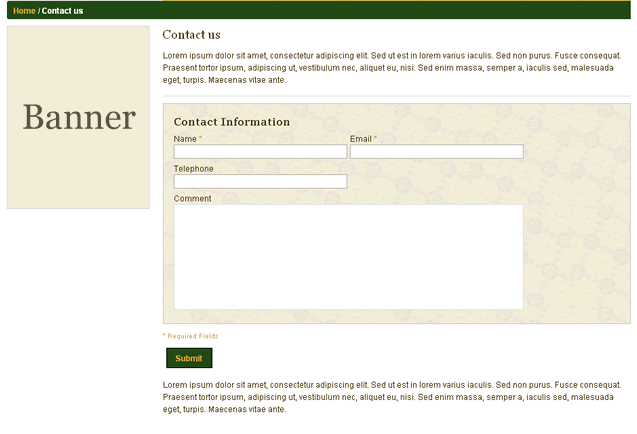
Here is how it looks like. Notice the breadcrumbs.
I know that this is not some breakthrough article, but I will certanly create contact CMS page on all of my future Magento projects.
To post code in comments, place your code inside [code] and [/code] tags.


January 15th, 2009 at 10:25
Hi,
Your website is very helpful. Lot of useful magento related stuffs. I am facing a problem with “Send To Friend” module in magento.
I want when anyone use the “Send to Friend” form to send an email (basically sharing a product) then copy of the same email will be sent at my email id as “BCC”.
Can you please tell me how to do it? Which file I have to modify?
January 18th, 2009 at 11:53
Hi Prashant,
The email sending is triggered in the app/code/core/Mage/Sendfriend/model/Sendfriend.php
Try to look at the whole app/code/core/Mage/Sendfriend folder and try to find a way to send BCC from there. I didn’t have a chance to play with it yet, but it is a good starting point.
Keep in mind that actual HTML/Javascript is visible from app/design/frontend/default/[your_theme]/template/sendfriend/send.phtml
I konow I didn’t give exact solution. If you find it, please share it here. If not, I’ll try to find it when I catch some time.
January 19th, 2009 at 7:36
I got it!
I have edited “public function send()” function in the file “app/code/core/Mage/Sendfriend/model/Sendfriend.php”
In this file I added the following code line
//Customization: following line is used to add the bcc, with every mail //which is sent from SendToFriend form.
$this->_emailModel->addBcc(“sales@mywebsite.com”);
below the this line
foreach($this->_emails as $key => $email) {
Now whenever anyone send mail (using send to friend form) to there recipient, each mail will also come at the BCC address. Like if user added 5 recipients then you will receive five emails at BCC address.
It works for me, hope it helps!
But @Tomislav please check this at your end that this is the right way to do this or we have some other easy way (I don’t think there is any).
Thanks,
Prashant
January 20th, 2009 at 10:48
Where does the default contact us form send email to? How do you change that?
Cheers,
Chris
January 20th, 2009 at 15:11
System> Configuration> General> Contacts
January 20th, 2009 at 16:14
I checked my theme folders and I don’t have any one called “contact” in “template” subdirectory. It is the default magento theme…
I can add a home made form but if magento has already ready form, I’d like better use it…
January 20th, 2009 at 18:17
Thats the “from address” that gets put into email generated on the server. What is the email address that the contact form information gets sent to on submission?
January 27th, 2009 at 7:34
@Prashant
Thanks for the input. But where exactly do I insert the codes. There are two public function codes and I tried in both, nothing happened. If you can post sample of the code integrated with magento core file, that would be nice.
January 28th, 2009 at 6:01
Hi @monocat,
In the file “app/code/core/Mage/Sendfriend/model/Sendfriend.php” have only one “public function send()” function, and in that function, find “foreach($this->_emails as $key => $email) {” this line, and then add my code below the foreach statement.
It works for me!
February 2nd, 2009 at 4:59
is it wise to change the core code of Magento ? when you upgrade the Magento, it will be replaced with the new code. I think the better way to add bcc is create a new custom module to handle that based on class Mage_Sendfriend_Model_Sendfriend.
February 12th, 2009 at 16:43
Hi there
does anybody know how to create an entirely new contact form? I want a “request catalogue” form as well as the standard contact form. i have tried replicating it but there are so many files for the contact form it’s ridiculous.
any help is appreciated!
thanks
February 18th, 2009 at 15:04
still require help if anybody is out there!
February 23rd, 2009 at 6:05
on my site, the action is blank and the form doesn’t work
February 23rd, 2009 at 19:01
I have the same problem as John… action is blank and the submit fails. Any easy solution?
February 23rd, 2009 at 19:07
Forgot to mention, I’m using Magento 1.2.1.
February 24th, 2009 at 20:49
To John and ltmayonnaise,
Use single quote instead of double quote. like the following:
{{block type=’core/template’ name=’contactForm’ template=’contacts/form.phtml’}}
March 3rd, 2009 at 17:37
i’ve been struggling it’s been 2 days now, all i wanted to do is just create a copy of the contact us form, in which i want to change the texts then later i want to add some more fields and dropdowns…etc
i tried every little possible possibility with no success.
even the last test i’ve done, is just by adding one button to my mainmenu and in the page pointed by that button i added this line
{{block type=’core/template’ name=’contactForm’ template=’contacts/form.phtml’}}
i also tried
in its layout
the form come out well but whenever i click on send it just refreshes the page, deltes everything on it, no message is displayed on top, and the mail isn’t sent.
hope i was clear enough
any ideas or tutorials on how can i create a copy of the contact us module, or on how to fix this sending problem ?
thanks very much in advance
Regards
March 3rd, 2009 at 19:40
I’m having the same problem geo is, above.
Any ideas?
March 26th, 2009 at 23:28
The contact us form works for me on some browser while on others does not work when i click the submit button it comes back to the same page no confirmation no error message and does not send an email too
March 30th, 2009 at 6:15
I tried. I can’t get it to show. I used this exactly…
{{block type=’core/template’ name=’contactForm’ template=’contacts/form.phtml’}}
Not sure if I was suppose to change parts of it to match my template. I’m on Magento 1.1.6
April 7th, 2009 at 16:44
I have the same problem as john and ltmayonnaise!
I have created a page called contact-us and inserted the block into the content of that page like so {{block type=’core/template’ name=’contactForm’ template=’contacts/form.phtml’}}
However, when I view the source, the action attribute on my form is blank and when I click submit button the form refreshes, deletes the form data, no messages are displayed and the mail is not sent.
I went into System/Configuration/General/Contacts and used my own email address to send to, I used custom email 2 as the sender and used a template based on the default template. Contact us is enabled.
Any one else solved this problem? I am using Magento 1.2.1.2.
April 9th, 2009 at 16:06
hi, set up the contact form in a new cms page. it works fine, only the “send” button has no reaction. Where or how can I set this button to send the form?
April 30th, 2009 at 6:26
I too tried the method described above, but like the comments stated here, it didn’t work (v. 1.3.1). My solution around it was to make a static block called ‘contact_static_block’, which I filled with appropriate content (store hours, directions, etc.).
Then, in order to insert this static block so that it displayed above the form, I edited the following files:
/layout/contacts.xml (add this between …)
contact_static_block
/template/contacts/form.phtml (add this to the top)
getChildHtml(‘contact_static_block’) ?>
You can probably tweak it a bit more to have a little greater control over the positioning of the static block and where it shows up, but this should suffice if you want it at the top, with the form following the static block content.
Hope this helps!
May 6th, 2009 at 8:22
Hi, that’s a good idea.
But, do you have encounter a problem that, we can not post the contact form?
May 8th, 2009 at 8:09
Got it to work on 1.3.1 with single quotes. Double quotes wouldn;t work for some reason.
{{block type=’core/template’ name=’contactForm’ template=’contacts/form.phtml’}}
May 16th, 2009 at 15:59
Thanks JJ, single quotes worked for me.
June 27th, 2009 at 14:22
For those of you who are using magento v.1.3.x, the situation is a little bit different. The completion of the contact form (the actual sending of the email) is not done anymore in the same core template you are picking up by using this code:
{{block type=’core/template’ name=’contactForm’ template=’contacts/form.phtml’}}
This is why you’ll have to change the form action, since posting to itself won’t work and do some modifications to the controller.
1: include the form (in the cms page) by using the same code:
{{block type=’core/template’ name=’contactForm’ template=’contacts/form.phtml’}}
2:
Do some javascript (also in your cms page) to change the action url:
elem = $(“contactForm”);
elem.writeAttribute(‘action’, ‘/contacts/index/post’);
3:
modify the controller’s redirects: app/code/core/mage/contacts/controllers/IndexController.php
Rules 108, 115 and 120 contain the locations your visitors will be redirected to after submitting their message.
Now, your emails will be send to the email adres you configured in your adminpanel (System> Configuration> General> Contacts)
I don’t know how to display the error-messages yet …
July 14th, 2009 at 11:44
this single quote solution to place block is really very helpful.
Thanks a lot!!
July 16th, 2009 at 13:27
Someone please tell me How do i get magento’s new templates on my mail ID…. I want every magento templates on my yahoo ID… How can I get it ?
July 27th, 2009 at 16:46
Does anyone have the solution for the form not submitting when used on a CMS page? My form looks great and populates perfectly, but it will not submit – just refreshes the page and deletes the info… I see some others had similar problems – did anyone fix this? Thanks so much!
August 22nd, 2009 at 11:09
I also see nothing when I insert the block code (single quotes) into a CMS page. Running Magento ver. 1.3.2.3. Help?
August 24th, 2009 at 15:52
There’s a forum topic that explains this well here (I used Paul’s solution):
http://www.magentocommerce.com/boards/viewthread/22807/
September 2nd, 2009 at 14:39
I also see nothing
use magento 1.3.2.3
September 16th, 2009 at 22:20
When you copy and paste the code above, the quotes will copy funny. You need to replace the quotes you see with freshly-typed double quotes. (Single Quotes will also work).
Do this, and it will show right up for you.
October 7th, 2009 at 11:45
I am beginner in magento1.3 and want to add new page before all product details with checkbox …..how it do..plz help it..
October 13th, 2009 at 12:29
I entered the code above as described.
But when i saved the page it did not work.
When i looked at the html the cms had added lots of unwanted code – i removed the unwanted code and removed the quotes.
saved the file and now it works!
November 6th, 2009 at 8:52
I did the same thing and just made a new page and pasted your code.
but when I linked it to main nav and clicked on it, it was a blank page.
No idea, why it dint work..
November 20th, 2009 at 15:39
You shouldn’t just copy n paste.
After you paste you shoult rewrite the quotes.
December 5th, 2009 at 18:03
You guys are so great to put up stuff like this more people just starting out. Thanks so much!
February 21st, 2010 at 22:58
thanks for the single quotes solution…
March 11th, 2010 at 16:30
This post explains how to get the form posting correctly:
http://www.casualcommerce.com/2009/03/magento-notes-fix-for-adding-contact-form-in-cms-pages/
March 17th, 2010 at 6:56
Hi,
Have you had a thought on how you could do this with Fontis Recaptcha extension enabled?
March 21st, 2010 at 19:49
Hi, this does not seem to work for Magento 1.4.0.1 – can anyone share how they placed a conact form in a CMS Page?
April 1st, 2010 at 21:00
Anyone know how to fix this on 1.4 .. ?
April 21st, 2010 at 21:00
Hi, I’m just look around your form but don’t know how to use with my website.
April 26th, 2010 at 18:23
@Leke
I have it working on magento 1.4. Have a look on the link that @mike post above.
Thank you guys.
April 27th, 2010 at 17:52
Hi
I haven’t yet got this working but the real issue is, how do I get the contacts page to adopt the new template I just installed?
Thanks for your help in advance.
Jerry
May 10th, 2010 at 12:50
thanks eric, your comments worked for
June 13th, 2010 at 9:21
on my contact us form when i submit it comes up with the following error message: Unable to submit your request. Please, try again later
anyone know why this is?
June 24th, 2010 at 4:21
putting the contact us form in the cms page is a bit complicated since the controller can’t identify what the current form of action is and that’s why the form action has no value at all but this only works fine in other versions of magento but others may cause some problems.
Instead of doing that, in your menu put this url as the link ‘index.php/contacts/index/’ to the contact us form. If you are using 2 or 3 columns page then just edit the layout xml for contacts default/layout/contacts.xml then replace the 1column to 2columns or 3 columns.phtml (whichever you like to use). You can edit the .phtml of the contact form in default/template/contacts/form.phtml..
this works very well for me (i think this works to all magento versions) and moreover you don’t have to get concern about the error messages. by the way the error messages will come up if you are working in your localhost, or you didn’t setup the contacts in the backend configuration.
Hope this will help.
July 12th, 2010 at 18:43
Is it possible to keep Magento contact form as is and create another form in a CMS page?
August 6th, 2010 at 16:42
[...] Contact Form in Magento – Inchoo // This entry was posted in Magento, Magento 1.4.1.0 CE. Bookmark the permalink. ← Displaying the SKU in Magento [...]
August 28th, 2010 at 8:52
Hi bos….
i flowed your order but no thing happen in my page……
i just got a blank page…