Here is small example which will explain how to create a simple Magento payment module.
I hope that you know how to create magento module and I will skip this step.
First of all, you have to create in etc folder config.xml file with next content:
< ?xml version="1.0" encoding="UTF-8"?> <config> <modules> <inchoo_mycheckout> <version>1.0.0</version> </inchoo_mycheckout> </modules> <global> <models> <mycheckout> <class>Inchoo_Mycheckout_Model</class> </mycheckout> </models> <helpers> <mycheckout> <class>Inchoo_Mycheckout_Helper</class> </mycheckout> </helpers> <blocks> <mycheckout> <class>Inchoo_Mycheckout_Block</class> </mycheckout> </blocks> </global> <default> <payment> <mycheckout> <model>mycheckout/standard</model>// very important thing, here you select the model for your payment method <active>1</active> <order_status>pending</order_status> <title>CUSTOM CARD</title> <payment_action>sale</payment_action> <submit_url>https://someurl.com</submit_url> <merchant_id>Insert merchant id</merchant_id> <allowspecific>0</allowspecific> <sort_order>1</sort_order> </mycheckout> </payment> </default> <frontend> <routers> <mycheckout> <use>standard</use> <args> <module>Inchoo_Mycheckout</module> <frontname>customcard</frontname> </args> </mycheckout> </routers> </frontend> </config>
Next step: you have to create system.xml file also in etc folder with next content:
< ?xml version="1.0"?> <config> <sections> <payment> <groups> <mycheckout translate="label comment" module="paypal"> <label>Custom CARD MyCheckOut</label> <frontend_type>text</frontend_type> <sort_order>0</sort_order> <show_in_default>1</show_in_default> <show_in_website>1</show_in_website> <show_in_store>1</show_in_store> <fields> <active translate="label"> <label>Enabled</label> <frontend_type>select</frontend_type> <source_model>adminhtml/system_config_source_yesno</source_model> <sort_order>10</sort_order> <show_in_default>1</show_in_default> <show_in_website>1</show_in_website> <show_in_store>0</show_in_store> </active> <title translate="label"> <label>Title</label> <frontend_type>text</frontend_type> <sort_order>20</sort_order> <show_in_default>1</show_in_default> <show_in_website>1</show_in_website> <show_in_store>1</show_in_store> </title> <order_status translate="label"> <label>New Order Status</label> <frontend_type>select</frontend_type> <source_model>adminhtml/system_config_source_order_status</source_model> <sort_order>50</sort_order> <show_in_default>1</show_in_default> <show_in_website>1</show_in_website> <show_in_store>0</show_in_store> </order_status> <submit_url> <label>Gateway URL</label> <frontend_type>text</frontend_type> <sort_order>58</sort_order> <show_in_default>1</show_in_default> <show_in_website>1</show_in_website> <show_in_store>0</show_in_store> </submit_url> <merchant_id> <label>Merchant ID</label> <frontend_type>text</frontend_type> <sort_order>59</sort_order> <show_in_default>1</show_in_default> <show_in_website>1</show_in_website> <show_in_store>0</show_in_store> </merchant_id> <allowspecific translate="label"> <label>Payment Applicable From</label> <frontend_type>select</frontend_type> <sort_order>60</sort_order> <source_model>adminhtml/system_config_source_payment_allspecificcountries</source_model> <show_in_default>1</show_in_default> <show_in_website>1</show_in_website> <show_in_store>0</show_in_store> </allowspecific> <specificcountry translate="label"> <label>Countries Payment Applicable From</label> <frontend_type>multiselect</frontend_type> <sort_order>70</sort_order> <source_model>adminhtml/system_config_source_country</source_model> <show_in_default>1</show_in_default> <show_in_website>1</show_in_website> <show_in_store>0</show_in_store> <depends><allowspecific>1</allowspecific></depends> </specificcountry> <sort_order translate="label"> <label>Sort Order</label> <frontend_type>text</frontend_type> </sort_order><sort_order>100</sort_order> <show_in_default>1</show_in_default> <show_in_website>1</show_in_website> <show_in_store>0</show_in_store> </fields> </mycheckout> </groups> </payment> </sections> </config>
In this system.xml file we create options for this payment method. These options you will see in admin section under payment method, also if you need additional options you can add them.
Last step: is creating model in folder model with file-name standard.php. This model is defined in config.xml file. Here is example:
< ?php
class Inchoo_Mycheckout_Model_Standard extends Mage_Payment_Model_Method_Abstract
{
protected $_code = 'mycheckout';
protected $_isInitializeNeeded = true;
protected $_canUseInternal = false;
protected $_canUseForMultishipping = false;
/**
* Return Order place redirect url
*
* @return string
*/
public function getOrderPlaceRedirectUrl()
{
//when you click on place order you will be redirected on this url, if you don't want this action remove this method
return Mage::getUrl('customcard/standard/redirect', array('_secure' => true));
}
}
If your method redirect when customer click on checkout button place order you have to create (customcard/standard/redirect) standard controller with method redirectAction and etc. This page will create html form which will send POST data to payment gateway. All data which you need for creating this form you can get from Magento model $session = Mage::getSingleton(‘checkout/session’); and etc.
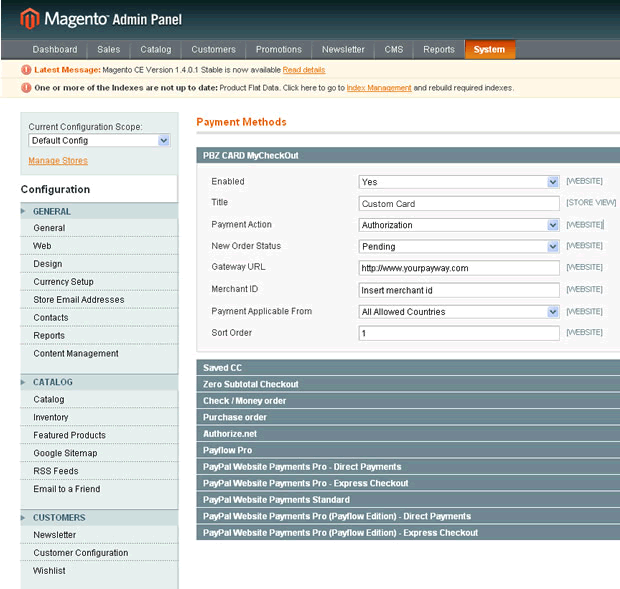
When you finish everything you will get next option in admin section:
I hope that will be helpful


Many kudus for very informative blog entry.
How can I add online and offline refund options from admin for a particular payment gateway? If you could provide any type of help I would be highly grateful.
\”SQLSTATE[23000]: Integrity constraint violation: 1452 Cannot add or update a child row: a foreign key constraint fails (`magento_database`.`sales_flat_quote_payment`, CONSTRAINT `FK_SALES_FLAT_QUOTE_PAYMENT_QUOTE_ID_SALES_FLAT_QUOTE_ENTITY_ID` FOREIGN KEY (`quote_id`) REFERENCES `sales_flat_quote` (`entity_id`))\”
Please guide me to solve this.
Thanks.
@ Karthik – You have a Foreign Key Constraint, you can set a flag in your MySQL script…
SET FOREIGN_KEY_CHECKS = 0;
Put this at top, this will prevent a FK from preventing your script completing. I would bare in mind this is a quick and dirty fix, there maybe be something wrong with your Magento install.
hi, Im half way though using your invaluable tutorial.
My payment gateway sends back the response to a URL which I can specify. Can you show me how to capture that and update the order status using this module please ?
many thanks
Amila
Aren’t there some parts missing here – like for example where do I put HTML which shows up when user selects my new module in checkout?
Is it possible to create a magento module in ASP.Net using C#? If yes how?
We like to integrate a payment module for creating admin orders which uses third party transfer.
When we try to create the order, it gets placed without redirecting.
Is it possible to make this in magento ?
If so please guide us to move forward.
Thanks to all.
Hello Domagoj Potkoc can u tell me is magento store order in databse before payment or after payment.
I am newbie in magento
I have my model configured. When I place any of the payment action method which are capture, initialize or authorize. I get error on Payment gateway selection page.
Note: I do not have Payment Action option available in my configuration section. Is that required?
Hello Everyone,
please am new to magento can any one show me in details how to get this payment gateway to work i cant really get it right.