Magento has pretty neat image helper you can use to output your product photos. Today one of my coworkers got frustrated with the white frame he kept getting around the resized image he tried to output in sidebar block. As s possible solution he tried resolving the issue with CSS. However, there is a better, more nicer solution to ditch the whit frame around resized images in Magento.
Here is a practical example of a code sample from default media.phtml file:
< ?php foreach ($this->getGalleryImages() as $_image): ?>
<li>
<a href="#" onclick="popWin('<?php echo $this->getGalleryUrl($_image) ?>', 'gallery', 'width=300,height=300,left=0,top=0,location=no,status=yes,scrollbars=yes,resizable=yes'); return false;" title="< ?php echo $this->htmlEscape($_image->getLabel()) ?>"><img src="<?php echo $this-/>helper('catalog/image')->init($this->getProduct(), 'thumbnail', $_image->getFile())->resize(56); ?>" width="56" height="56" alt="< ?php echo $this->htmlEscape($_image->getLabel()) ?>" /></a>
</li>
< ?php endforeach; ?>
Turning it into this will yield a “frame-free” image:
< ?php foreach ($this->getGalleryImages() as $_image): ?>
<li>
<a href="#" onclick="popWin('<?php echo $this->getGalleryUrl($_image) ?>', 'gallery', 'width=300,height=300,left=0,top=0,location=no,status=yes,scrollbars=yes,resizable=yes'); return false;" title="< ?php echo $this->htmlEscape($_image->getLabel()) ?>"><img src="<?php echo $this-/>helper('catalog/image')->init($this->getProduct(), 'thumbnail', $_image->getFile())->keepFrame(false)->resize(56); ?>" alt="< ?php echo $this->htmlEscape($_image->getLabel()) ?>" /></a>
</li>
< ?php endforeach; ?>
As you can see, all it took was to add the keepFrame(false) method call prior to calling the resize() method.
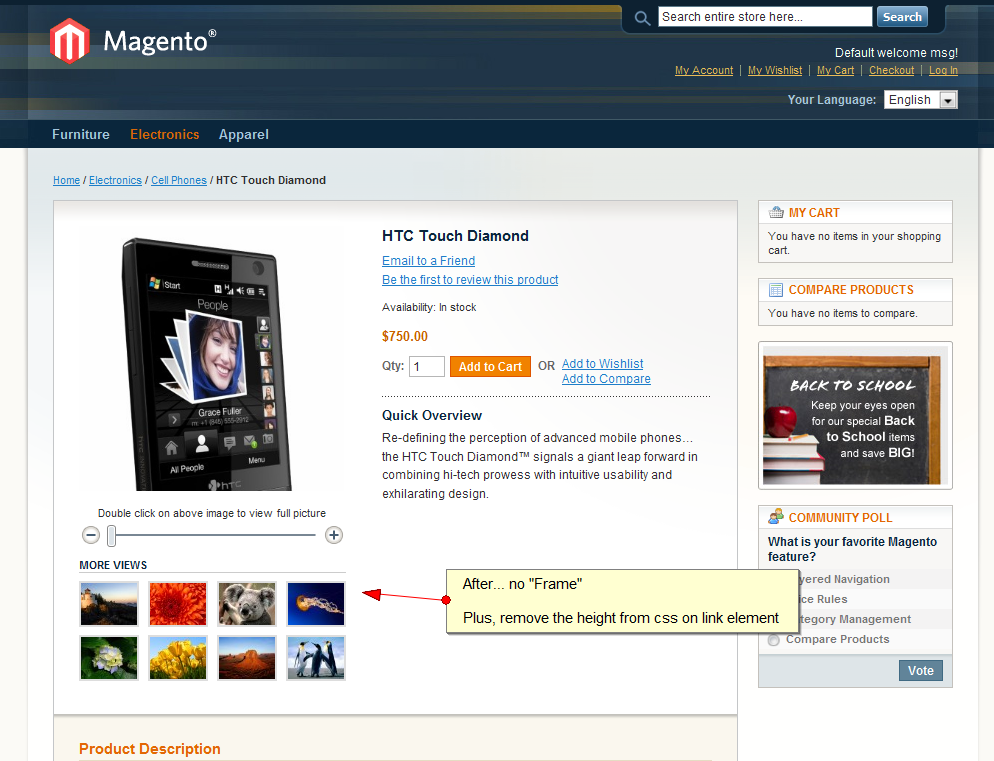
Here are the results of before/after scenario.
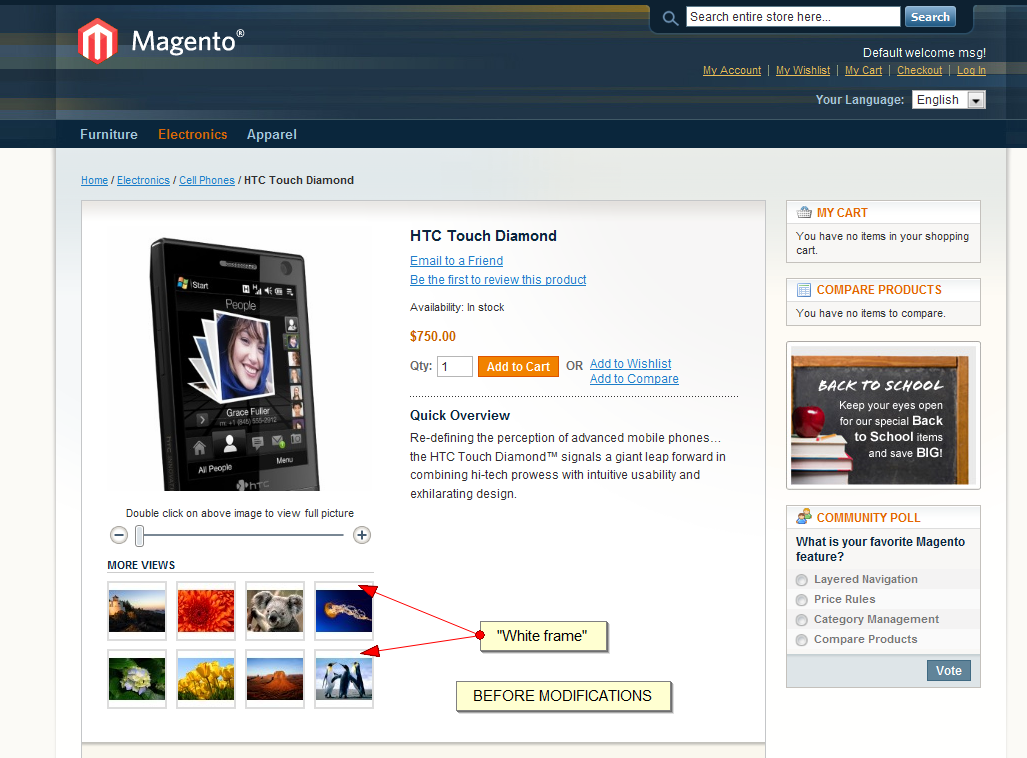
Hope it helps around minor styling issues
Cheers.


Thanks for the great tip?
I found the file in this location: /app/design/frontend/default/default/template/catalog/product/view/media.phtml.
Edited the file and uploaded it and refreshed my cache, but the images still have the white frame.
Any ideas on what I can do?
@Guilio Surrounding “a” or shall I say link tag has some CSS attached that adds additional padding to it. Remove the height from “.product-view .product-img-box .more-views li a” from styles.css on line 933 (at least this is so on default theme).
Simply brilliant. That frame is so annoying!!
Thanks guys
nope didn’t work.. in
1.4.0.1
Worked for us in Magento Version 1.3.2.4. Thanks!
@Branko where are the files located that you referenced
Found the files but couldnt find the line that deals with the height;
.product-view .product-img-box .more-views li { float:left; padding:1px; background-color:#ddd; margin:0 0 8px 4px ; }
.product-view .product-img-box .more-views li { float:left; margin:0 21px 5px 0 ; }
.product-view .product-img-box .more-views li a{ text-decoration:none !important;}
I am in app/design/frontend/default/default/template/catalog/product/view/media.phtml
and this is what i have, i dont see where i should make the change mentioned
getProduct();
$_helper = $this->helper(‘catalog/output’);
?>
getImage() != ‘no_selection’ && $_product->getImage()): ?>
<?php
$_img = 'helper(‘catalog/image’)->init($_product, ‘image’).’” alt=”‘.$this->htmlEscape($this->getImageLabel()).’” title=”‘.$this->htmlEscape($this->getImageLabel()).’” />’;
echo $_helper->productAttribute($_product, $_img, ‘image’)
?>
__(‘Double click on above image to view full picture’) ?>
<img id="zoom_out" src="getSkinUrl(‘images/slider_btn_zoom_out.gif’) ?>” alt=”__(‘Zoom Out’) ?>” class=”btn-zoom-out” />
<img id="zoom_in" src="getSkinUrl(‘images/slider_btn_zoom_in.gif’) ?>” alt=”__(‘Zoom In’) ?>” class=”btn-zoom-in” />
Event.observe(window, ‘load’, function() {
product_zoom = new Product.Zoom(’image’, ‘track’, ‘handle’, ‘zoom_in’, ‘zoom_out’, ‘track_hint’);
});
<?php
$_img = 'helper(‘catalog/image’)->init($_product, ‘image’)->resize(265).’” alt=”‘.$this->htmlEscape($_product->getImageLabel()).’” />’;
echo $_helper->productAttribute($_product, $_img, ‘image’)
?>
getGalleryImages()) > 0): ?>
__(‘More Views’) ?>
getGalleryImages() as $_image): ?>
<a href="#" onclick="popWin(’getGalleryUrl($_image) ?>’, ‘gallery’, ‘width=300,height=300,left=50,top=50,location=no,status=yes,scrollbars=yes,resizable=yes’); return false;”><img src="helper(‘catalog/image’)->init($this->getProduct(), ‘thumbnail’, $_image->getFile())->keepFrame(false)->resize(56); ?>” alt=”htmlEscape($_image->getLabel()) ?>” title=”htmlEscape($_image->getLabel()) ?>” />
Hi, I am using Magento version 1.4, unfortunately this didn’t work for me
Any other suggestions?
I did the above change in: /app/design/frontend/base/default/template/catalog/product/view/media.phtml
Have also checked the CSS as mentioned above, but there is no padding in any of the classes. Also removed cached from magento and from browser and no change!
Please help
Finaly got this working after making the changes to the media.phtml file, the border was still there. Edited the styles.css file of my tempate and set the border pixels to 0px instead of 2px and presto no image border or frame.
Hi All,
This is weird. I actually want a frame on mine and but I don’t see it. I just uploaded a product with an impage and all it shows is the product image and no line frame.
I don’t this this as being configurable on the backend. Is there a code I need to look for on the css file? Please help.
I’m on 1.4.2.
OK, the image frame I’m referring to is actuall on the featured products block on home page. I noticed I do get them on the product details.
Anyone?
Thanks a lot, it worked!
Thanks! Worked in Magento Version 1.5.1.0 with your Featured Products extension
I use Magento Version 1.5.1.0 and this works but the thumbnails have different heights with your solution
I used that to prevent it
$_image->getFile())->keepAspectRatio(false)->constrainOnly(false)->keepFrame(false)->resize(50,59)
now they are all the same size but aspect ratio is wrong. that does not hurt that much on thumbnails but
how can I crop my images to keep the aspect ratio and have all the same size?
I tried this but did not generate thumbnails with their settings
http://2ammedia.co.uk/web-design/magento-adaptive-resize-resize-to-best-fit
how to disable photos so that no one can save them by right click