Modern Magento development is all about speed, flexibility, and maintainability, while still keeping code clean and reliable. Hyvä was built with these exact principles in mind.
Today, we’re focusing on Hyvä CMS, a powerful content management system available in Hyvä Commerce. It offers a modern, flexible alternative to Magento’s Page Builder, designed to speed up and simplify content creation for both developers and merchants.
In this post, we’ll walk you through a real-world use case: building an interactive and engaging slider with the help of AI tools. We’ll also go through how AI can significantly accelerate development, highlight common traps developers should avoid, and explain where AI still struggles to deliver reliable results.
First Things First
Before diving into the development process, let’s clarify what we’re building. Our dynamic slider (live on Štark, Hajduk, Hootify), originally implemented using Page Builder, is now being recreated in Hyvä CMS. We’ll use Snap slider as the foundation and then enhance it to achieve nearly identical functionality to the original slider.
Our main stars in this project are Claude Code and the Hyvä AI Skills, tools we’ve been using for months to speed up development.
AI Workflow
The project required a few key enhancements to the basic Snap Slider: an infinite loop and autoplay. To implement these, we used Claude Opus 4.6 for the more complex parts (autoplay logic and the infinite loop). For simpler tasks (adding fields in the admin, making small adjustments to adapt components), we relied on Claude Sonnet 4.6.
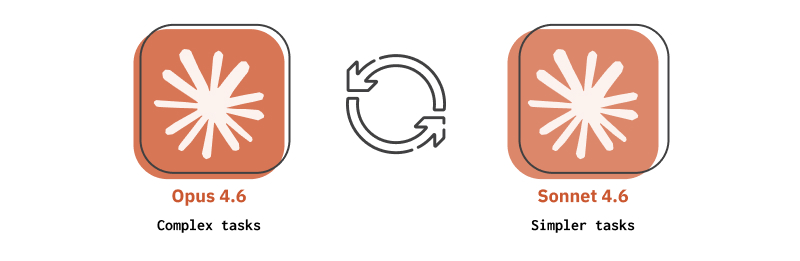
A few things we learned about working with Claude effectively:
- Be precise with context.
- In our prompts, we specified which files to modify, which to explore, which Hyvä AI Skills to use and clearly described the required implementations. Providing precise context and task-specific information makes it much easier for the AI to produce useful results.
- One task at a time.
- A key part of working effectively with AI is focusing on one task at a time, rather than asking it to implement an entire feature in a single prompt. Breaking work into smaller, clearly defined steps reduces confusion and makes it easier to review and validate the generated code before moving on.
- Step-by-step beats planning mode.
- Although Claude offers a planning mode that lets you build an entire feature at once, we found it more reliable to work step-by-step. This approach gives you better control over the implementation and makes testing (and sometimes debugging) easier.
- Reset context deliberately.
- When working on larger features, it’s often helpful to clear the conversation context and start fresh. This prevents situations where the model confidently continues solving a problem that became irrelevant several prompts ago. For smaller adjustments or follow-up changes, continuing within the same session usually works well.
- Fundamentals still matter.
- A strong understanding of fundamentals still matters. Working with Claude sometimes feels like programming with a junior developer who writes code instantly but occasionally forgets how browsers work. Without careful oversight, minor issues can waste significant time.
The Hyvä AI Skills made a meaningful difference here. With proper context about Hyvä CMS’s component structure and alpine CSP components, Claude produced solid suggestions on the first try far more often than without it.
Infinite Loop in Snap Slider
As a foundation for these enhancements, we used the Hyvä Snap Slider. It’s a highly performant, easy-to-use AlpineJS slider that adds essential interactive features to CSS-driven sliders, while remaining fast and lightweight.
We started by creating a dedicated module for the slider, designed to be plug-and-play so it could be easily installed on any project. As a starting point, we copied the basic slider variant along with the default banner and renamed them accordingly.
For the infinite loop, cloning slides as most sliders do would work, but we didn’t want to modify Snap Slider heavily. We decided to simplify it so that the slider goes through all the slides and then loops back to the first one.

Since the slider track is essentially a CSS scroll-snap container without a custom scrolling engine, the cleanest approach was to rely on the browser’s native scrolling behavior. The solution is to call the native scrollIntoView() API on the target slide once the loop boundary is reached. This lets the browser handle the scroll naturally, allowing CSS scroll-snap to position the slide perfectly.
_handleBoundaryClick(btn) {
      const track   = this._sliderEl.querySelector('[data-track]');
      const slides  = track ? this._getSlides(track) : [];
      const inView  = track?.querySelectorAll('[data-in-view]') ?? [];

      if (!track || slides.length <= 1 || !inView.length) return;

      const atEnd   = inView[inView.length - 1] === slides[slides.length - 1];
      const atStart = inView[0] === slides[0];

      if (btn.hasAttribute('data-next') && atEnd) {
          slides[0].scrollIntoView({ block: 'nearest', inline: 'start' });
      } else if (btn.hasAttribute('data-prev') && atStart) {
          slides[slides.length - 1].scrollIntoView({ block: 'nearest', inline: 'end' });
      }
}Another thing to address for a true infinite loop is that Snap Slider disables the navigation buttons at the start and end boundaries. This makes sense for a finite slider, but in a loop, there are no real boundaries. The approach we settled on was to use a MutationObserver to watch the navigation buttons and immediately remove the disabled attribute whenever Snap Slider applies it, ensuring both buttons remain clickable at all times.
if (this._sliderEl.hasAttribute('data-loop')) {
      this._btnObserver = new MutationObserver((mutations) => {
          mutations.forEach(({ target, attributeName }) => {
              if (attributeName === 'disabled' && target.hasAttribute('disabled')) {
                  target.removeAttribute('disabled');
              }
          });
      });

      this._sliderEl.querySelectorAll('[data-next], [data-prev]').forEach((btn) => {
          this._btnObserver.observe(btn, { attributes: true, attributeFilter: ['disabled'] });
      });
}Once the idea was clear, we implemented the logic using Claude to help generate code based on our approach. After reviewing and testing the implementation thoroughly, everything worked exactly as intended.
Autoplay in Snap Slider
Before diving into autoplay, we intentionally reset the context and approached it as a completely separate feature from the infinite loop implementation.
For autoplay, the obvious approach is to use a setInterval to change slides every few seconds. It’s simple, but requires careful handling to keep everything in sync and ensure smooth timing for the user.
We wanted something cleaner and simpler, so we came up with an approach that relies primarily on CSS animation instead of JavaScript timers. The active pagination dot already changes as the user scrolls, so we used it as the driver for autoplay. By attaching a @keyframes animation to it, a progress bar can grow from left to right over the configured interval. When the animation completes, the browser fires an animationend event, which Alpine listens for to trigger scrolling to the next slide.
@keyframes autoplay-progress {
      from { transform: translateY(-50%) scaleX(0); }
      to   { transform: translateY(-50%) scaleX(1); }
  }

  [data-autoplay-playing] [data-pager] [aria-current="true"] {
      &::before {
          animation: autoplay-progress var(--autoplay-interval, 5000ms) linear forwards;
          ...
      }
      ...
  }

  [data-autoplay-paused] [data-pager] [aria-current="true"]::before {
      animation-play-state: paused;
}The really elegant part is how pausing works. Instead of managing timers or tracking elapsed time, the code simply toggles animation-play-state: paused via CSS. When the slider needs to pause, a JavaScript-controlled attribute marks it as paused. A CSS rule detects this and freezes the animation exactly where it is. Once the attribute is removed, the animation resumes from the same point. This approach eliminates the need to reset timers or manually track progress.
The trickiest part was handling the pause logic. Automatic pauses from hovering and manual pauses triggered by the user need to work independently. When the user is no longer hovering, the automatic pause should be removed, but a manual pause must remain active.
Claude couldn’t solve the problem on his own, despite multiple attempts, both with and without resetting context, and trying different models. Some of the proposed solutions looked promising, and Claude was very confident about them. The browser, on the other hand, had other plans. So, we took the version that seemed closest to working, debugged it, and guided Claude in the right direction. He then refined it, resulting in a smooth autoplay fully handled by CSS.
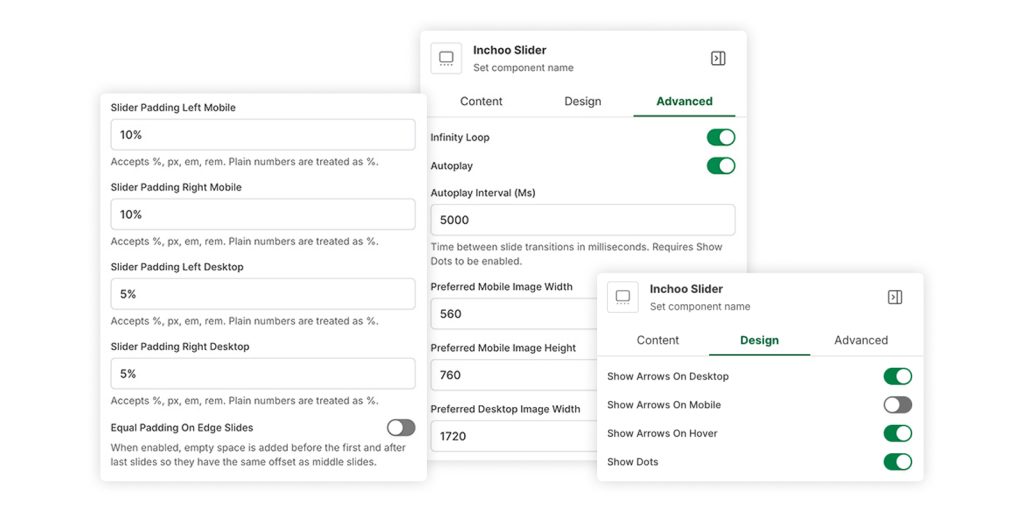
Results
All of these modifications were kept minimal to preserve the slider’s performance, while still adding commonly used and highly useful features. This way, we enhanced functionality without significantly impacting performance or simplicity.
The Takeaway
Claude works really well with new Hyvä CMS components and, in general, with Hyvä (thanks to Hyvä AI skills). We’re now writing significantly less code, and in the future, this trend will only increase. The real shift isn’t about speed though; it’s about where your attention goes. Less time on syntax, more time on architecture, review, and the problems that actually require judgment.
That said, fundamentals are still crucial. You need to understand what AI generates, catch it when it’s wrong, and know how to steer it back on track. The slider’s autoplay pause logic is a good example. Claude couldn’t get there alone, but with the right direction it did.
If you’re building on Hyvä and haven’t explored this workflow yet, it’s worth trying on your next module. And if you want to talk through how we approach it, reach out!