f you’ve spent any real time in Magento’s admin panel, you already know the feeling. It works, technically. But “technically works” is a low bar for something you use every day. Over the time, we have been bringing quality-of-life improvements in that area.
Earlier, we’ve covered Growth Hub and how it can help you. This time, we prepared two improvements that change how you actually work: product grid filtering by category and a significantly richer customer grid.
Filtering Products by Category
The product grid in Magento is powerful, but it has always had one obvious gap: you couldn’t filter by category. You could filter by almost anything else: price, status, attribute set, stock. But if you wanted to act on “all products in the Summer Sale category,” you had to find your way around it. And that should not be the case.
The category filter is most valuable when you’re doing mass actions. Enabling a collection of products for a flash sale, disabling seasonal items after they’re no longer relevant, bulk-updating an attribute across a products… these are tasks where scoping your selection to a category first isn’t just convenient, it’s a safeguard. Mass actions on the wrong product set can cause real damage, and filtering by category reduces the chance of an accidental bulk change affecting things it shouldn’t.
Beyond mass actions, it simply makes catalog navigation and audit easier. Being able to narrow to “Women > Outerwear > Jackets” before you start reviewing stock levels is the kind of thing that doesn’t sound exciting until you do it every day and realize how much friction it removes.
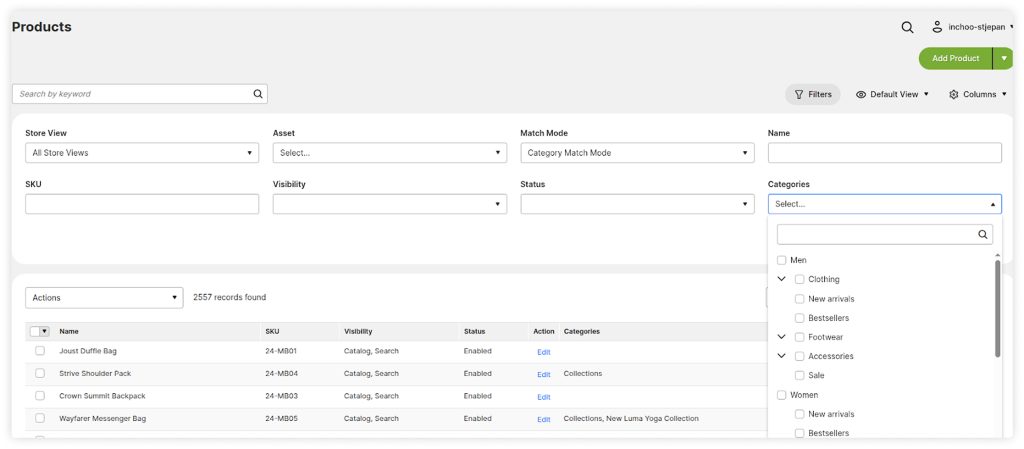
The category filter appears as a standard grid column filter. You select a category (including sub-categories), the grid scopes accordingly, and you proceed with whatever you were doing. Simple, and it works just like any other filer that’s already there.
Customer Data You Can Actually Act On
The default Magento customer grid shows you a list of customers with default data such as name, email, group, address data. That’s fine for managing individual accounts, but it’s nearly useless if you want to understand your customer base as a whole.
The improved customer grid adds a set of optional columns that turn it into something genuinely useful for analysis:
- First and last order date: See immediately who’s been with you longest and who’s recently gone quiet.
- Lifetime orders, items, and order total: Your top buyers, ranked by volume or value.
- Average order value: A quick read on purchase behavior without exporting to a spreadsheet.
- Has Products in Wishlist (Yes / No): Identifies customers who are interested but haven’t converted yet.
- Days Since Last Visit: A straightforward way to spot customers who haven’t been back in a while.
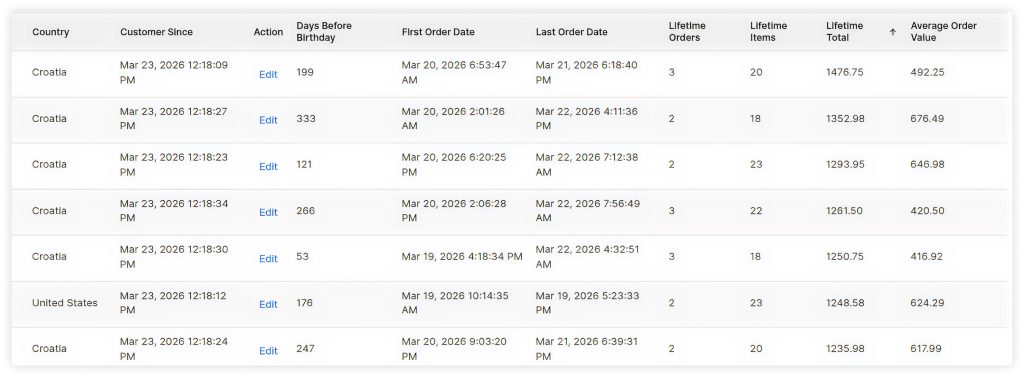
The value isn’t in the columns themselves, it’s in what you can now see at a glance and act on.
Tasks such as identifying your most loyal customers become trivial. You simply sort by lifetime order total or order count, and your VIPs are right there. That segment is worth treating differently. Either by a personal follow up, early access or a loyalty program.
Finding customers who are drifting is just as important. A customer with six lifetime orders and 180 days since their last visit isn’t necessarily lost, but certainly is at risk. The Days Since Last Visit column makes this pattern visible without running a custom report or exporting the customer table.
Wishlist data adds an interesting layer. Customers with products in their wishlist have told you what they want, they just haven’t bought it yet. Whether that’s a price sensitivity issue, a timing issue, or something else, it’s a segment worth addressing directly.
Part of an Ongoing Effort
Neither of these is a flashy feature. They’re the kind of improvements that experienced Magento merchants look at and immediately understand, because they’ve felt the absence of them.
We’re continuing to build out this kind of admin-layer work. The goal is consistent: reduce friction for the people who run stores day-to-day, and give them better information to make decisions. If you’re curious how these improvements might fit your setup, reach out and let’s talk.
These Features Are Already in Hootify
Both these admin improvements are built into Hootify, our Magento-based eCommerce platform, out of the box.
Worth noting: the features can also be implemented on any standard Magento 2 store. They’re not Hootify-exclusive, just already done for you if you’re on Hootify.
The technical details are in the Hootify User Guide if you need them. If you’d rather just see how it works, our Free Admin Demo is the quickest way to try both firsthand.