Access denied in Magento admin

32 Comments 30th MAR 2009 | Posted by Ivan Weiler in Magento

Access denied in Magento admin

Some of you may encountered this problem. You install new Magento extension through downloader, try to access its configuration settings and Magento throws “Access denied” page at you. Although you’re administrator of the system.
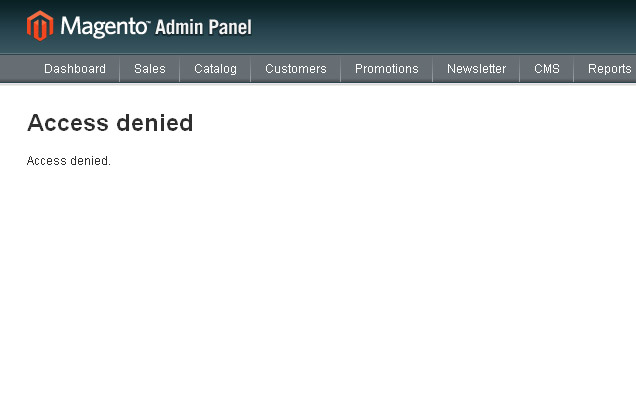
access-denied-in-magento-admin-1

So what happened here? Magento just doesn’t have stored privileges for this new extension.

First just try to logout and login again. If that doesn’t work, you need to reset admin privileges.

Navigate to System->Permissions->Roles and click Administrators role.
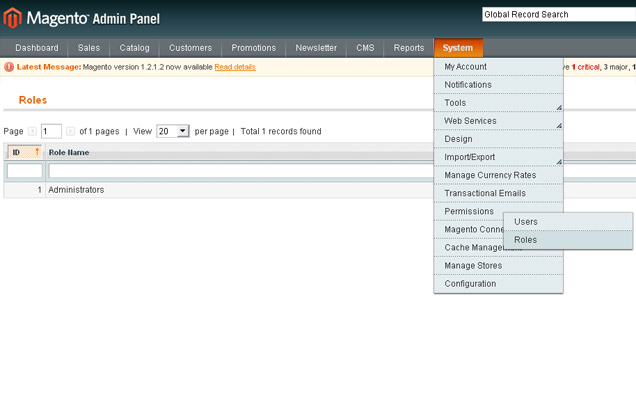
access-denied-in-magento-admin-2

Check your Role Resources settings just in case, Resource Access dropdown should be already set to All for administrators.
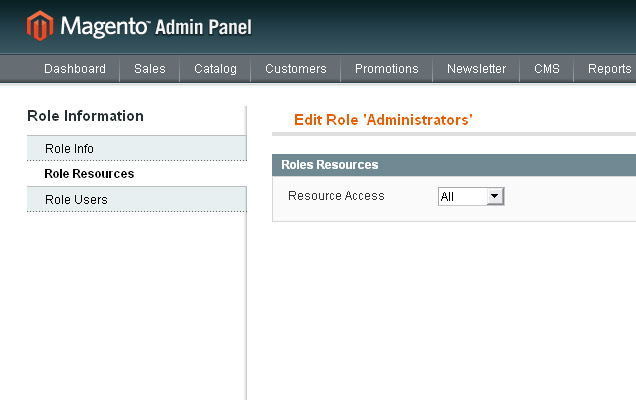
access-denied-in-magento-admin-3

Without changing anything just click “Save Role” button, so that Magento re-saves all permissions.

You should be able to access your new extension now without problems.

If you like what you read, please share it.

  • Digg
  • del.icio.us
  • Facebook
  • Google Bookmarks
  • Yahoo! Bookmarks
  • Reddit
  • Technorati
  • Twitter
  • StumbleUpon
  • LinkedIn
  • Netvibes
  • NewsVine
  • Sphinn
  • Tumblr
  • Posterous

To post code in comments, place your code inside [code] and [/code] tags.

There are 32 comments (Add Yours +)

  • Hi there,
    Good piece of advise. I talked to Yoav about this issue and they are aware of it. He advised that they will probably be fixing this shortly. However it can be fixed by writing some code in the setup script that runs when you first install the module.
    I don’t have example code at the moment but will be posting it shortly.
    Cheers
    Adam

  • Hey, thanks for the info. Example would be great!

  • I see this problem sometimes, when, my url expries due to inactivity and I click on / login / go to same url automaticall – the KEY seen in url does not exist.
    So, it gives out the message to me.

  • Great follow the instrutions now i cant even login to admin,

  • i then tryede ask for new password got it but still cant login

  • Logging out and back in worked for me. Thanks a lot.

  • What if you are locked out and the function “Permissions” is not shown anymore after succesfull login using admin login account?

    Thit happend to me after making a new Magento admin user and trying to restrict some of its rights.

  • Great, i have the same issue I can’t log back into admin, now what?

  • In older Magento versions you need to reset admin privileges sometimes. This was changed in 1.3.x versions where is enough to logout and login again if you have similar problems, assuming that it’s not the problem in the extension you’re trying to install.

    For those that aren’t careful when setting up permissions I think our new article may help :)

    http://inchoo.net/ecommerce/magento/locked-out-from-magento-admin/

  • @ivan Thank you for the reply however I am running version 1.4. What I did is made sure that admin role was set to ALL for permissions and it was but I hit save to make sure, when I did that I got Access Denied on the page, I then loged out and tryed to log back in with my admin info and got “Access Denied” not “Invalid Username or Password”. I then reset the password and still the same issue, I then opened the DB via phpmyadmin and looked at table admin_user to verify that my admin info is right and it was, my permissions are set as ALL in the DB so I don’t know why I can’t log back in. Any thoughts???

  • @chris please check admin_user,admin_role,admin_rule table.according to my perception you changed the permission that’s why you got “access denied” error.

  • AK,

    I’ve got the same problem as Chris. You said “please check admin_user,admin_role,admin_rule table.according to my perception you changed the permission that’s why you got “access denied” error.”.

    What exactly should I check in these tables? I tried to set privileges to “all” in “admin_rule” table, but it didn’t help.

    Thank you very much in advance.

  • @Nadya.try to installed new magento separately and match the value of existing database tables(admin_user,admin_role,admin_rule table) with your new database tables.and also clear your magento cache(public_html->Var->cache).hope it help

  • AK,

    I fixed the database. The problem was in admin_role table – I had to add additional role there, and change rule_id in admin_rule table in the original db.

    Thank you for advices,

    Nadya

  • Tarun V Patel Says

    Thanx Yaar… its too great…

  • Hi,

    i have installed EasyFlag extension and after this i got Access denied when im trying enable extension for store views via System > Configuration > Templates-Master > EasyFlags. re-save admin role and logging out after instalation doesnt work, still Access. any suggestion ?

  • If using 1.4+ and none of the above works you can try adding the node from config.xml to a new file adminhtml.xml in your module’s etc directory.

  • I’ve just installed the Featured Products extension into Magento 1.4. & getting Access Denied when I try and access the Featured Products page under Configuration.

    I’ve tried logging out & logging back in. Updating the Administrator Role and nothing works.

    Can you help? What folders under app/design/ are meant to contain the inchoo files? I

  • @v here is folder path app\design\frontend\default\default\template\inchoo
    also check the extension files and folders permission and try to reinstall it.

  • Thanks for sharing the great tip to solve the error.

  • @AK Thanks for the info. Still having problem though. The files are located under app\design\frontend\default\default\template\inchoo (block_featured_products.phtml & view.phtml). They are both set to 666 permissions is that correct? The inchoo/ folder is 777. I’ve tried uninstalling / reinstalling. Strange thing is if I modify the administrator Role, and set the permissions to ‘Custom’ and the tick all the boxes the Featured products link no longer appears in the admin. I’m not sure if this is related or not.

  • @v file permission must be 644 and folder permission must be 755.also check the permission of code files in app\code\community\Inchoo and app\etc\modules\Inchoo_FeaturedProducts.xml

  • @AK Thanks for the reply. I’ve checked that folder permission is 755 & all 3 files are set to 644. Still getting access denied though. Are these the only files associated with the extension? The featured products link under Catalog is also not appearing, the only link is under the configuration which is where I get the access denied. Any other suggestions would be much appreciated!

  • Please help me to get this feature work in megento 1.4..
    After clicking on featured Product under catalog

    “There has been an error processing your request

    Exception printing is disabled by default for security reasons.

    Error log record number: 618982792600″

    Any Help ?

  • hi,

    i have a big issue, i selected custom under roles and did not check any of the modules / menu. so the next time i logged in, i dont see any menu in the admin and i get only access denied error.

    PLS HELP!!!

    Thanks

  • If you have done the above and it still comes up with error page for featured products then try your cache management and refresh everything and flush javascript, it worked for me.

  • I’ve been trying to do this for a while and never succeeded.

    Say i have to create different role, let’s say manager, which under any circumstances shouldn’t have all privileges. That’s no problem for standard Magento, but is a problem if you want to grant that role the privileges for an extension (for example, the Inchoo Gallery module). I tried inserting the admin rules manually in the db tables but still haven’t succeeded.

    Anyone know some way i can get this to work?

    Thanks

  • Wow…I am completely locked out. I created a new login via the db and still get “Access Denied”. PLEASE HELP! This is a huge problem.

    We are using Magento 1.4.1.1…I’m not seeing any folders called inchoo. We installed the 1.4 extension.

    Help! Help! Help!

  • Ok…just deleted all items in table: admin_role and ran this SQL

    LOCK TABLES `admin_role` WRITE;
    /*!40000 ALTER TABLE `admin_role` DISABLE KEYS */;
    INSERT INTO `admin_role` VALUES (1,0,1,1,’G',0,’Administrators’),(3,1,1,0,’U',1,’Store’);
    /*!40000 ALTER TABLE `admin_role` ENABLE KEYS */;
    UNLOCK TABLES;

    Now I am back in the the admin tool…but still seeing Access denied inside and menu options are all gone.

  • Ok…my problem was in the admin_rule table. Again, you can run this sql to clean that table after you empty it:

    LOCK TABLES `admin_rule` WRITE;
    /*!40000 ALTER TABLE `admin_rule` DISABLE KEYS */;
    INSERT INTO `admin_rule` VALUES (1,1,’all’,”,0,’G',’allow’);
    /*!40000 ALTER TABLE `admin_rule` ENABLE KEYS */;
    UNLOCK TABLES;

    Everything is back to normal.

  • vishal lakhani Says

    Thanx Works for me!!!!!!!!!!!!!!!!!!!!

  • For 1.4.1 is not working?! everithing is working, i guess, only that on the homepage where I want to see the featured products there arent any products: {{block type=”featuredproducts/listing” template=”inchoo/block_featured_products.phtml”}} in Hompage

    Any help?

Leave a Comment

Please wrap all source codes with [code][/code] tags.
Magento Design and Development | Magento SEO | iPhone Application Development Web Application Development with ZEND | WordPress Ecommerce | WordPress development
Sitemap

Inchoo - webappsolutions | 2009