
Category toolbar has many options. By default it shows how many items are in the category, you can choose how many products you wish to be displayed per page, you can change the listing type (List or Grid) and you may choose Sort Order. This “Sort Order” can be confusing. The default “Sort Order” is “Best Value”. What does it mean? How is the Best value determined? Can we change the default sort order?
What is “Best Value” field?
From official Magento Community User Guide 1.7:
page 75./85. “Product Listing Sort By: The products are sorted, by default, by the selected attribute. The Best Value products are featured products as determined by the store administrator; for more information, see “Creating Categories,” page 83. The customer can select from the other options on a per-page basis. You can configure attributes to be used for sorting using the Used for Sorting in Product Listing setting of an attribute. For details, see “Managing Product Attributes,” page 92.”
page 88./98. “3. In the Position column, specify a whole number that indicates the order in which the product is listed when the products are sorted by Best Value. The product with a Position value of 1 is listed first, 2 is listed second, and so on. If more than one product has the same value for Position, the product with the lowest (that is, closest to 1) ID number is listed first.”
When you go to Category page in Magento administration (Catalog/Manage Categories), you will see “Category Products” tab. From there, you will see the list of products that are associated to this category. The last column is “Position”. That is how “Best Value” is determined. So, best value is not something that is dynamically calculated. You can tailor it to your likings.
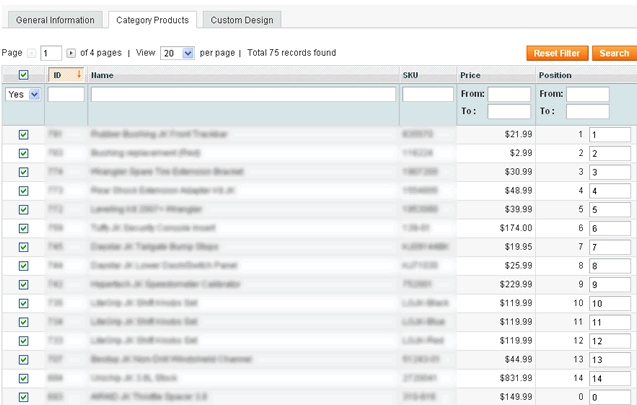
Now after you’ve changed “Best Value” you can visit your Category page on frontend and you’ll see your new sorting in Product Listing (if your default sort is by Position).
There are two options you can use via Magento administration.
1. Setting default Sort Order for category
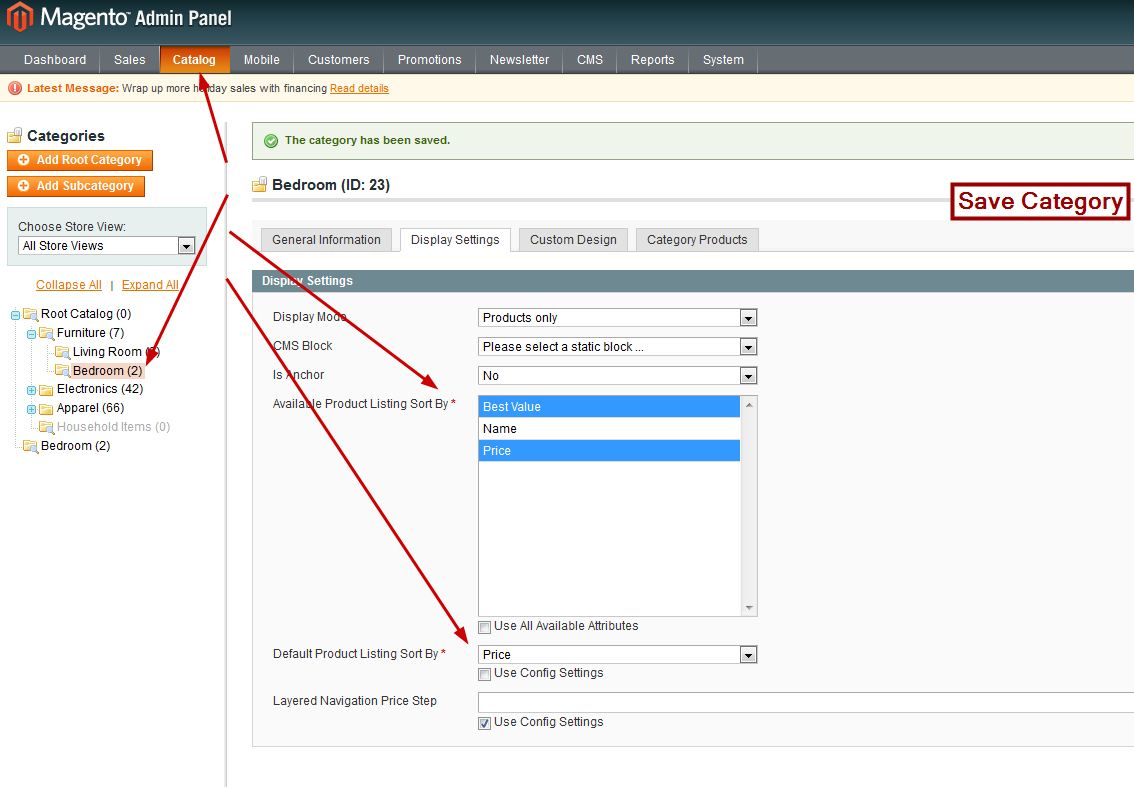
When you go to Category page in Magento administration (Catalog/Manage Categories), you’ll see “Display Settings” tab. From there you can modify “Available Product Listing Sort By” and “Default Product Listing Sort By” values.
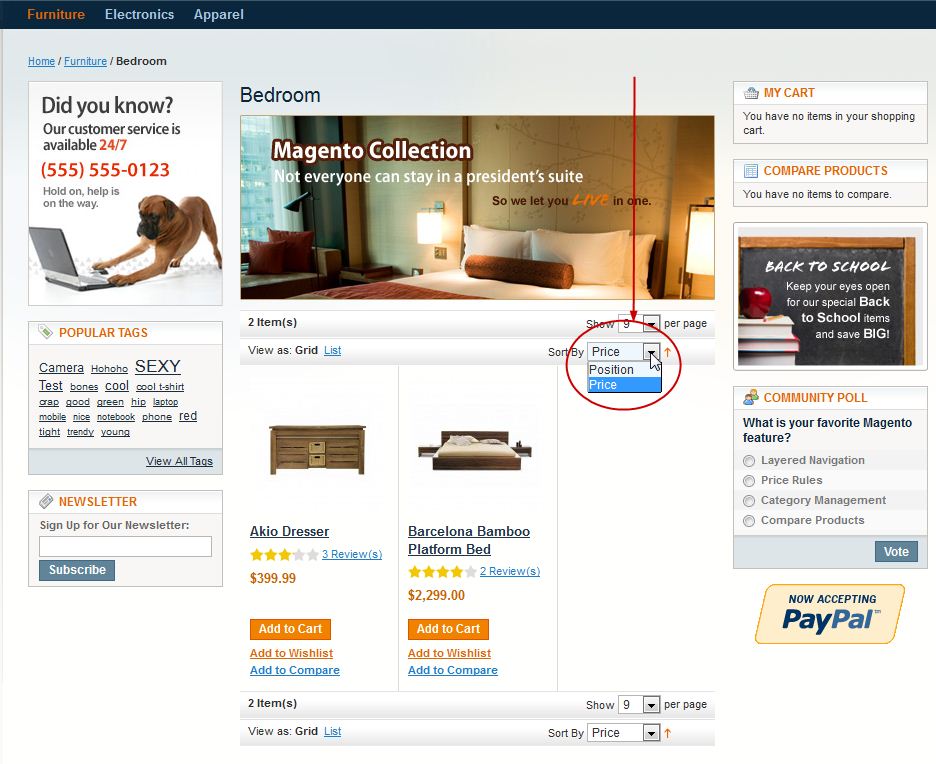
Let’s modify “Default Product Listing Sort By”. If you deselect “Use Config Settings” and if you select “Price” for “Default Product Listing Sort By”, on frontend for specified category you’ll see that all items are now sorted by price ascending (growing upward). If you have Magento CE 1.7 with Sample Data you can modify sorting by Price for, i.e. Bedroom category. Additionally you can deselect “Use All Available Attributes” for “Available Product Listing Sort By” and if you check only few of them (“Best Value” and “Price”), on frontend you’ll be able to sort only by selected options. Now click “Save Category” button.
You should see something like this:
2. Setting default Sort Order for Store / Website / Default Config
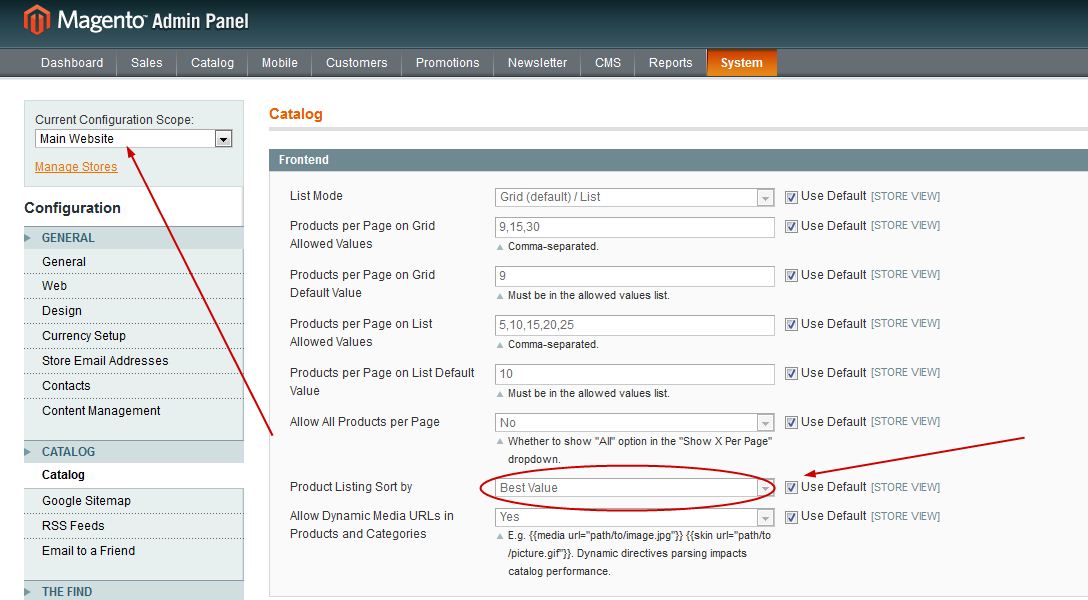
When you go to System / Configuration / Catalog (left menu) / Frontend you’ll see “Product Listing Sort by” drop down menu. Now if you deselect “Use Default” you’ll select default sorting for specified view (Store/Website/Default). This will apply to all categories but notice that by override rule (fallback) this has lower priority than “Sort Order for category”.
Fallback for Magento sorting
When you visit some category page on frontend, this is how Magento choose “Default Sorting” for specific category page:
- look for Default Sort set in Category page in Magento administration, if not set then
- look for Default Sort set in configuration for Store, if not set then
- look for Default Sort set in configuration for Website, if not set then
- look for Default Sort set in configuration for Default Config, if not set then
Note that configuration could be in database, table core_config_data, or config.xml file (for sorting – app/code/core/Mage/Catalog/etc/config.xml around line 723. – position). And that’s why you have default sorting by Position (“Best Value”) for category view page.
Note! This article was revised on Nov 22, 2012. You will notice that some of the comments are older. This is because the original article was posted in 2009 by Tomislav Bilic.
If this or anything else regarding Magento development confuses you, we will gladly check out your site and offer technical insights on what to improve based on our detailed custom report. Feel free to get in touch!