Powerful fallback system, organized folder structure and tons of functionality is what makes Magento one of the most flexible and powerful eCommerce platforms out there. By default, Magento offers a lot, but as eCommerce evolved during the years, there is always additional work required to fit client needs.
Probably the first thing you will do when starting a new Magento project will be to create a Magento theme that will have custom styling and functionality. Although creating a Magento theme is a pretty simple thing to do (just ask any certified frontend developer), by not following Magento recommendations and rules you can easily make your life a bit complicated.
So, how to do it properly? Read on…
If you are new to Magento, be sure to read Magento Designer’s Guide, where the Magento design terminology is explained in a PDF document.
Magento Theme fundamentals
Magento themes are placed in design packages. Each package can have multiple themes.
When You install Magento, there are 3 packages available:
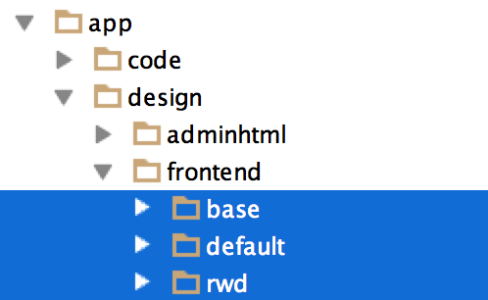
In Base package, there is a “Default” Magento theme with all the files necessary for Magento to work properly. You should NEVER delete or edit files in “Base” package. I will explain why later.
Default package is legacy from < 1.4CE where it was the original base package. This package can be found only in CE edition of Magento, not in EE. You can safely remove that package from your installation. However, it may be restored during a Magento upgrade.
RWD is a new package which holds a new responsive Magento theme.
Magento has two main folders which correspond with each other:
“app” directory contains files that control how page templates are rendered.
“skin” directory contains files that control the site’s appearance.
- Template files
app/design/frontend/package/theme
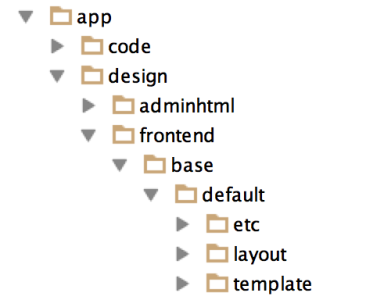
Layout folder contains XML files which are used to define and control structural and content blocks of your theme.
Template folder contains .phtml files – they hold the markup for each Magento blocks that are being displayed in the frontend.
- Skin files
app/skin/frontend/package/theme
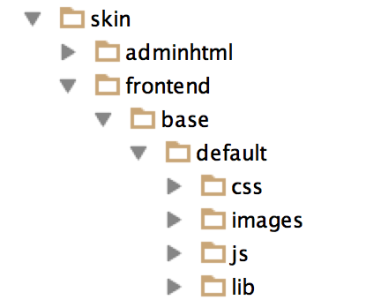
Skin folder contains all of your assets such as CSS, images, js, Sass etc.
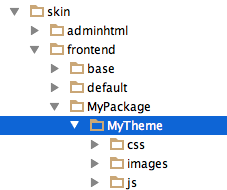
NOTE: Package and theme names should be the same in both design and skin folders.
For example:
app/design/frontend/MyPackage/MyTheme
app/skin/frontend/MyPackage/MyTheme
Creating your theme
First, you need to create a new design package, in both “design” and “skin” folders.
Let’s call it “MyPackage”.
In your design package, create a new folder which will hold your theme. Let’s call it “MyTheme”.
Create two new folders in your theme folder – “layout” and “template”.
In the skin folder, open your theme folder and create folders – css, js, images.
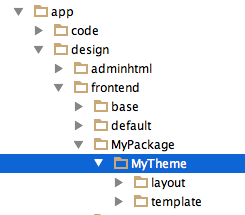
Next, you should create “local.xml” and place it in “layout” folder.
That’s all you need!
Working with the theme
Next step would be to tell Magento which package and theme will be used as default.
To do this, go to
system > configuration > design
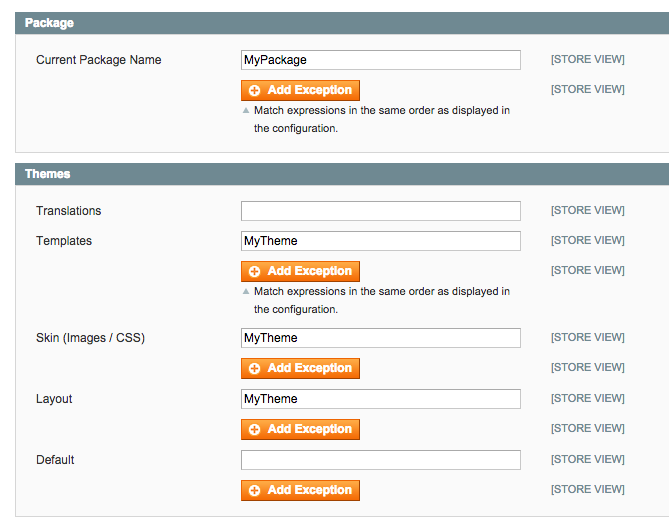
First, we need to tell Magento which package we will use. We are using “MyPackage” design package.
As you can see, we can use assets from multiple themes. Templates can be called from one theme, skin files from another. Yet another cool thing about Magento and its fallback system which will be explained in the next paragraph.
Now, insert your theme name in all fields except “default” field – leave that blank.
Et voilà! Your theme is all set and ready.
You are probably eager to start with theme styling and editing. Since you don’t have any files in your folders, you are probably asking yourself “what now?” Now we will talk about Magento’s fallback system and then you will be ready to start with work. 🙂
Magento fallback system
The fallback system in Magento is very powerful. It allows you to edit your theme without duplicating unchanged files.
So, how does the fallback system work?
Like any other modern framework, Magento consists of many small blocks which are rendered and combined before they are outputted to one html file which is served to client.
If some of those files are missing, you will probably get a render error and the site will be broken.
Basically, what Magento does is this:
it looks for specific file in your theme folder
- if found – outputs it
- if not found, it searches for “default” theme in custom design package
- if “default” theme exists in a custom package, it searches for the file there
- if “default” theme does not exist in a custom package or file is not found in “default theme”, it fallbacks to “base” package and searches for file in “default” theme
- if file is not found, Magento outputs rendering error
For example, when 1column.phtml is required, this is where Magento will look for it:
- app/design/frontend/MyPackage/MyTheme/template/page/1column.phtml
- app/design/frontend/MyPackage/default/template/page/1column.phtml
- app/design/frontend/base/default/template/page/1column.phtml
Now that you know how fallback system works, you understand why you should never edit or delete files in “base” package. If you delete some file by accident, Magento has nowhere to fallback and will generate a rendering error. Also, during a Magento upgrade, “base” package can be overwritten, therefore your changes would be lost.
3 rules to rule them all
To sum up, try to stick with these 3 simple rules and your Magento career will be less painful.
- You should always create your own Design package and the theme inside it.
- Duplicate files from base/default but only the ones that will be edited.
- Your theme should hold only the files that were changed. Magento will fallback and look for the rest of the files in base/default theme.
I hope that article was useful to some of you. If you have any questions regarding Magento development, feel free to get in touch – we would be happy to assess your site and get you on the right track with our Magento Technical Audit.
Thanks for reading. 🙂