Acquiring a customer costs money. Losing them to a competitor after a perfectly good first order costs even more.
A customer buys, leaves, and maybe comes back on their own. Most stores accept this as normal. There’s no mechanism pulling the customer back, no reason to finish the next order with you rather than whoever shows up in their inbox tomorrow.
Loyalty programs have been standard in retail for decades. Points at the till, stamps on a coffee card, miles on a flight. The mechanic is simple and it works. What has been missing for most Magento merchants is a native, flexible implementation that fits into how they already sell. That is what we built.
How Customers Earn Points
Our loyalty module rewards the actions that matter most to growing a healthy customer base. Each trigger is configured independently, so you only activate what fits your strategy.
Two Redemption Modes
How customers spend their points is where the strategic decision sits. The module supports two approaches with different implications for margin control and customer experience:
Exchange Rates
Reward exchange rates control two things: how many points customers earn per purchase, and what those points are worth when they spend them.
There are three rate directions to configure:
- Currency to Points defines how many points a customer earns per unit of currency spent (example: 5 points per €100 spent).
- Points to Currency defines how many points are needed to get a monetary discount (example: 1 point = €2 off).
- Points to Cart Rule defines how many points unlock a specific cart rule (example: 20 points activates a 5% discount rule).
Each rate ties to a website, a customer group, and a direction, so the configuration stays clean even if you’re running multiple stores.
Points Management
A few settings that matter in practice:
What Customers See
The storefront experience covers three touchpoints, and the goal across all of them is the same: make it obvious, make it easy, don’t make customers go looking for it.
Account Dashboard
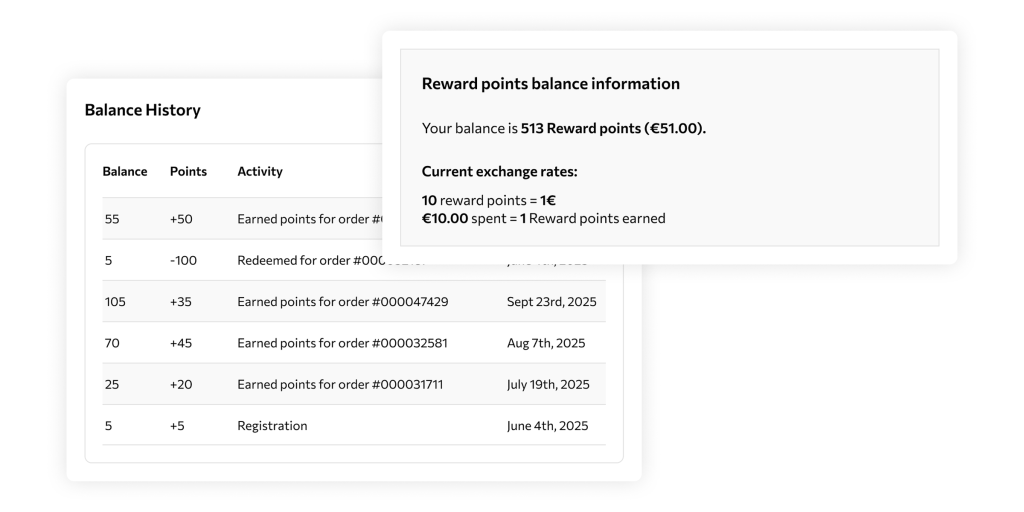
Under My Account > Reward Points, customers can see their current balance, full transaction history, available exchange rates, and notification preferences. Everything they need without contacting support.
Cart Page
The current points balance is displayed prominently above the cart items, so customers see it before they’ve committed to anything. The summary block includes the redemption interface.
In Standard mode, one action applies all available points. In Cart Rule mode, a dropdown lets them choose which promotion to unlock. Totals update immediately on redemption.
Checkout Page
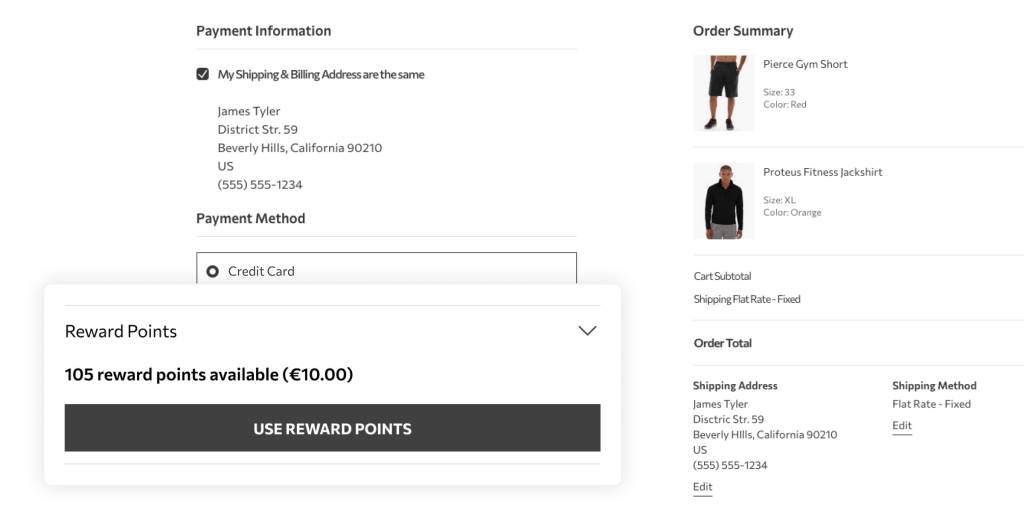
The same redemption interface appears under the payment methods section, for anyone who missed it on the cart page. Totals recalculate the moment points are applied, so customers always see exactly what they’re paying before they confirm.
Ready to Add Loyalty to Your Magento Store?
A first order is just the beginning. With the right loyalty mechanics in place, customers have a reason to come back, and a reason to choose you over whoever shows up in their inbox next. If you’d like to see how this fits your catalog and customer base, we’re happy to help.
Included Out of the Box with Hootify
The Loyalty module is fully integrated into Hootify, our Magento-based eCommerce platform. It is also available for any standard Magento 2 store.
Request a Free Admin Demo to set up earning triggers, configure exchange rates, and see how a complete loyalty program comes together before committing to anything. For a full walkthrough, the User Guide is always available to help you succeed.