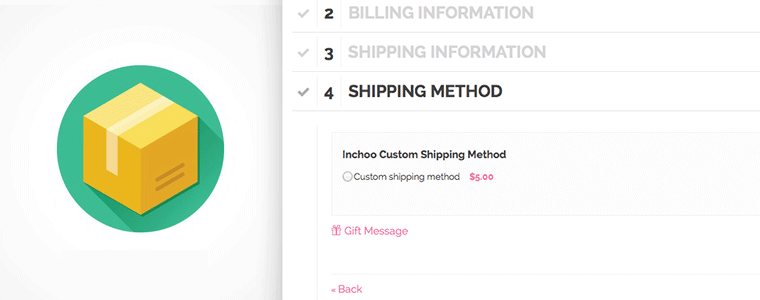
In this article, I will demonstrate how to write custom shipping in Magento, or to be more precise, two of them: standard shipping and express shipping, which is only available if none of your cart items exceeds specified weight threshold. Lets start by explaining how Magento handles shipping, and what would be needed to achieve our goal.
When looking for available shipping methods, Magento first gathers all available carriers. A “Carrier” represents a shipping carrier, just like in real world (ex. FedEx). Each carrier is represented with the class that extends Mage_Shipping_Model_Carrier_Abstract.
After list of carriers has been received, shipping information(implemented as Mage_Shipping_Model_Rate_Request) is sent to carrier in order to retrieve all available rates provided by given carrier, represented as Mage_Shipping_Model_Rate_Result.
This process happens in Mage_Shipping_Model_Shipping::collectRates() as seen in code below:
...
$carriers = Mage::getStoreConfig('carriers', $storeId);

foreach ($carriers as $carrierCode => $carrierConfig) {
    $this->collectCarrierRates($carrierCode, $request);
}
...
Function collectCarrierRates() is responsible for checking carrier availability (is carrier enabled in admin, is it available for requested country, etc.), and eventually triggers collectRates() function of your class, which we will implement later.
And that is general outline of what is going on behind the scenes. We are now ready to write some code that will fit nicely into everything explained above. First thing you will need to do, is create new module which depends on Mage_Shipping. Besides standard module configuration, you will have following inside your config.xml:
<config>
    ...
    <default>
        ...
        <carriers>
            <inchoo_shipping>
                <active>1</active>
                <model>inchoo_shipping/carrier</model>
                <title>Inchoo Shipping Carrier</title>
                <sort_order>10</sort_order>
                <sallowspecific>0</sallowspecific>
                <express_max_weight>1</express_max_weight>
            </inchoo_shipping>
        </carriers>
        ...
    </default>
    ...
</config>
Entries active, sallowspecific and express_max_items are config entries which will be used and explained later. We will start with model entry. You can see that our carrier will be represented with Inchoo_Shipping_Model_Carrier, so lets implement that class. As previously said, carrier needs to extend Mage_Shipping_Model_Carrier_Abstract and implement Mage_Shipping_Model_Carrier_Interface in order to ensure Magento can work with it. We will start by doing just that:
class Inchoo_Shipping_Model_Carrier
    extends Mage_Shipping_Model_Carrier_Abstract
    implements Mage_Shipping_Model_Carrier_Interface
{
    protected $_code = 'inchoo_shipping';
Next, our interface requires us to implement getAllowedMethods() which returns array of key-value pairs of all available methods, so let’s do that:
public function getAllowedMethods()
{
    return array(
        'standard'    =>  'Standard delivery',
        'express'     =>  'Express delivery',
    );
}
Finally, we said that rates are collected by calling collectRates(). This function takes shipping information as parameter, and returns all available rates. It is also responsible for determining which rate is available for given request:
public function collectRates(Mage_Shipping_Model_Rate_Request $request)
{
	/** @var Mage_Shipping_Model_Rate_Result $result */
	$result = Mage::getModel('shipping/rate_result');

	/** @var Inchoo_Shipping_Helper_Data $expressMaxProducts */
	$expressMaxWeight = Mage::helper('inchoo_shipping')->getExpressMaxWeight();

	$expressAvailable = true;
	foreach ($request->getAllItems() as $item) {
	    if ($item->getWeight() > $expressMaxWeight) {
		$expressAvailable = false;
	    }
	}

	if ($expressAvailable) {
	    $result->append($this->_getExpressRate());
	}
	$result->append($this->_getStandardRate());

	return $result;
}
As you can see, code is pretty straight forward: Weight of all products in cart are compared to value stored in config, which determines availability of our ‘express‘ rate. Our ‘standard‘ rate is always available. Each rate is added by passing Mage_Shipping_Model_Rate_Result_Method object to append() of our result object. And we get those rate objects by calling _getExpressRate() and _getStandardRate(), which are implemented as following:
protected function _getStandardRate()
{
    /** @var Mage_Shipping_Model_Rate_Result_Method $rate */
    $rate = Mage::getModel('shipping/rate_result_method');

    $rate->setCarrier($this->_code);
    $rate->setCarrierTitle($this->getConfigData('title'));
    $rate->setMethod('large');
    $rate->setMethodTitle('Standard delivery');
    $rate->setPrice(1.23);
    $rate->setCost(0);

    return $rate;
}
And that’s all that our class needs in order to work. We will finish up by adding admin configuration through system.xml. Here is an shortened version:
<config>
    <sections>
        <carriers>
            <groups>
                <inchoo_shipping translate="label">
                    ...
                    <fields>
                        <active translate="label">
                            ...
                        </active>
                        <title translate="label">
                            ...
                        </title>
                        <sallowspecific translate="label">
                            ...
                            <frontend_type>select</frontend_type>
                            <frontend_class>shipping-applicable-country</frontend_class>
                            <source_model>adminhtml/system_config_source_shipping_allspecificcountries</source_model>
                            ...
                        </sallowspecific>
                        <specificcountry translate="label">
                            ...
                            <frontend_type>multiselect</frontend_type>
                            <source_model>adminhtml/system_config_source_country</source_model>
                            ...
                        </specificcountry>
                        <express_max_weight translate="label">
                            ...
                        </express_max_weight>
                    </fields>
                </inchoo_shipping>
            </groups>
        </carriers>
    </sections>
</config>
What is important to note here, is that active, title, sallowspecific and specificcountry are handled automatically by Magento, so besides adding this to admin, you aren’t required to do anything else. With others being self explanatory, there are only two options being interesting here. First one, sallowspecific, tells Magento should carrier be available for all countries, or only for once that are specified in specificcountry.
And that is all work required for our shipping method to appear on checkout step. This module has been written as an example for Magento CE 1.9.0.1 and can be downloaded here.
Note: This is a revamp of an article originally written in July 2009.
In case you still need some help regarding your checkout or would simply like to have your site improved, we can help you out by creating a detailed custom report based on our Magento Technical Audit. Feel free to drop us a line!