
As most of you know that “When dealing with online stores with a lot of products, pagination on category pages can get really problematic for search engines” like Toni Anicic wrote in his article. I don’t want to repeat his words, but to show you how you can add rel=”prev” and rel=”next” link tag attributes in the head tag for pages, which will boost your SEO. This peace of code is already provided by Magento community, but this is improved version.
Tested in Magento CE 1.6.1.0.
Implementation
1. So, if you didn’t already modified head.phtml file, create identical directory hierarchy and copy/paste head.phtml in your theme or package.
Path example if using package:
..\app\design\frontend\[your_package_name]\default\template\page\html\head.phtml
Path example if using theme:
..\app\design\frontend\default\[your_theme_name]\template\page\html\head.phtml
2. Add code below to head.phtml. I’ve added code at the bottom of file.
<?php
$actionName = $this->getAction()->getFullActionName();
if ($actionName == 'catalog_category_view') // Category Page
{
$category = Mage::registry('current_category');
$prodCol = $category->getProductCollection()->addAttributeToFilter('status', 1)->addAttributeToFilter('visibility', array('in' => array(Mage_Catalog_Model_Product_Visibility::VISIBILITY_IN_CATALOG, Mage_Catalog_Model_Product_Visibility::VISIBILITY_BOTH)));
$tool = $this->getLayout()->createBlock('page/html_pager')->setLimit($this->getLayout()->createBlock('catalog/product_list_toolbar')->getLimit())->setCollection($prodCol);
$linkPrev = false;
$linkNext = false;
if ($tool->getCollection()->getSelectCountSql()) {
if ($tool->getLastPageNum() > 1) {
if (!$tool->isFirstPage()) {
$linkPrev = true;
if ($tool->getCurrentPage() == 2) {
$url = explode('?', $tool->getPreviousPageUrl());
$prevUrl = @$url[0];
}
else {
$prevUrl = $tool->getPreviousPageUrl();
}
}
if (!$tool->isLastPage()) {
$linkNext = true;
$nextUrl = $tool->getNextPageUrl();
}
}
}
if ($linkPrev) echo '<link rel="prev" href="' . $prevUrl . '" />';
if ($linkNext) echo '<link rel="next" href="' . $nextUrl . '" />';
}
?>
Result
Below is a result if you are on page 3.
<head> ... <link rel="prev" href="http://www.example.com/store.html?p=2"> <link rel="next" href="http://www.example.com/store.html?p=4"> ... </head>
Search engine optimization in Magento’s Configuration
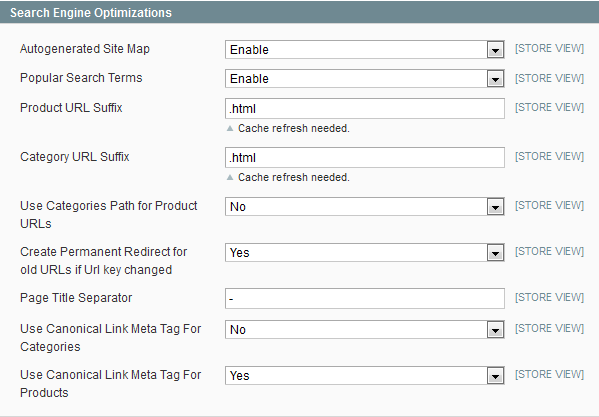
After implementing rel=”prev” and rel=”next” you need to re-config Magento’s SEO options, which means that you don’t need anymore Canonical Link Meta Tag For Categories. Below is a example how we setup Magento’s SEO options for one of our clients.


Great work, but lines 28 and 29 of your code seem to be lacking the actual tags to output.
@Johnboy
Thanks for noticing. It is corrected!
nice… but too bad it’s a template override and not an extension though.
Failed creating an extension myself. The link rel prev and next keeps being overwritten by canonical.
With the implementation of rel next and prev you don’t have to disable the canonical URL. At least not regarding the article on the Google Webmaster Blog. http://googlewebmastercentral.blogspot.com/2011/09/pagination-with-relnext-and-relprev.html
[quote]rel=”next” and rel=”previous” on the one hand and rel=”canonical” on the other constitute independent concepts. Both declarations can be included in the same page. [/quote]
As Hans said canonical doesn’t need to be disabled, the ideal situation is that the canonical actually includes the page parameter in it’s URL
@Hans,
That canonical is not implemented well in Magento’s categories by default. It points page 2 to page 1, page 3 to page 1… and so on. So disabling it would be a smart choice (canonical should only point to same content pages, and page 2 has different content than page 1).
@Johnboy,
That’s correct. But require custom development because default Magento’s functionality doesn’t work that way.
@Toni -> True. That’s why I use some custom development just like Vanja points out.
Just tried it on Magento 1.7 (rc1) and it only returns a blank page.
Hi Vanja – I have created a small module for this – might be helpful
Link was cut off my last comment for some reason. Anyway, here it is: https://github.com/drewhunter/SeoPagination
Hi Drew,
One question regarding your module.
Why all urls include parameters like attribute param, list, order, dir, price ???
We lost all benefit due to it ?
Hi Ilan – from my understanding, query parameters need to be kept consistent throughout the any series of links where rel=”next” and rel=”prev” are being used. So the module will keep any query parameters intact for filtered pages etc.
If you are worried about duplicate content, then that is precisely what canonical links are for – and so you should be using these too.
@Drew Hunter
Thanks for the module!
@Drew
Thx for the module…. great!
@Toni
I was aware that the Magento implementation of Canonical URL did not work well… So I’m using Yoast Canonical URL extension for a while.
Just disabled the extension (set active state to false in app/etc/modules/Yoast_CanonicalUrl.xml) and tried again. I came to the conclusion that Magento fixed the Canonical URL. Can anyone confirm this?
please check the source of http://threetosties.nl/apparel?p=5
@Hans
Magento Canonical is not working right. It should display <link href=”http://threetosties.nl/apparel?p=2″ rel=”canonical”> not <link href=”http://threetosties.nl/apparel” rel=”canonical”>
But if you could put canonical link to “View All”, then it will catch all products as unique from it.
@Vanja
Should it? Than I have to rewrite my definition of canonical URL. I always refer the canonical URL to the first page without any parameters.
Cut off all parameters and refer to the first page of the category shown.
Please correct me if I’m wrong. Be so kind to refer to some documentation where it states how a Canonical Url should look like. I’m lost now.
Hans,
Canonical is used to point to the original version of the content. So you can’t point all to page 1 since page 1 serves different content than other pages.
Here is an article about basic stuff on how rel canonical works, there is a 20 minute video of Matt Cutts (Google’s engineer) explaining it embeded in the article as well – http://inchoo.net/online-marketing/how-to-use-rel-canonical-element-tag/
viewing the video now
I think my question is answered on 13:58
Q: Do the page have to be bit-for-bit identical?
A: No, but they should be similar. Slight differences are okay.
“…merging ascending sorted page with descending sorted page using canonical URL is no problem. The content is similar” -> Matt Cutts
Canonical is a referral to the preferred version. My preferred version is the first page of a multi page catalog, not indexing the others. For me the product detail pages are allowed to be indexed as well as the first page of a catalog.
Hans,
No…
Ascending and descending can be canonicalized if the only difference is the sort order. The problem is, when you have paginated content, ascending and descending sort order is no longer canonical version, it’s different content, not just sort order.
I’m not sure how to explain it clearer
Found another Google source to empower your way of working.
http://youtu.be/6AmRg3p79pM?t=3m34s
“Avoid rel=’canonical’ for each component page in a series to page one.
Instead, use new rel=’next’ and rel=’prev’ markup for paginated content” – Maile Ohye from Google
@Drew Hunter: your module works perfect but if I enable the “All” option in the “Show X Per Page” dropdown and choose “All” in frontend it only shows me one product even when I have e.g. 400 products in this category. If I disable your module it works like it should with the “All” option. Is it a bug?
Thanks for your answer in advance,
Marcus
Hey Marcus – thanks for spotting that. I have fixed the bug and updated the module.
Thanks again,
Drew
@Drew Hunter: cool!
@Drew Hunter: I verrided the old files and flushed the cache. But then I get the error: Call to a member function getLimit() on a non-object in …/app/code/local/Dh/SeoPagination/Model/Paginator.php on line 39
?
Hi Marcus – grab the latest source code. There was a missing method call – all should now be working correctly.
@Drew Hunter: absolutely perfect now!
Hi Drew,
I have one question for you.
I wanted to add the rel start to your module.
Like this way :
if (!$pager->isFirstPage() && $numPages > 1) { $headBlock->addItem('link_rel', $pager->getPagerUrl(array($pager->getPageVarName() => NULL)), 'rel="start" rev="child" type="text/html"'); }But unfortunatly the method getPagerUrl return nothing.
That is a bit strange because I used this method elsewhere and it works perfectly.
I tried also Mage::registry(‘current_category’)->getUrl() but it return nothing neither…
However, Mage::registry(‘current_category’) seems filled when you call the event observer.
Have you some advice ?
Cheers,
Ilan
Ok, that was the method removeCanonical from your module which deleted my link rel=”start” tag.
thank you !
Thanks all for sharing your experience.
@Drew Hunter: Thanks Drew for its module, it is working fine.
Parse error: syntax error, unexpected T_VARIABLE in …/template/page/html/head.phtml on line 32
this is my 32 line :
$category = Mage::registry(‘current_category’);
Why you don’t instead copy the app/design/frontend/base/default/template/pager.phtml file and put it in your theme and set in the “a” tag the attribute “rel=prev” or “rel=next” in the correct link?!!!! It’s a cleaner solution instead of make your complicated code and work for all pages using the pager navigation.
Below a sample of the pager.phtml
isFirstPage()){ ?>
<a rel="prev" class="previousgetAnchorTextForPrevious()): ?> i-previous” href=”javascript:ajaxLoad(‘getPreviousPageUrl() ?>’);” title=”__(‘Previous’) ?>”>
<img src="getSkinUrl(‘images/i_pager-prev.gif’) ?>” alt=”__(‘Previous’) ?>” class=”v-middle” />getAnchorTextForPrevious()): echo $this->getAnchorTextForPrevious(); endif;*/ echo (!$this->isFirstPage())? ”:”; ?>
….
isLastPage()){ ?>
<a rel="next" class="next" href="javascript:ajaxLoad(‘getNextPageUrl() ?>’);” title=”__(‘Next’) ?>”>
getAnchorTextForNext()): echo $this->getAnchorTextForNext(); endif;*/ ?><img src="getSkinUrl(‘images/i_pager-next.gif’) ?>” alt=”__(‘Next’) ?>” class=”v-middle” />isLastPage())? ”:”; ?>
Sorry the code was not from magento core code. Here is a better sample:
canShowFirst()): ?>
<a rel="prev" class="first" href="getFirstPageUrl() ?>”>1
…
isLastPage()): ?>
<a rel="next" class="nextgetAnchorTextForNext()): ?> i-next” href=”getNextPageUrl() ?>” title=”__(‘Next’) ?>”>
getAnchorTextForNext()): ?>
<img src="getSkinUrl(‘images/pager_arrow_right.gif’) ?>” alt=”__(‘Next’) ?>” class=”v-middle” />
getAnchorTextForNext() ?>
In my oppinon. the best solution ist to use the new rel=pref and rel=next und set canonical fpr categories to no.
The problem is, we have many many paremeters to sort the products, so we still need the canonical tag. (WMT parameter settings did not work – actually we got over 70.000 pages in teh google index – but we only have about 2.500 “real” pages. Is there a better canonical extension then the original magento one? Because like you guys said before, the magento canonical isn’t perfect it points page 20 to page 1.
I have implemented this fine, apart from product page count and $tool->getLastPageNum() dont match
I narrowed it down to $prodCol, which is outputting the total amount of products in the category. That can be seem in the admin, not the visible products on the front end
Is there any way to get this to match the actual products in the category – I dont think it is taking the whether the products are in stock, so it doesnt know which is the last page to not have the “next tag” on
Can anyone help please?
For anyone else struggling with this – i figured it out from a variation of the code posted here
http://inchoo.net/online-marketing/how-do-relnext-and-relprev-work/
This will only select the current products in the category to work with
Thanks for the guide and the module. I also edited app\code\core\Mage\Catalog\Block\Category\View.php to make the canonical tag link to the view all page instead of the first page of a category. Search for ” $headBlock->addLinkRel(‘canonical’, $category->getUrl());” within that file and replace it with ” $headBlock->addLinkRel(‘canonical’, $category->getUrl().’?limit=all’);”
Hi,
First of all I would like to thank all of you for sharing your expertise.
I have been reading this post since I faced the same problem with link rel and canonical in conjuntion, as Toni well described… I have not been able to solve it yet. Has any of you finally solved it?
Thanks you all
Thanks Drew. Works perf on 1.7
THANKS THANKS THANKS, just copied-pasted and worked!!!!
Works like a charm in 1.4 BUT there’s is one thing to improve: Magento still will create a /your-search-page?p=1 as a duplicate of /your-search-page.
I’ve solved this by tweaking the same file head.phtml on the line for robots :
0 )
$indexing = false;
if($indexing ==true)
{
//We use the option set in Magento admin
?>
<meta name="robots" content="getRobots()) ?>” />
I use this method to eliminate pages I don’t want to be indexed (including parameter like “dir,mode,price…”), but I suppose this is a different topic.
Ups, I tried to paste the code into the textarea but I guess the ” < ? " are not welcome… sorry, if the moderator considers my solution could be interesting don't hesitate contact me and I'll post it back.
Regards
THANKS THANKS THANKS, just copied-pasted and worked!!!!
Works like a charm in 1.4 BUT there’s is one thing to improve: Magento still will create a /your-search-page?p=1 as a duplicate of /your-search-page.
I’ve solved this by tweaking the same file head.phtml on the line for robots :
//Old line: //<meta name="robots" content="<?php echo htmlspecialchars($this->getRobots()) ?>" /> //Substituted by the following code: $indexing = true; $url=$_SERVER['REQUEST_URI']; if(substr_count($url, "?p=1") > 0 ) $indexing = false; <?php if($indexing ==true) { //Use of the option set in Magento admin ?> <meta name="robots" content="<?php echo htmlspecialchars($this->getRobots()) ?>" /> <?php }else{ ?> <meta name="robots" content="NOINDEX,NOFOLLOW" /> <?php } ?>I use this method to eliminate pages I don’t want to be indexed (including parameter like “dir,mode,price…”), but I suppose this is a different topic.
Hello,
Thanks this helpful tutorial.
I have a question if you can help me please :
How to rewrite pagination url (for exemple ?p=2) in htaccess in magento.
Thanks in advance for your answer .
Yes, but if you disable rel canonical as you described, then this may cause Mass dup content issues due to URL rewrite.
Currently, I have set URL rewrite to SEF URLs and I have canonical tags set to each page. In some cases though paginated content appears with rel canonical to each page, i.e. ?page=2 has rel canonical to ?page=2 which is not good…
But still it is better than handle the paginated content and have x2 of all of your pages due to URL rewrite, isn’t it?
Thanks for your solution. I’ve optimize it a bit.
$toolbar = $this->getToolbarBlock()->setCollection($_productCollection);
$pager = Mage::getBlockSingleton(‘page/html_pager’)->setLimit($toolbar->getLimit())->setCollection($_productCollection);
if ($toolbar->getCollection()->getSize() > 0):?>
isFirstPage()): ?>
<a class="prev-page" href="getPreviousPageUrl() ?>” title=”__(‘Previous’) ?>”>Previous
PreviousDisable
Page getCurrentPage(); ?> of getLastPageNum(); ?>
isLastPage()): ?>
<a class="next-page" href="getNextPageUrl() ?>” title=”__(‘Next’) ?>”> Next
NextDisable