Inline translation in Magento

If you need translations for your site but translation packs are not fully translated, then inline translation is very nice feature.
In this post I will cover entire process for inline translation in Magento.
So I assume that you already instaled your language packs, and that you created diferent store views for diferent languages.
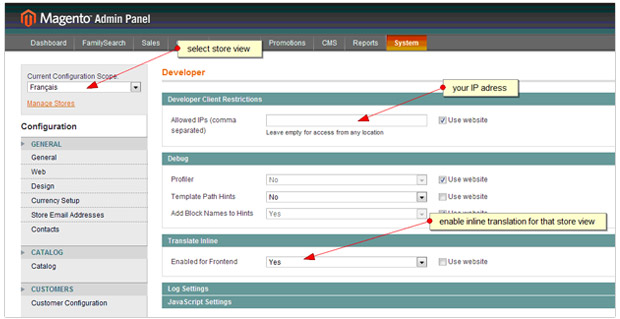
Next step is to go to Magento admin/system/configuration/developer.
There you must do two things:
- from current configuration scope select desired store view on witch the inline translation will be aplied
- apply inline translation for that desired store view
Next step is to go to the frontend and select desired language from the dropdown. Red rectagle strokes around text will apear and when you hover it the little book icon will apear. Just click on the icon and insert desired text.
Here is how to:
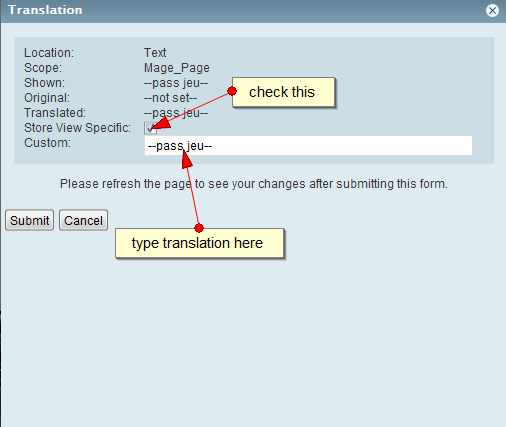
All translations that are been made by inline translation are stored in database in shop_core_translate table. If you move magento from server to server you need to export this table and import it when you configure your mysql database on another server.






38 comments
cobay admin inline translation : backend -> configuration -> default config -> developer -> Enabled for Admin = Yes
backend -> configuration -> default config -> developer -> Enabled for
ys, you are right
thanks
Hi Guys,
Can anyone help to answer this question.
“When customers translate one word in three following position: table core_translate, design/locale, which position will be displayed?
table core_translate
App/locale
All of them are correct
design/locale”
Pozdrav,radio sam sa inline translation par dana sve je bilo ok sad je isto postavljen na enabled ili yes ali frontend u opste ga ne registruje tjst ne mogu da prevodim,ocistio sam sve moguce kesove iskljucio ukljucio izlogovao ulogovao i nista ima li neki savet.
impossible to do, because the book shows, but it moves away once I hover it with my arrow. Either the creator of inline translation is a really evil person or I have a bug here. :/
It´s because the browser Chrome has a bug, use another browser to do the job.
Thanks to Andersson Amaral – I did learn something very useful and it solved my issue.
Hi Filip Svetlicic,
I have made all changes to your according your guide but,
Translate inline bug, red dots are there but no book icon to change,
in my another magento website translate inline working fine
please help me
thanks in advance
its possible to revert/reset to default values all the inline translations i have made?
Hey, I have the same query. Can you please tell me the solution?
Thanks
same here. i think it’s not possible. O__O one of M1’s limitation. We should have a backup of DB and files so that we can revert it.
can’t translate the button text with inline translation tried cache flush management except that clear shopping button i can translate every button a little help will be appreciated..thanx..:)
The problem can be fixed by flushing your JavaScript/CSS Cache, then Flush Magento Cache and finally Select your Translation Cache and submit a Refresh action. That will do it!
Hi,
The DEVs at the office have been debating if inline translation was better than file. We cannot come to acceptable conclusion, anyone can help here?
Some say that inline translation (reading form DB) can slow down the site?
Any comment is appreciated 🙂
Hej,
did anyone fix the problem “Rik” has a year ago?
I have it now ;/ Magento 1.7.0.2 a German version. I activated “inline translation”. (Caches were disabled) and since then no chance to got the interface. No User-Interface no Admin-Interface – just the weird footer (as admin) ({{Site Map}}{{Site Map}}{{Site Map}}{{Mage_Catalog}).
Any ideas?
Thanks in advance,
-peter
Hey guys, refreshing your browser cache and your magento cache worked for me once! Switch inline translate on and off as well as you flush cache.
Now does anyone know why I can’t inline translate normal text on my site…? Specifically under “BS Points” on the checkout page. I swear I can translate every other piece of text except that one.
@munyah
well this did not do the trick. Now we disabled the modules and uploaded new css but still this problem remains ahhhhhhhhhhhhhhhhhhhhhhhhhhhhhhhhhhhhhhhhhhhhhhhhhh
@sara, @matt, @rik I had that issue once and just cleared all caches and it was sorted.
I am still having this problem as RIK. Nobody in the world knows the answer:(
I have the red dots but the book does not appear!!!!!!!
I have the same problem with rik.. any ideas anyone?
Same problem as RIK here. We need help. I googled already, but nothing
After using inline translation my footer links go weird (e.g. {{{Site Map}}{{Site Map}}{{Site Map}}{{Mage_Catalog}}}{{{Search Terms}}{{Search Terms}}{{Search Terms}}{{Mage_CatalogSearch}}}{{{Advanced Search}}{{Advanced Search}}{{Advanced Search}}{{Mage_CatalogSearch}}}{{{Orders and Returns}}{{Orders and Returns}}{{Orders and Returns}}{{Mage_Sales}}} ) – any ideas?
This excellent tutorial i have ever read, clear and understandable.
I have a question on how to translate the footer and category list.
thanks in advance for whom would help!
Anyone ever see the %s part of the label actually show up on the frontend? I’m getting that in my shopping cart now: %s was successfully added to your shopping cart.
I’ve tried adding translate.csv files, looked for it in the db. Would appreciate any ideas on what might work to fix it.
Thanks!
We can translate the 98% words using inline translation. Now we are not able to translate pop-up windows, and selections. Try to edit the template theme, but can not know where to change.
Goodday beautiful people. Please can someone help in how to translate “success messages” in magento? Inline or cvs translation is not working. The Inline and cvs translation is working on other labels but not on success and validation messages. Example: XXXXXX has been added to your wishlist. Click here to continue shopping
Best Regards
Now the translation are stored in database in core_translate not shop_core_translate
thx
Cao Filipe,
i pored toga sto sam ispratila celu proceduru, ne uspevam da izmenim tekst na sajtu. Htela sam da te pitam u cemu je problem. Hvala
My customer has made inline translations on the dev site, but now I can’t get those translations working on the live site. I’ve copied all the rows inside core_translate table, refreshed the cache, but still nothing. Argh I hate how Magento makes simple tasks take up days of hard work and frustration,,
There isn’t any other method to delete the custom string but from admin?
thanks.
@Grollaz
Strings that are translated with inline translation as an option are stored in database->core_translate table. Delete the string from database.
Cheers!
I have edit one string with inline translation, now how i can delete one inline translation tu use the standard text file translation?
Thanks.
we create some custom website,store,and store view but magento inline translation in admin panel could not render it properly.
would you plz tell me where is the problem
@cobay admin inline translation : backend -> configuration -> default config -> developer -> Enabled for Admin = Yes
Why doesn’t wok inline transtrate for ADMIN Pannel ?
(Not Frontend)
How to inline transtrate for ADMIN Pannel?
Nice tutorial and easy to undertand. This is really a great help to people still starting to use Magento, and its not really that hard to do.
Hi Bruno
you are right but sometime this is impossible.
Thanks
Isn’t it better to edit the translate text as normally, even if Modules are not 100% translated the developer use __(‘bla bla’) and all we need is to add the default text as a new line in the localized file and enter the localized text?
I do this as I fell safer that reading from DB.
I had problems that I localized using this feature and some strings were not localized 🙁
arghhh… Magento… why r u so difficult! 😉