Making use of Magento getSingleton method

In one of my previous articles I showed you how to use getModel and getData methods in Magento. Although we should not put those to methods at the same level, since I’d say the getModel is a bit more higher. Higher in sense, you first use the geModel to create the instance of object then you use getData to retrieve the data from that instance. I have said it before, and I’m saying it again; Magento is a great peace of full OOP power of PHP. It’s architecture is something not yet widely seen in CMS solutions.
One of the architectural goodies of Magento is it’s Singleton design pattern. In short, Singleton design pattern ensures a class has only one instance. Therefore one should provide a global point of access to that single instance of a class.
So why would you want to limit yourself to only one instance? Let’s say you have an application that utilizes database connection. Why would you create multiple instance of the same database connection object? What if you had references to an object in multiple places in your application? Wouldn’t you like to avoid the overhead of creating a new instance of that object for each reference? Then there is the case where you might want to pass the object’s state from one reference to another rather than always starting from an initial state.
Inside the Mage.php file of Magento system there is a getSingleton method (function if you prefer). Since it’s footprint is rather small, I’ll copy paste the code for you to see it.
public static function getSingleton($modelClass='', array $arguments=array())
{
$registryKey = '_singleton/'.$modelClass;
if (!Mage::registry($registryKey)) {
Mage::register($registryKey, Mage::getModel($modelClass, $arguments));
}
return Mage::registry($registryKey);
}
First, notice the word static. In PHP and in other OOP languages keyword static stands for something like “this can be called on non objects, directly from class”. Now let me show you the footprint of the getModel method.
public static function getModel($modelClass='', $arguments=array())
{
return Mage::getConfig()->getModelInstance($modelClass, $arguments);
}
Do you notice the parameters inside the brackets? They are the same for both of theme. So all we need to do at this point is, play with those parameters using getSingleton() method and observe the results.
Most important thing you need to remember is that using getSingleton you are calling already instantiated object. So if you get the empty array as a result, it means the object is empty. Only the blueprint is there, but nothing is loaded in it. We had the similar case using getModel(‘catalog/product‘) on some pages. If we done var_dump or print_r we could saw the return array was empty. Then we had to use the load method to load some data into our newly instantiated object.
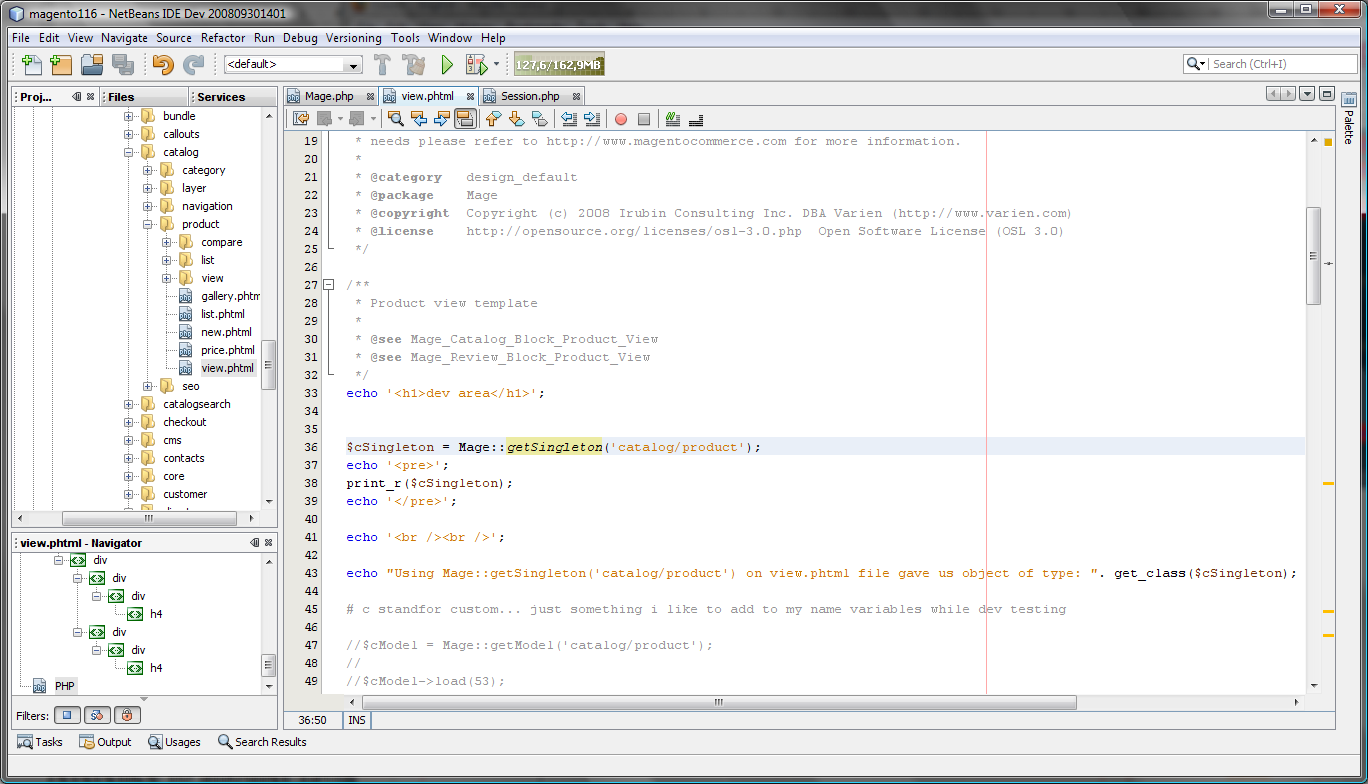
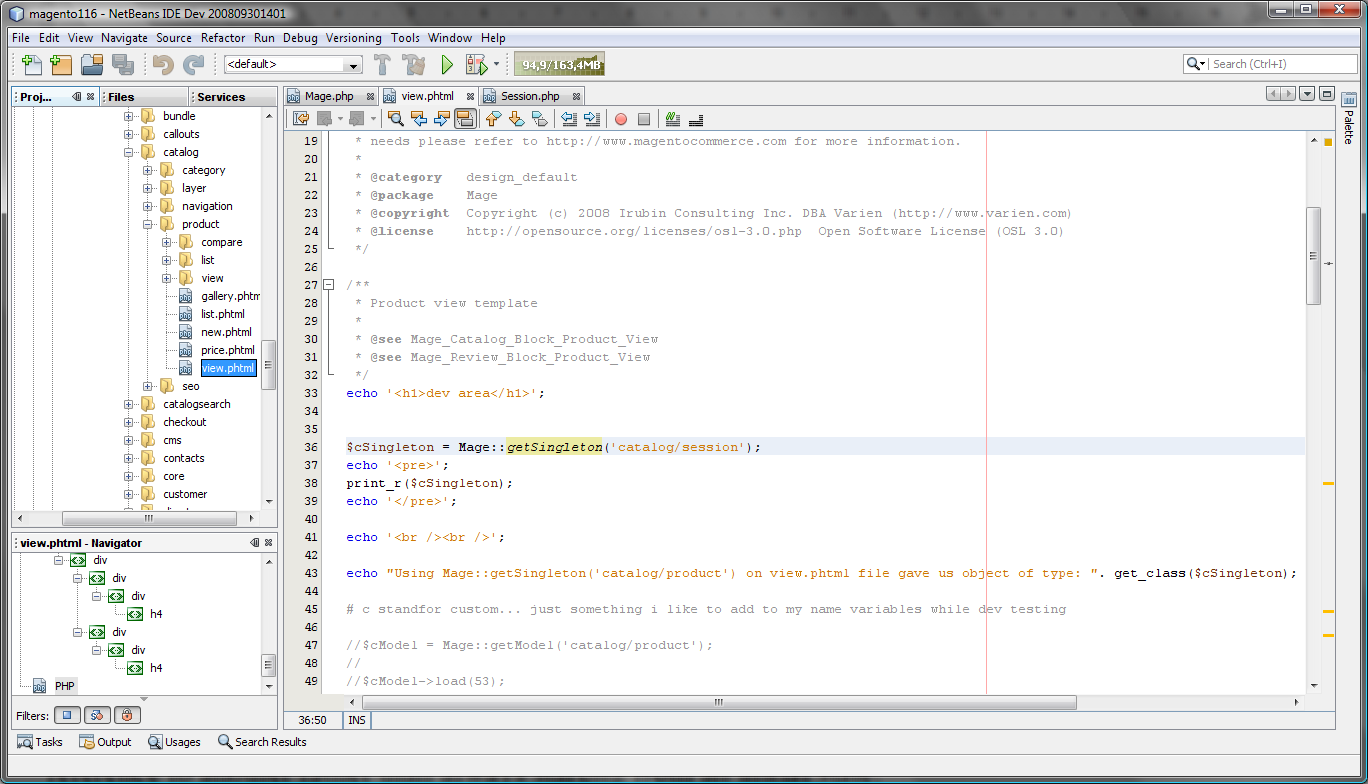
What I’m trying to say, you need to play with it to get the feeling. Some models will return data rich objects some will return empty arrays. If we were to do Mage::getSingleton(‘catalog/session’) on view.phtml file we would retrieve an array with some useful data in it. Do not get confused with me mentioning the view.phmtl file, it’s just he file i like to use to test the code. Using Mage::getSingleton(‘core/session’) would retrieve us some more data. You get the picture. Test, test, test… What’s great about the whole thing is that naming in Magento is perfectly logical so most of the time you will probably find stuff you need in few minutes or so.
For the end here are some screenshots for you to see the results of calling getSingleton with catalog/product and catalog/session parametars.
Hope this will be useful for some of you.





19 comments
how do i do the same in .net soap api, how do i get all quote id in shopping cart
great article! thanks dude
Exactly what I needed. Thanks for this!
I noticed a couple of typing errors in my post above and wanted to correct that Example Two should read:
Example Two
In my controller:
$test = Mage::getSingleton(‘foo/bar’);
$test = $test->getCollection()->addFieldToFilter(‘product_id’,$productId);
In my Block:
$test = Mage::getSingleton(‘foo/bar’);
Still, this code doesn’t work as expected.
A detail that I didn’t include earlier was that the getSingleton method wasn’t actually instantiated inside the controller, but inside an observer class for the product edit event.
I must be missing something obvious?
I’ve got a problem implementing the getSingleton approach and was hoping someone could shed some light:
The first example works, the second fails:
Example One:
In my controller:
$test = Mage::getModel(‘foo/bar’)->getCollection()->addFieldToFilter(‘product_id’,$productId);
Mage::register(‘foo/bar’,’test’);
in my Block:
$test = Mage::registry(‘test’);
Example Two
In my controller:
$test = Mage::getSingleton(‘foo/bar’);
$test->getCollection()->addFieldToFilter(‘product_id’,$productId);
In my Block:
$_test = Mage::getSingleton(‘foo/bar’);
Shouldn’t these be roughly equivalent? The contents of example two are essentially empty.
I know this article is fairly old, but I was recently looking into this issue and use Inchoo as a source of Magento information. That said, the article is highly misleading.
To those reading this, Mage::getSingleton() is not an implementation of the singleton pattern. If anything, it more closely resembles the registry pattern. While calling getSingleton() multiple times with the same argument will assure you that you only ever get a single instance of a class, it does not prevent multiple instances of a class being instantiated, which is what the singleton pattern sets out to do. At the end of the day, it’s a fairly lazy implementation of the registry pattern and was probably used as a shortcut to avoid having to think about and implement complex OOP.
I have created one module in admin. now when i call its model by
then it gives me blank array.. i want to get all the records from db.
please help if you have any solutions.
Any ideas why Mage::getSingleton(‘checkout/session’) would be NULL/Empty on the checkout screen?
Had major issues since upgrading to 1.4.1 – blown up my C/C plugin.
i am aware of that, but not familiar with it. i came from a J2EE background and just started to pick up php/magento two months ago. so if i understand correctly from your answer, the singleton object does not persist across multiple requests?
are you aware that PHP is a scripting language?
i have a question about using singleton for checkout session. there is a instance variable $_quote in Mage_Checkout_Model_Session class. getQuote function will set this instance variable based on the user session data if this variable is not set yet.
if ($this->_quote === null) {
….
this->_quote = quote;
}
if the session instance is singleton, and the _quote instance inside singleton session instance should be singleton too. wouldn’t that make the second user get the first user’s quote?
I agree, I am currently doing a Magento contract (did 5 extensions n 3 months) and have seen a lot of its code. It smells like UML models being sent to the Ukraine, with undocumented shortcut code being sent back. Thank you Varien, for calling that open source and putting it out there. Sure, it does the marketing trick quite well, because we, developers think it coulnd’t be all that bad, when so may people are talking about it and using it.
But the devs on the bottom are the ones getting beat on because your code is so faulty and we can’t even work around it in many cases.
I do like the fact that it has so much functionality tho, but more from an end user perspective than the purist coder that I am.
I Couldn’t agree more with Joy except to say that the mess is not caused by ZF, it was caused by Magentos “design decision” to override parts of ZF that in my opinion they should not have.
They also screwed up big time with the .xml thing, plus implicit interfaces and magic getters are a major code smell. To the person writing such a system I’m sure it works great and yes it saves them time, but an overall goal should be to build understanding into the system, not to cut corners
Hey, I ran accross this while trying to trouble shoot a call to Mage::getSingleton(‘core/session’);
I am trying to get session data from with in “Mage_Core_Model_Cookie”.
And as soon as I add the above code the browser gives me the following error: “The connection to the server was reset while the page was loading.”
I am able to use “Mage::getModel(‘catalog/product’)->getCollection()”. So I am confused as to why I can not get the session. Can anyone shed some light on this? Thanks A Million.
Hi Branko,
I’m currently working on a custom import module for magento, and i’ve overridden the product adapter for that. I’m importing a column for manufacturer and in the case in which the manufacturer value for the current imported line is new (does not exists as an attribute option in the system) i’m adding it to the system. For that i use the following code:
$l_aOption = array(
                    		'attribute_id' => $attribute->getAttributeId(),
                    		'value' => array(
                    			'new_option' => array($value)
                    		)
                    	);

                    	$l_oEavEntitySetupResource = new Mage_Eav_Model_Entity_Setup('eav_setup');

                    	$l_oEavEntitySetupResource->addAttributeOption($l_aOption);
It is working. My question is: is there a better way to get an instance of Mage_Eav_Model_Entity_Setup then using ‘new Mage_Eav_Model_Entity_Setup’, for example getSingleton or another function ?
Thx and appreciate you effort in posting usefull tips bigtime!
I’ve spent most of the past 2 days trying to override an admin module. I’ve got the book and manuals and google at my disposal, but still can’t figure it out. Worst of all is that modules are automagically loaded, and seem to fail silently. This means you are left with trial and error or scrutinising the differences between what does work against your own.
I come from 16 years dev experience, 2 of those with Ruby and Rails. Anyone should look at Rails before panning MVC. I’ve also found there are different interpretations of MVC. eg. In Rails, the controller uses the models (or anything else) to gather data for rendering in the view. In Adobe Flex Cairngorm framework, the view is bound to the model, and the controller updates the model. (I much prefer Rails).
I was drawn to Magento with the idea that I would add a full featured cart to my skillset for large jobs, while using Rails when I need to build from first principles. I’m finding for this my first Magento job which is quite simple, that I could have built the functionality I want from Magento more than once over if I had used Rails from the beginning. Its just so hard to first figure out what I need to do, and then very slow to get things done – largely because of the deep directory trees and the lack of debugging.
Its great that Magento has taken on ecommerce with a view to do things ‘properly’ ie structured, but it feels more like bondage and discipline, without any assistance from the framework when things just don’t work. I’ve already decided to do future jobs with a minimal cart front end and an accounting system backend. I’m now even contemplating renegotiating this project and leaving Magento behind (sadly).
“You are clearly uninformed of what true OOP is”
I come from .NET (C#) and I belive I have a pretty good understanding of what OOP is. PHP 5 lacks great amount of features as a language to even compare to C#. However, it still functions as OOP language. Hopefuly version 6 will be better.
I agree the code is… hmmm… would not say bad, but disconnected. There is simply to many of the M, V and C-s around. What makes it catastrophic is the full lack of good comments in the code and the general lack of good (aka MS SDK) documentation. System this big needs good IDE, since I can’t imagine any “expert” memorizing all the method names therefore working without code completion features ans so on. Not to mention the debugging which is a big no with PHP.
About the MVC arhitecture itself… I’m not a big fan of it. I find the ASP.Net and it’s code behind files plus the App.config files to do the job just fine. However even ASP.Net has a MVC version nowdays, so I’m guessing there’s something to it.
About the Magento itself… I’m currently loosing my mind with it 🙂 I’m always for learning new things, digging into something ans stuff like that but Magento makes the simplest things so hard (stuff like Module development). All I know for now is that one should be Zend Framework master to get thing rolling with Magento.
Hopefully no hard feelings for the things said here 🙂
I really appreciate other people views on things, cause no one is perfect. Plus we all sometimes change our views on some topics over time. I entered Magento waters with great enthusiasm, therefore I said a lot of good stuff about it. For the last two weeks I’m breaking my neck over it. So, as some of you might notice I paused my blogging for a while 🙂
All the best men. p.s. Feel free to put some comments on my site as well, http://activecodeline.com.
Thank you.
You are clearly uninformed of what true OOP is. Hopefully we will not see more CMS solutions with this architecture because it is truly a terrible way to do things.
There is nothing Object-Oriented about Magento. It is built on the Zend framework, so a lot of the mess is caused by that. This awful code is what I call “object-based”. Because the data and the methods to act on it are not totally encapsulated, you need kludgy functions like getSingleton and getData, so you can operate on some container of some values. You shouldn’t need to do that in an object-oriented system. This generates a lot of code that is very similar and hard to debug and hard to maintain and has performance issues as well.
Sorry, I have nothing good to say about Magento, except that the concept is nice. The implementation is atrocious. It reminds me of the code I was working on for the U.S. Postal system Point-of-Sale. It was so bad I changed jobs. This code is very similar. Awful!
excellent. I can definitely see this helping when you’re calling on data that has already been instantiated. Whereas other times, say, you want to get a different listing of products from a category than the one magento will already be loading, you would then instantiate an entirely new object utilizing the other methods. thanks again for sharing the infos Branko