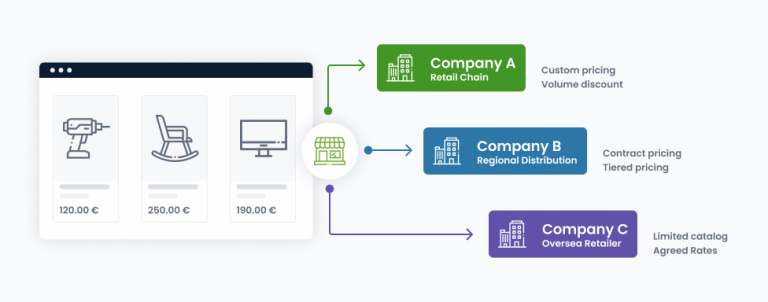
If you sell to companies, your customers’ purchasing rules are part of your checkout whether you support them or not.
A buyer at a customer’s branch office can’t place an order over a certain amount without a manager’s approval. A new hire can prepare orders but not commit the company to paying for them. Finance wants to know who approved what. None of this is unusual; it’s how companies are run. But when the webshop doesn’t support it, the approval happens elsewhere, and the order arrives late, changed, or not at all.
We covered the building blocks in our post about B2B eCommerce essentials. This one is about the piece that handles the approval itself: our Purchase Order module for Magento Open Source, and the Approval Rules module that lets each company decide who needs to approve what.
What a purchase order workflow solves
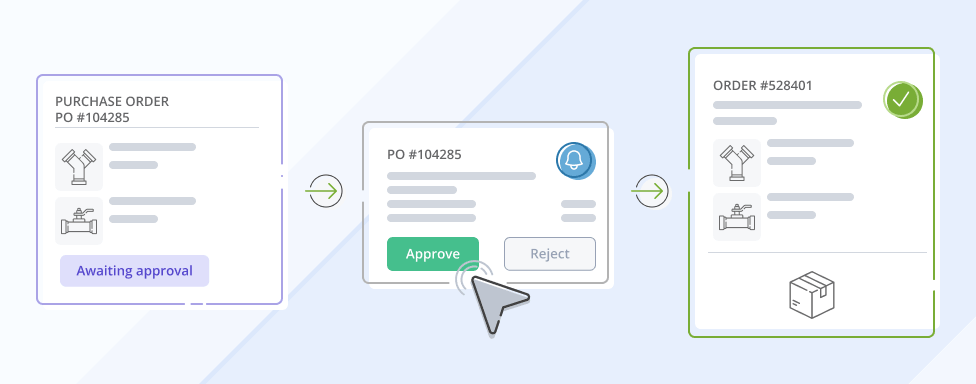
A purchase order sits between checkout and the Magento order. The buyer goes through checkout as usual, but instead of creating an order at the end, Magento stores what was submitted as a purchase order and hands it to the company’s approval process. The approver reviews exactly what the buyer submitted, at the prices the buyer saw, and the order is created once the required approvals are in.
Magento Open Source doesn’t include purchase orders, so the approval step usually lives wherever each company put it, and the webshop only sees the final result. Bringing it into the store makes the approval part of the order itself: reviewable, traceable, and tied to the exact cart that was submitted.
This is not the Purchase Order payment method that ships with Magento, which only records a PO number at checkout and changes nothing about how the order is processed. The workflow here is about the approval itself; the buyer’s own PO number has its place in it too, further below.
There were two more requirements we wanted to fulfill: the workflow had to feel at home on the Hyvä storefronts we build today, and the purchase order itself had to stay separate from the rules that decide who approves it. That’s why there are two modules.
Purchase Orders for Magento Open Source
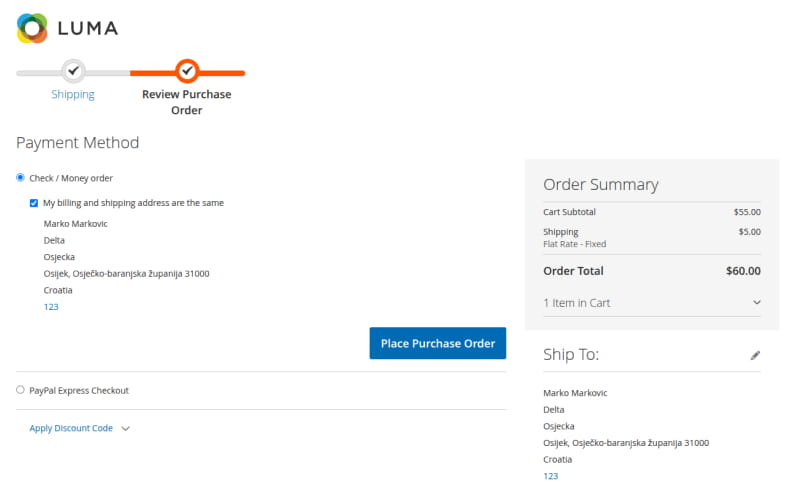
The Purchase Order module builds on our InchooDev Company module, which already covers companies, users, roles, permissions and the company hierarchy. Purchase orders are switched on per company. For members of such a company, checkout looks the same as before right up to the last step, where the button places a purchase order instead of an order. From there on, everything happens in the customer account.
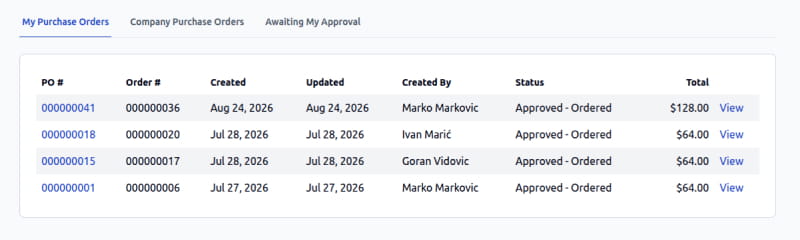
- Buyers see their own purchase orders and the status of each. With the right permissions they also see purchase orders from people below them in the hierarchy, or from the whole company.
- Approvers get an Awaiting My Approval view with a counter, so nothing waits unnoticed.
- Purchase orders are approved or rejected one by one, with an optional comment, or in bulk from the list.
- A buyer can cancel their own purchase order while it’s still waiting.
- Each purchase order has a details page with products, totals, shipping and payment information, comments, and a full history of who did what.
- An existing purchase order can be used as the starting point for a new cart, either merged into the current cart or replacing it. B2B customers reorder the same things a lot.
On the merchant side there’s a global switch and the per-company setting, so the feature can stay off for customers that don’t need it.
The price being approved is the price being ordered
When a purchase order is created, we store a snapshot of the cart at that moment: products, quantities, prices, discounts, addresses, shipping and payment method. That snapshot is what the approver sees, and it’s what gets converted into the Magento order later.
If a catalog price changes in the meantime, the purchase order doesn’t change with it. The buyer and the approver look at the same numbers from start to finish, which is the whole point of having someone approve them.
Approval first, online payment afterwards
Offline payment methods need no special handling. With bank transfer or payment on account, Magento already has everything it needs, and the order is created as soon as the approvals are in.
Online payments are different, because nobody wants to charge a card for a purchase that might still be rejected. So for online methods the payment is deferred: once the purchase order is approved, the buyer gets an email with a link back to the payment step, pays, and the order is created after that.
Keeping buyers and approvers informed
Approvers get an email when a purchase order is waiting for them. Buyers get one when their purchase order is created, approved or rejected, when payment details are needed, and when somebody adds a comment. These are standard Magento email templates, so merchants adjust wording and branding the same way they do for order emails.
A PO number from the buyer’s own system
One small thing we added on top of the standard workflow: the buyer can attach their own reference number to a purchase order. It seems minor until you’ve worked with a company that runs on internal PO numbers. That’s the number from their ERP or accounting system, and the one their finance department will look for on the invoice.
Approval Rules
The Purchase Order module works on its own. Without rules, approval follows the company hierarchy: a purchase order goes to the buyer’s manager or the company administrator, and roles that don’t need supervision can be set to approve automatically. For some companies that’s enough. Others need rules that depend on what’s being bought, and that’s the job of the second module.
Approval rules are managed by the company administrator from the storefront. Neither the merchant nor a developer has to be involved in a customer’s internal approval process.
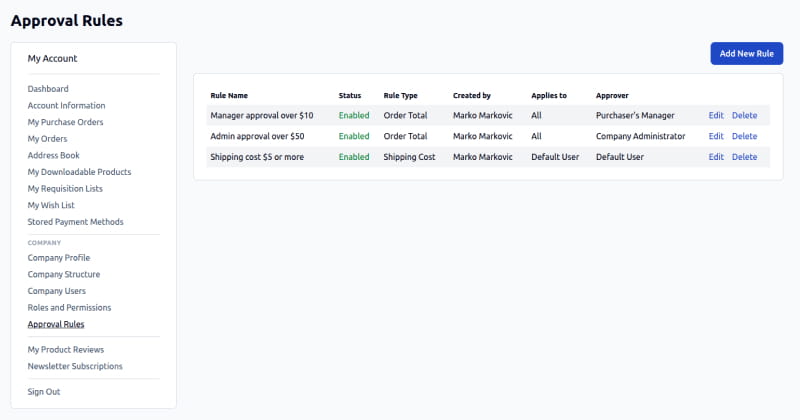
A rule has three parts: a condition, the roles it applies to, and the approvers.
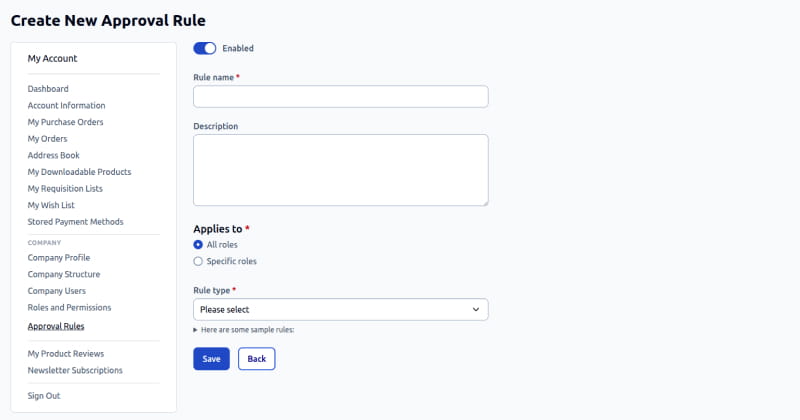
The condition compares something about the purchase order against a threshold, an order total above a certain amount being the typical case. Which conditions make sense varies from one business to another, so we kept them pluggable: adding a new condition type for a specific client is a small, isolated change, not a rework of the module.
The rule can apply to every role in the company or only to some of them, so a junior buyer can need approval for purchases a senior buyer makes on their own. Approvers can be one or more company roles, the company administrator, or the buyer’s direct manager in the hierarchy.
Rules are evaluated as soon as the purchase order is submitted. No match means the purchase order is approved on the spot; otherwise it waits until the required people have decided.
What happens when several rules match
A purchase order can match several rules at once, and every one of them has to be approved before it moves on. That’s also how approval tiers work in practice: one rule sends everything over 1,000 EUR to the manager, another sends everything over 10,000 EUR to the administrator as well, and a large order simply matches both. If the same person is an eligible approver for more than one of them, one click covers all the rules they’re responsible for.
Rejection is stricter: if any required approver rejects, the whole purchase order is rejected, whatever approvals were already given. A rejected purchase order isn’t a dead end, though: the buyer can pull its items back into a cart, adjust whatever caused the rejection, and submit a new purchase order.
The company administrator can approve over any rules that are still pending. That covers the ordinary case where the designated approver is on holiday or has moved to another department. And rules never stop anyone from submitting a purchase order; they only decide what happens to it afterwards.
Each purchase order has an Approval Status view listing the rules that were triggered, who is responsible for them, and which ones are approved, pending or rejected. During testing, the question that came up was what this view should show after an administrator approves over a pending rule. We settled on marking those rules as overridden by the administrator, so the record says what happened instead of showing an approval that will never come. It’s also the audit trail finance asks for, without anyone piecing it together from emails.
Approval rules belong to the company
Each company administrator manages their own rules, sees only their own, and can change them whenever the company’s process changes. Changing a rule doesn’t touch purchase orders that are already waiting: they keep the rules they were evaluated against when they were submitted. Otherwise an edit made today could rewrite an approval that started yesterday.
Built for Hyvä, with Luma support

Purchase order lists, details pages, approval flows and rule management are built with Alpine.js and Tailwind for Hyvä, and the same functionality is available on Luma. The purchase order step plugs into Magento’s standard checkout, so there’s no separate checkout to maintain just for approvals.
There’s a fair amount of interaction in this workflow: buyers switching between lists and details, approvers going through several purchases and approving in bulk, administrators editing rules. On Hyvä we wanted that to feel like part of the theme, not an older Magento interface embedded in it. Same approach as the rest of our B2B work: readable templates, no more frontend than necessary, and room to customize per project.
Part of a broader B2B direction
These two modules continue the direction we described when we introduced our Requisition List modules: B2B functionality for Magento Open Source, built as separate modules rather than one large package, so a merchant installs what their business uses. Right now that covers:
- Company, the foundation for B2B accounts, roles, permissions and hierarchy
- Shared Catalog for company-specific catalogs and pricing
- Quick Order for building carts from SKUs or a CSV file
- Requisition Lists for repeat purchasing, with company-level sharing
- Request for Quotation for negotiated pricing
- Purchase Orders and Approval Rules for purchases that need internal sign-off
All of it Hyvä-native, with Luma support where a project needs it.
It’s the same thinking behind our Adobe Commerce to Magento Open Source migration work. Plenty of merchants need B2B features without the enterprise platform around them, and for those projects, building the specific workflows that matter is a better fit than carrying complexity they don’t use. Together, the modules now cover most of the B2B buying process, from building a cart or asking for a quote to getting the purchase approved.
Wrapping up
The person choosing what to buy often isn’t the person allowed to approve the spending. That’s an easy difference between B2C and B2B to overlook, and when the webshop ignores it, companies work around it with email, copied carts and a manager’s reply somewhere in a thread.
Purchase orders put that step back into the store. The buyer submits once, the right people review it under rules the company controls, and Magento creates the order only when the approvals are in, at the prices everyone saw. With the Purchase Order module and the Approval Rules layer, that now works on Magento Open Source too.
If your B2B customers need internal approval before they can buy, we can help you design the workflow around how their companies purchase.