
B2B buyers rarely come to a store just to browse. Most of the time, they already know what they need: the same SKUs they ordered last month, the same consumables for a workshop, or the same approved products for a branch office.
That makes reordering one of the most important workflows in B2B eCommerce. It should be fast, predictable, and easy to repeat. In Magento, that usually points to requisition lists – reusable shopping lists built for frequent purchasing.
We recently wrote about why B2B buyers expect B2C-level ecommerce, and repeat ordering is a good example of that shift. Buyers don’t want to rebuild the same cart again and again. They expect the store to remember their buying patterns and help them move through the process with fewer steps.
In real projects, however, we kept running into the same limitations. Requisition list functionality is tied to the Commerce/B2B stack, the frontend implementation doesn’t naturally fit modern Hyvä storefronts, and the workflow often behaves more like a personal list than a shared company tool.
That’s why we built our own implementation for Magento Open Source: a modern requisition list module, with a separate sharing layer for company accounts.
What a requisition list actually solves
A requisition list is a reusable, named shopping list for repeat purchasing. It’s closer to an order template than to a wishlist.
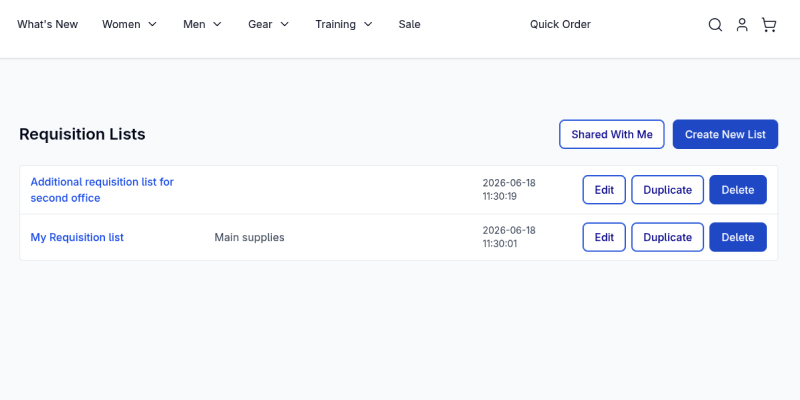
A few common examples:
- A facilities manager keeps a “Monthly Office Restock” list and adds the needed products to the cart without searching for every SKU again.
- A workshop keeps separate lists per machine, vehicle, or project, each with the exact parts and quantities it usually needs.
- A procurement lead maintains a list of approved products that other buyers should use when placing orders.
Unlike a cart, which is cleared after checkout, a requisition list stays available for future use. Unlike a consumer wishlist, it isn’t mainly about “saving for later.” In B2B, it’s about reducing repeated work, avoiding wrong-SKU orders, and making frequent purchasing easier for the people who do it every day.
The tricky part isn’t only storing a list of product IDs. A useful requisition list needs to preserve the actual buying intent: selected configurable options, bundle selections, quantities, cart merge behavior, and all the storefront entry points where buyers expect this action to be available.
That’s where many “simple” reorder features become fragile.
The problem with the usual approach
When we looked at how requisition list workflows are usually delivered in Magento projects, three issues stood out.
In Adobe’s native ecosystem, this type of requisition list workflow belongs to the Adobe Commerce B2B stack, not Magento Open Source. So Open Source merchants don’t get it out of the box, and if repeat ordering matters to the business, the choice is usually either moving to a higher license tier or implementing custom functionality.
The workflow is often too personal for a company process. In many Magento B2B implementations, requisition lists still behave more like personal working lists than company-wide collaboration tools. Sharing them across a buying team is either unavailable, limited by the storefront stack, or requires additional implementation work.
That’s a problem because B2B buying is rarely handled by one person only. A procurement lead may define what should be ordered, branch managers may place the actual orders, and different team members may need to work from the same list.
The frontend stack doesn’t always fit modern storefronts. Many older Magento frontend implementations rely heavily on Knockout, RequireJS, jQuery widgets, and UI components. That can make the feature harder to adapt on a modern Hyvä storefront, where merchants expect leaner templates, less JavaScript overhead, and faster interaction patterns.
We wanted a cleaner implementation: one that works on Magento Open Source, fits Hyvä projects, and keeps the base reordering workflow separate from company-level sharing.
Module one: a modern requisition list for Magento Open Source
The base Requisition List module gives logged-in customers a complete repeat-ordering workflow without requiring Adobe Commerce B2B.
From the storefront, customers can:
- Create, rename, duplicate, and delete multiple named lists from their account dashboard.
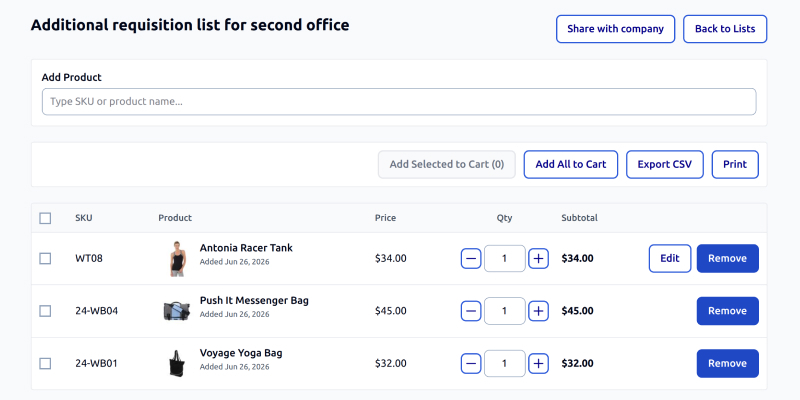
- Add products by inline SKU or name search directly inside the list view, without going back to the catalog.
- Preserve configurable and bundle selections across the workflow. If a customer adds a configurable product with a selected color and size, or a bundle product with specific selections and quantities, those choices stay intact.
- Move items to the cart individually, in bulk, or all at once.
- Choose how the list interacts with the cart, including merging into the existing cart or replacing it.
- Add products to a list from multiple storefront surfaces, including the product page, category and search listings, related and upsell blocks, the cart, and past orders.
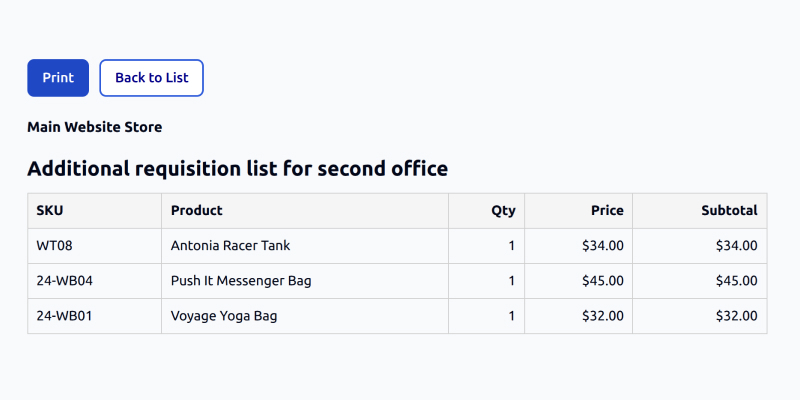
- Print and export Lists
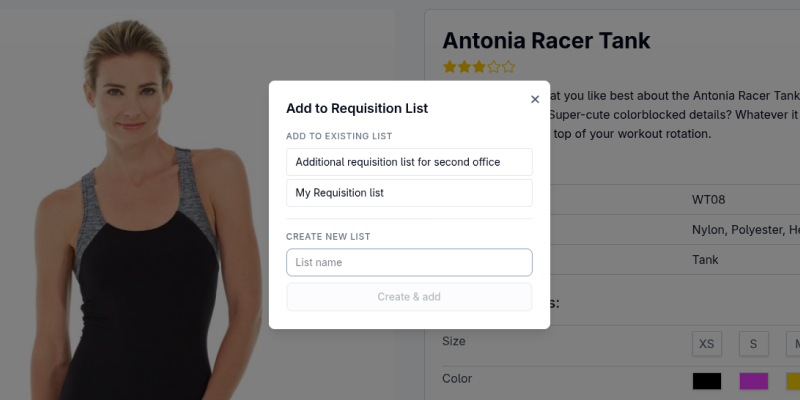
Merchants get matching configuration in the admin: a main enable/disable toggle, per-customer and per-list limits, and granular controls for where the “Add to Requisition List” action should appear.
The goal wasn’t to build a small wishlist variation. The goal was to support the way repeat ordering actually works in B2B.
Keeping product configuration intact
One of the more important parts of the implementation is preserving product configuration through the entire flow.
For simple products, that’s straightforward. But B2B stores often rely on configurable and bundle products. A buyer may need a specific size, color, package configuration, or bundle selection. If that information is lost when the product is saved to the list, edited, or moved to the cart, the list becomes unreliable.
The module currently supports simple, configurable, and bundle products. Configurable options are preserved, and bundle quantities are kept per selection, so the list remains a usable reorder template instead of just a rough product reminder.
One base module, not several disconnected add-ons
A common problem with feature extensions is that support for each product type becomes a separate package or a separate workaround. That increases maintenance cost and makes future changes harder.
We took a different approach. The base module handles the supported product types in one extensible implementation. That keeps the installation simpler, reduces the number of moving parts, and makes it easier to extend the workflow later if the project needs additional product-type support.
Built for Hyvä, with Luma support
The storefront interface is built with Magewire and Alpine.js, with first-class support for Hyvä and support for classic Luma storefronts as well.
That matters because requisition lists are interaction-heavy. Customers create lists, search products, update quantities, select items, open modals, and move products to the cart. On a modern storefront, those actions need to feel immediate and lightweight.
Instead of bringing older Magento frontend patterns into a Hyvä project, the module follows the same direction as the rest of our modern storefront work: less frontend overhead, clearer templates, and a smoother path for future customization.
Module two: adding company-level sharing
The base module works for any logged-in customer. But in a B2B project, repeat ordering often needs to be shared across a team.
That’s handled by a separate companion module: Company Requisition List Sharing.
Architecturally, we kept company sharing outside of the base requisition list module. Stores that only need personal repeat-ordering can use the core feature on its own. Stores with company accounts can add the sharing layer on top. This keeps the dependency direction cleaner and avoids forcing company-account logic into the base module.
The sharing module integrates with our InchooDev Company module, which provides the company account foundation behind the broader B2B suite.
With the sharing layer enabled, a company member can open one of their requisition lists, click Share, and select active colleagues from the same company. The recipient list is searchable, the sender is excluded from the list, and the sender can optionally add a short message.
Each selected colleague receives an email notification with a link to the shared list.
On the receiving side, company members get a “Shared with me” section. From there, they can preview the shared list, see who sent it, read the message, review the products, and import a copy into their own account.
Importing creates a copy. It doesn’t give the recipient direct access to the owner’s original list. That distinction is important: the sender can maintain their own version, while recipients can use the shared list as a starting point for their own ordering workflow.
Guardrails around company membership
Sharing is scoped to the company. A user can only share a list with active members of their own company, and membership is re-validated when the list is shared and when it’s imported.
That prevents a common access-control issue: someone who was previously part of a company shouldn’t keep access to company-specific purchasing workflows after leaving that company.
The module also avoids duplicate noise. If the same list is shared with the same colleague again, the existing share is updated instead of creating a duplicate entry every time.
On the admin side, merchants can configure limits such as the maximum number of recipients per share and the maximum message length. They can also configure the email sender and notification template.
A typical use case would be a procurement lead creating an approved reorder list once, sharing it with buyers across different branches or depots, and allowing each buyer to import a copy into their own account. That turns the requisition list from a personal shortcut into a practical team workflow.
Part of a broader B2B direction
These two modules are part of a broader direction we’ve been taking with Magento Open Source B2B functionality.
Many merchants don’t necessarily need the full enterprise stack, but they do need specific B2B workflows: company accounts, quick ordering, shared purchasing flows, customer-specific rules, and tools that make frequent ordering easier.
This is the same thinking behind our Adobe Commerce to Magento Open Source migration work: keep the functionality that matters to the business, but avoid unnecessary platform weight when a focused implementation is a better fit.
The requisition list modules also share the same technical direction as the rest of the suite we’ve been building:
- Quick Order for rapid SKU-based and CSV-based cart building.
- Company as the B2B account foundation.
- Magewire + Alpine.js for modern storefront interactions.
- Hyvä-native implementation, with Luma compatibility where needed.
- Clean separation between base features and B2B-specific extensions.
- Request for Quotation Feature
The goal isn’t to create a set of disconnected extensions. The goal is to build a coherent B2B toolkit for Magento Open Source, where each module can stand on its own but also work naturally with the others.
Wrapping up
For many B2B stores, reordering is one of the most repeated customer workflows. Buyers shouldn’t have to rebuild the same cart every week or search for the same products every time they need to restock.
A good requisition list workflow turns repeat purchasing into a predictable process: save the right products, preserve the right options and quantities, and move them to the cart when needed.
With the base Requisition List module and the Company Requisition List Sharing layer, Magento Open Source stores can support that workflow without moving to a heavier enterprise setup. Customers get faster repeat ordering, buying teams can work from the same starting point, and merchants get a feature that feels at home on a fast, modern storefront rather than weighing it down.
If repeat ordering is a major part of your B2B business, we can help you design the right workflow for your Magento store.